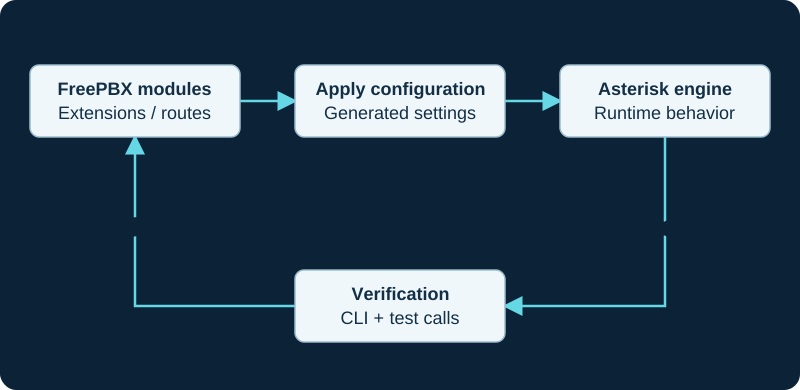
A management layer with operating responsibilities
FreePBX provides a graphical administration environment for an Asterisk-based phone system. It organizes common tasks such as extension creation, trunks and call destinations. The interface can reduce direct file editing, but reliable service still depends on networking, permissions, updates and recovery.
Use the right baseline
This library targets FreePBX 17 on Debian 12. Follow the official installer and its supported Asterisk selection. Do not adapt a CentOS-era installation guide by changing only the version name, and do not assume that every newer Debian release is supported by the same procedure.
Treat the published installation minimum as a way to start the software, not a guarantee of call capacity. Recording, transcoding, queues and other workloads need explicit planning and local validation.
FreePBX version, Debian release and Asterisk engine are distinct choices. Sangoma’s version matrix describes changing default Asterisk branches over a FreePBX release and marks some newer branches as beta. Check the matrix and actual installed version before assuming the Asterisk version used by another FreePBX 17 host applies to yours.
Separate setup from production activation
Begin with an isolated deployment, two extensions and internal calls. Confirm routing and media before connecting outside service. Back up configuration before substantive changes, and prove that a backup can be restored away from production.
Understand the difference between submitting a form and applying configuration. Record which settings your installed modules generate. Standalone Asterisk snippets are explanatory references, not instructions to overwrite FreePBX-managed files. For updates, the module-administration workflow keeps discovery, package download, installation, enablement, reload and call acceptance separate.
Treat PJSIP listeners as generated restart-bound state
FreePBX owns PJSIP transport generation through Asterisk SIP Settings. When an address, port or protocol change does not appear, use the transport activation investigation to compare the submitted setting, generated file, loaded object, listener and selected consumer. Sangoma's FreePBX 17 migration guidance explicitly calls for checking chan_sip and PJSIP bind-port conflicts, applying configuration and restarting Asterisk; editing a generated file or repeating Apply Config is not a substitute for that evidence chain.
Treat music on hold as a routed media source
FreePBX Music on Hold categories are selected by routes, ring groups and queues, while Asterisk can also inherit or override a channel's music class. Silence, the wrong audio or early-media replacement therefore require the exact call path, selected category, channel class and PJSIP hold behavior rather than a blind file replacement. Use the focused music-on-hold investigation to keep upload, licensing, class selection, decoding, transcoding and hold signaling separate.
Prove the live parking lot before changing retrieval
A parked call belongs to a runtime parking lot and slot, not merely to the number printed on a key label. The standard Parking module and Park Pro have different lot scopes, while Asterisk can generate retrieval extensions from the active lot configuration. When a parked call cannot be retrieved, preserve the announced slot and use the focused parked-call retrieval investigation to match that call to its live lot, slot, context, retrieval method and timeout owner.
Separate page delivery from endpoint auto-answer
A page group can generate a call to the intended endpoint while that phone still rings normally. FreePBX group membership, busy handling and generated dialplan remain distinct from the outbound SIP headers and the exact model's local auto-answer mapping. Use the focused paging auto-answer investigation to compare one working and one failing endpoint without treating a PBX reload or universal header as the first repair.
Follow direct-to-voicemail calls through the selected destination
An inbound call that reaches voicemail has passed more boundaries than a call that never reached the PBX. Preserve the matched inbound route, schedules and downstream destination, then determine whether FreePBX attempted the extension, treated it as unavailable or busy, followed DND or forwarding policy, or simply reached the configured no-answer destination. Use the focused direct-to-voicemail investigation before disabling several user features at once.
Keep voicemail storage and email delivery separate
A message that plays locally has passed mailbox deposit and storage, but its email copy still depends on mailbox policy, Asterisk's mail command, the local transport, relay and recipient systems. Use the voicemail-to-email evidence path to preserve one test message, correlate its queue identifiers and distinguish submission from final receipt. Do not enable delete-after-email merely to make the mailbox appear empty; prove end-to-end delivery and recovery policy first.
Treat feature codes as active numbering-plan entries
A remembered star code can fail before it reaches FreePBX, be disabled or reassigned in Feature Codes, collide with another extension or pattern, or select the intended action while its separate BLF indication remains stale. Use the focused feature-code investigation to preserve the exact digits, effective code, owning module, generated dialplan and feature-specific state without editing FreePBX-generated files.
Keep manual call-flow state separate from the schedule
Call Flow Control is a manual normal-or-override switch with two destinations; it is not a replacement for a Time Condition's clock-based decision. The focused state and destination diagnostic keeps the saved mode, effective feature code, action result, BLF subscription and actual call branch independently observable.
Classify trunk registration before changing credentials
A FreePBX trunk can be designed to register, use fixed source addresses without REGISTER, or use different identity models by direction. Preserve the provider's exact order and current instructions before treating an empty or red registration indicator as a fault. Use the focused trunk-registration investigation to distinguish an intentionally registration-free trunk from an unloaded object, a request with no response, a registrar rejection and exhausted retries.
Keep report visibility separate from CDR creation
A call absent from FreePBX CDR Reports may be hidden by the report query or user scope, absent from the database, omitted by Asterisk CDR policy, delayed in backend dispatch or represented as several linked records. Use the focused FreePBX CDR report investigation to preserve those boundaries before changing logging or retention.
Follow the external Follow Me leg
The external Follow Me destination investigation starts only after the call selects the extension, then traces the marked external list entry through generated dialplan, outbound routing, trunk response, caller identity, confirmation and final destination. It does not treat a configured list or a mobile notification as proof that the business caller reached the intended answer path.
Treat Sangoma Phone as a PBX service, not a downloaded endpoint
The Sangoma Phone client guide preserves its FreePBX/PBXact license, module, PJSIP extension, secure service, certificate, WebSocket and user-login boundaries. It does not apply older SNG7 package commands unchanged to the FreePBX 17 Debian 12 baseline, and it keeps the installed desktop and browser paths as separately accepted clients.
Trace a connected call's media through generated state
When a FreePBX PJSIP call connects but speech is missing, use the FreePBX one-way or no-audio investigation. It preserves the GUI intent, generated and loaded objects, final SDP, observed RTP on both legs, direct-media topology and each NAT or media control as separate evidence; it does not repair a managed system by editing generated files.
Diagnose pickup from the ringing channel outward
When general, directed, ring-group or BLF pickup fails, the focused call-pickup diagnostic proves the managed feature code, target context, effective groups, exact ringing channel and race outcome before changing extension or phone settings.
Diagnose transfers from the phone action to the final bridge
When a transfer disconnects, returns the caller or reaches the wrong place, the focused transfer diagnostic identifies the phone, BLF, REFER, feature-code or application path before changing permissions or routes.
Resolve contact-limit symptoms at the owning layer
The FreePBX max-contacts diagnostic compares extension intent, generated configuration, loaded AoR policy, live contacts and dial behavior before raising a limit or enabling replacement.
Treat chan_sip retirement as a service migration
The chan_sip-to-PJSIP trunk migration guide inventories the installed Asterisk boundary, translates legacy behavior into distinct PJSIP objects, rehearses listeners and routes, and requires per-direction call evidence before retiring the old trunk.
Keep FreePBX's Debian 12 target inside an explicit LTS plan
The refreshed FreePBX 17 installation guide separates FreePBX's still-current Debian 12.x target from Debian's current 13.7 stable release. Debian 12 is now oldstable under LTS through June 30, 2028, with package-level coverage exceptions. Do not substitute Debian 13, bypass an installer version check or treat Debian LTS as a support guarantee for every FreePBX, Sangoma, Asterisk or third-party component.
Treat the Firewall module as loaded policy, not a checkbox
The FreePBX Firewall guide separates installed module and platform state, interface defaults, network zones, Smart Firewall pre-classification, per-zone services and Responsive Firewall. A green module state does not prove the external firewall, administrator recovery path, phone registration or media path.
Treat Backup & Restore as a security-sensitive execution path
The refreshed FreePBX backup and restore guide and version-mismatch diagnostic start with the installed Backup & Restore and Filestore versions before parsing an archive or using remote-storage credentials. The release/17.0 metadata listed Backup & Restore 17.0.14 and recent security corrections on October 8, 2026; that repository state does not prove the installed module, archive, destination or host is safe.
Treat Endpoint Manager as a staged configuration pipeline
The Endpoint Manager guide separates mapping, template, generated artifact, delivery and device runtime, and keeps DPMA, Option 66, zero-touch and file provisioning distinct. Use the stale-configuration diagnostic before rebuilding a fleet or resetting a phone.
Treat Follow Me as an extension-owned call sequence
The FreePBX Follow Me guide separates saved policy, enabled state, primary and list timers, external outbound legs, human confirmation and the final no-answer destination. A saved list or ringing mobile is not proof that the original caller reached the intended person or mailbox.
Treat music on hold as call-flow policy, not a file upload
The Music on Hold guide separates licensed media, category, call-target precedence, generated dialplan, runtime class, local or remote media ownership and audible result. A saved category does not establish which caller heard which source.
Keep contact source, permission and consumer delivery separate
The Contact Manager guide separates User Management defaults, Contact Manager overrides, internal and external groups, viewer scope, UCP and supported phone delivery. Use the missing-or-stale contact diagnostic to follow one entry through those boundaries before rebuilding devices or widening access.
Treat PIN Sets as one outbound-route gate
The PIN Sets guide separates the named list, route reference, loaded dialplan, prompt result and downstream trunk. The focused reject-or-bypass diagnostic proves which route ran without copying a reusable PIN into tickets, captures or CDR exports.
Treat DISA as a privileged inbound-to-outbound bridge
The FreePBX DISA guide keeps inbound routing, authentication, selected dial context, outbound routing and the provider boundary independently observable. Use the focused DISA diagnostic for failures; never enable a password-free externally reachable path or broaden the post-authentication context merely to make a test call pass.
Keep sound-pack inventory separate from channel language
The Sound Languages guide separates the global default and installed prompt packs from Languages destinations, route or user overrides and Asterisk fallback. Use the wrong-language or missing-prompt diagnostic to trace one exact prompt through channel language, file and format selection, playback and audible content before replacing recordings.
Publish custom dialplan through an explicit control-flow contract
The Custom Destinations guide keeps the registry entry, owned target code, generated wrapper and loaded dialplan separate. It distinguishes a direct Goto transfer from the Gosub and Return path used when Return is enabled, and it does not treat a selectable label as proof that the target exists or is safe.
Keep conference admission, lifecycle and media evidence separate
The conference guide and symptom-led diagnostic distinguish a routed call, accepted PIN, participant or administrator role, marked-user lifecycle, loaded ConfBridge membership and usable mixed audio. No one state proves the next.
Publish a managed destination as an internal code
Use FreePBX Misc Applications when an authorized internal user needs a unique dialable code for a managed destination. The guide keeps that access code distinct from a Misc Destination, Custom Destination, ordinary extension and the target application's own permissions.
Treat Blacklist as an inbound identity and route decision
The refreshed FreePBX Blacklist guide separates a stored number or unknown-ID policy from the identity actually received, the generated and loaded inbound-route hook, Asterisk match result and blocked destination. Use the paired diagnostic for a missed block or false positive.
Keep Bulk Handler validation, writes and runtime acceptance separate
The refreshed Bulk Handler guide uses the installed handler's export as the schema, treats blanks and REGEN as possible mutations, and reconciles every accepted or rejected row before another batch. Use the paired diagnostic for a failed, partial or wrong-record import.
Prove the certificate each service actually serves
The refreshed FreePBX certificate guide separates the managed object, default, per-service binding, loaded PJSIP transport and client-observed chain. Use the renewal diagnostic when issuance succeeds but one consumer keeps serving an older certificate.
Rehearse restores without competing for production calls
The refreshed FreePBX restore-testing guide isolates carrier, phone, provisioning and scheduled-work paths before import, then measures recovery through a bounded call matrix. If a restored host has already registered a production trunk or carried live calls, use the containment diagnostic.
Trace outbound caller ID through the active route and trunk
The refreshed FreePBX caller-ID guide separates extension, emergency, route, trunk and PJSIP policy from the exact egress headers, carrier authorization and destination display. Use the paired diagnostic for a rejected or wrong identity.
Treat System Recordings as shared managed media
The System Recordings guide separates the reusable object, ordered media, language, optional feature-code rerecording and each downstream consumer. Use the paired diagnostic before replacing a prompt that is wrong, silent or unexpectedly changed.
Treat CDR Reports as a query over record relationships
The FreePBX CDR Reports guide keeps report filters, timezone, role, Asterisk CDR relationships, backend dispatch, database acceptance, export and downstream billing logic independently observable. Use the missing-call diagnostic when one known call does not appear.
Separate UCP identity, login and feature scope
When one user cannot sign in to UCP or cannot see an expected feature, use the focused User Management and UCP diagnostic. It keeps the authoritative account, authentication, UCP Allow Login, group inheritance, application scope, template, saved layout and web session independently observable.
Treat calendars as external routing dependencies
The FreePBX Calendar guide separates source retrieval, event time, group matching and each consuming module. Use the focused calendar diagnostic when an event does not match or the live branch is wrong.
Trace a ring group beyond the member list
The Ring Groups guide covers strategy, member syntax and terminal destinations. Use the answer-race diagnostic when external voicemail or the wrong member takes the call.
Trace fax beyond the inbound route
The FreePBX fax guide separates DID routing, fax-session results, recipient ownership, attachment policy, local retention, UCP visibility and email delivery. If the session completed but an artifact is missing, use the post-receipt diagnostic.
Treat Callback as an automated outbound call
The FreePBX Callback guide separates the inbound trigger, received or configured callback number, generated state, originated leg, answer and post-answer destination. Use the focused diagnostic when the return call is missing or misrouted.
Map Asterisk SIP Settings to generated and loaded owners
The Asterisk SIP Settings guide separates global defaults, transport listeners, NAT rewriting, RTP allocation, codecs and TLS. It follows one change from submitted value through generated object, loaded state, selected consumer and bounded call acceptance.
Treat route congestion audio as the final summary, not the cause
The Route Congestion Messages guide separates default, intra-company and emergency message classes, a route-specific congestion destination, the selected System Recording or tone, generated dialplan and the original trunk result.
Treat logging as generated, loaded and retained state
The Asterisk Logfile Settings guide follows the installed FreePBX module, saved rows, generated logger include, loaded channels, file writes and rotation owner without treating a visible page or old file as runtime proof.
Keep caller-name enrichment inside the matched inbound route
The Caller ID Lookup Sources guide separates the route assignment, source family, request and result, optional AstDB cache, channel caller name and endpoint display.
Treat a scheduled wake-up as an originated call with several owners
The Wake Up Calls guide keeps scheduler authorization, stored local time, module job, Asterisk call file, originated channel, answer, prompt, confirmation and archive status separate.
Separate Sangoma Phone service readiness from user login
The Sangoma Phone connection diagnostic traces edition, module and license state, PJSIP ownership, per-user permission, RTAPI reachability, certificate and WSS before later call behavior.
Keep selectable destinations distinct from dialable applications
The Misc Destinations guide follows a managed module selection into exact digits and their real route or feature owner. It remains distinct from an internal code created by Misc Applications and a dialplan target registered through Custom Destinations.
Separate caller priority from queue and member controls
The Queue Priorities guide follows one caller path through the inherited QUEUE_PRIO value and queue admission while keeping caller order distinct from member penalty, availability, ring strategy and SLA results.
Bound automation with API applications and scopes
The FreePBX API applications guide separates application identity, OAuth grant, token, scope, active module schema and GraphQL execution. Use the focused diagnostic when token issuance or one operation fails.
Route a documented lookup result without hiding the fallback
The FreePBX Dynamic Routes guide separates caller input, substitution, lookup source, returned text, exact entry match and default destination. Use the paired diagnostic when the selected branch is wrong or the call disappears.
Change caller ID at one documented call-flow handoff
The FreePBX Set CallerID guide defines the module as a channel name-and-number transition before one destination, not a carrier presentation promise. Use the paired diagnostic when the rule does not run or a later owner replaces it.
Migrate custom Macro dependencies before FreePBX 17 cutover
The FreePBX 17 macro-to-Gosub guide inventories site-owned Macro calls and translates their targets, arguments, variable scope and return paths without editing generated dialplan. Use the paired diagnostic when a restored custom route is absent or returns incorrectly.
Connect Time Conditions to the generated Asterisk decision
The Asterisk time-routing guide explains the loaded timespec and channel test boundary beneath FreePBX, while the FreePBX guide retains Time Groups, overrides and destination ownership.
Match the CommPeak FreePBX example to the installed release
CommPeak currently documents an Add SIP (chan_pjsip) Trunk flow with credentials, SIP domain, codecs and outbound routes. The provider record still requires the installed FreePBX and Asterisk versions, loaded PJSIP objects, route normalization and negotiated call evidence.
Separate Filestore connectivity from recoverable backup evidence
The FreePBX Filestore destination guide qualifies protocol, identity, path, transfer, retention and custody separately. Use the missing-artifact diagnostic when a connection test passes but the expected archive is absent.
Read Asterisk Info as a versioned runtime snapshot
The FreePBX Asterisk Info guide keeps report module, data provider, loaded object, observation time and service outcome separate. Use the focused diagnostic when a report is absent, stale or conflicts with the CLI.
Read the System Dashboard as multiple bounded evidence providers
The FreePBX System Dashboard guide separates cards, hook providers, cached statistics, history and runtime outcomes. Use the focused diagnostic when a card is empty, stale or disagrees with its source.
Keep FreePBX administration identities distinct
Use the Admin login diagnostic when the Admin Control Panel rejects a user or hides expected modules; shell, Admin, UCP, extension and API identities are not interchangeable.
Watch the explanation
Follow the chain from an Endpoint Manager template to an extension/MAC mapping and a redirect service that tells the phone where to fetch its configuration. Firmware slots and model-specific templates make the demonstration especially useful beside the existing manual-registration lesson. The aim is to understand provisioning ownership and scope before automating changes across many phones.
Read applicability and editorial notes →Watch this video here
FreePBX 101 v15, part 12, using a Sangoma S500. Menus, portal workflows, supported devices and licensing belong to that version. Review used the available transcript and primary references; audio and screen readability remain unverified.
The player loads only when you choose Watch here. Playback uses YouTube’s privacy-enhanced embed; YouTube processes playback data.
Sources & applicability
Primary references for the technical details above. Operational examples and planning checklists are VoIP.info editorial guidance.
- FreePBX official installation paths ↗
- Sangoma: FreePBX versions and Asterisk support matrix ↗
- Sangoma PBX GUI Asterisk SIP Settings ↗
- Sangoma FreePBX 17 chan_sip migration and bind-port guidance ↗
- Sangoma FreePBX Follow Me user guide ↗
- Sangoma FreePBX UCP Find Me/Follow Me ↗
- Sangoma FreePBX extension Find Me/Follow Me fields ↗
- Sangoma FreePBX outbound routes ↗
- Sangoma desktop client installation and login ↗
- Sangoma FreePBX and PBXact desktop app administration guide ↗
- FreePBX browser-based Sangoma Phone announcement ↗
- Sangoma Phone web-app documentation ↗
- Sangoma desktop client current release pointer ↗
- Sangoma PBX GUI Asterisk SIP Settings ↗
- Sangoma FreePBX 12 SIP audio issues (legacy context) ↗
- Asterisk res_pjsip NAT configuration ↗
- Asterisk PJSIP troubleshooting guide ↗
- Asterisk 22 res_pjsip configuration reference ↗
- Asterisk bounded debug-information collection ↗
- Asterisk CHANNEL function ↗
- Asterisk call-pickup architecture ↗
- Asterisk certified 22.8 Pickup application ↗
- Asterisk PickupChan application ↗
- Asterisk 22 AMI Pickup event ↗
- Sangoma FreePBX feature-code descriptions ↗
- Sangoma FreePBX Ring Groups guide ↗
- Sangoma phone BLF key behavior ↗
- Asterisk feature-code call transfers ↗
- Asterisk 22 BlindTransfer application ↗
- Asterisk 22 AttendedTransfer application ↗
- Asterisk 22 features configuration ↗
- Asterisk 22 FEATUREMAP function ↗
- Asterisk AMI v2 transfer-event specification ↗
- Asterisk CEL specification ↗
- Sangoma FreePBX end-user transfer documentation ↗
- Sangoma FreePBX feature-code descriptions ↗
- Sangoma phone BLF transfer-type guide ↗
- Asterisk current res_pjsip configuration reference ↗
- Asterisk PJSIP troubleshooting guide ↗
- Asterisk dialing PJSIP channels ↗
- Asterisk PJSIP_AOR dialplan function ↗
- Asterisk 22 ContactStatus AMI event ↗
- Asterisk 22 PJSIPShowContacts AMI action ↗
- Sangoma FreePBX Extensions module guide ↗
- Sangoma FreePBX Core GraphQL APIs ↗
- Sangoma: using FreePBX 17 with chan_sip ↗
- Asterisk: chan_sip status and support boundary ↗
- Asterisk: migrating from chan_sip to res_pjsip ↗
- Asterisk 21 chan_sip module removal ↗
- Asterisk PJSIP configuration objects and relationships ↗
- FreePBX 17 official Debian installation repository ↗
- Debian release and lifecycle table ↗
- Debian 12 Bookworm LTS handover ↗
- Sangoma FreePBX Firewall overview ↗
- Sangoma FreePBX Firewall getting started ↗
- Sangoma FreePBX Firewall technical details ↗
- Sangoma FreePBX Firewall permissions ↗
- Sangoma Responsive Firewall ↗
- FreePBX Firewall 17 module metadata ↗
- FreePBX Backup & Restore 17 module metadata and security changelog ↗
- Sangoma Endpoint Manager ↗
- Sangoma Endpoint Manager admin guide ↗
- Sangoma EPM and DPMA for D and P phones ↗
- Sangoma Endpoint Manager custom firmware ↗
- Sangoma Option 66 precedence after EPM provisioning ↗
- FreePBX Endpoint module password advisory ↗
- Sangoma FreePBX Follow Me module overview ↗
- Sangoma FreePBX outbound routes ↗
- Sangoma FreePBX Extension Routing ↗
- Sangoma FreePBX feature codes ↗
- Sangoma FreePBX Music on Hold user guide ↗
- Sangoma FreePBX Music on Hold module ↗
- Asterisk MusicOnHold application ↗
- Asterisk CHANNEL function ↗
- Asterisk Dial application ↗
- Asterisk MusicOnHoldStart event ↗
- Asterisk voice-prompt and music-on-hold licensing ↗
- Sangoma FreePBX Contact Manager module ↗
- Sangoma FreePBX User Management group and user settings ↗
- Sangoma FreePBX UCP Contacts ↗
- Sangoma FreePBX DPMA Contacts application ↗
- Sangoma FreePBX Bulk Handler user guide ↗
- FreePBX Contact Manager module source ↗
- Sangoma FreePBX standard PIN Sets module ↗
- Sangoma FreePBX PIN Sets admin guide (PBX GUI 13) ↗
- Sangoma FreePBX outbound routes guide (PBX GUI 13) ↗
- FreePBX PIN Sets release/17.0 module metadata ↗
- FreePBX DISA release/17.0 source repository ↗
- FreePBX DISA release/17.0 dialplan generation source ↗
- Asterisk DISA application documentation ↗
- Sangoma Sound Languages user guide (PBX GUI 13) ↗
- Sangoma Languages module user guide (PBX GUI 13) ↗
- FreePBX Sound Languages release/17.0 metadata ↗
- FreePBX Languages release/17.0 metadata ↗
- FreePBX Languages release/17.0 dialplan source ↗
- Asterisk sound-prompt search by channel language ↗
- Sangoma Custom Destinations user guide (PBX GUI 13) ↗
- Sangoma Custom Destinations module overview (PBX GUI 13) ↗
- Sangoma Misc Applications user guide (PBX GUI 13) ↗
- FreePBX Custom Applications Registry release/17.0 metadata ↗
- FreePBX Custom Applications Registry release/17.0 dialplan source ↗
- Asterisk Goto application ↗
- Asterisk Gosub application ↗
- Asterisk Return application ↗
- Asterisk contexts, extensions and priorities ↗
- Sangoma FreePBX Conferences module ↗
- Sangoma FreePBX conference configuration examples ↗
- Asterisk 22 ConfBridge application ↗
- Asterisk ConfBridge configuration ↗
- Asterisk ConfBridge CLI commands ↗
- Sangoma Misc Applications overview ↗
- Sangoma Misc Destinations user guide ↗
- FreePBX Misc Applications release/17.0 metadata ↗
- FreePBX Misc Applications release/17.0 dialplan source ↗
- Asterisk dialplan inspection example ↗
- Sangoma Blacklist module user guide ↗
- Sangoma Blacklist GraphQL APIs ↗
- FreePBX Blacklist release/17.0 metadata ↗
- FreePBX Blacklist release/17.0 inbound-route hook ↗
- FreePBX Blacklist release/17.0 class and dialplan source ↗
- Asterisk BLACKLIST dialplan function ↗
- Asterisk CALLERID dialplan function ↗
- Asterisk party-ID information ↗
- FreePBX Bulk Handler release/17.0 metadata ↗
- Sangoma deprecated Bulk Extensions notice ↗
- Sangoma FreePBX Certificate Management ↗
- Sangoma Certificate Management GraphQL APIs ↗
- Sangoma FreePBX fwconsole certificate commands ↗
- FreePBX Certificate Manager release/17.0 metadata ↗
- Asterisk 20 TLS certificate reload notes ↗
- Sangoma Backup and Restore for FreePBX 15 and later ↗
- FreePBX Core release/17.0 metadata ↗
- Sangoma FreePBX 17 FAQ ↗
- Asterisk configuring outbound registrations ↗
- Sangoma FreePBX Trunks Module user guide ↗
- Sangoma FreePBX Core Module GraphQL APIs ↗
- Sangoma outgoing caller name and caller ID customization ↗
- Sangoma FreePBX emergency-service calling requirements ↗
- Sangoma FreePBX System Recordings module ↗
- Sangoma System Recordings Module User Guide ↗
- Sangoma System Recordings GraphQL APIs ↗
- FreePBX System Recordings source ↗
- FreePBX IVR release/17.0 metadata ↗
- Asterisk Playback application ↗
- Asterisk BackGround application ↗
- Sangoma FreePBX CDR Reports module ↗
- Sangoma FreePBX CDR User Guide ↗
- Sangoma Asterisk log files and call trace ↗
- Asterisk CDR specification ↗
- Asterisk 22 CDR configuration ↗
- Asterisk 22 CDR_PROP function ↗
- Asterisk 22 CEL configuration ↗
- Sangoma: User Management guide ↗
- Sangoma: User Management users ↗
- Sangoma: User Control Panel 14+ ↗
- Sangoma: UCP user templates ↗
- Sangoma: System Admin HTTPS setup ↗
- FreePBX User Management release/17.0 metadata ↗
- Sangoma: Calendar module ↗
- Sangoma: Calendar Event Groups module ↗
- Sangoma: local calendar ↗
- Sangoma: remote iCal calendar ↗
- Sangoma: remote CalDAV calendar ↗
- Sangoma: Outlook calendar OAuth 2.0 integration ↗
- FreePBX Calendar release/17.0 source ↗
- FreePBX Time Conditions release/17.0 metadata ↗
- Sangoma: Ring Groups module user guide ↗
- Sangoma: Ring Groups module overview ↗
- FreePBX Ring Groups release/17.0 source ↗
- FreePBX Ring Groups release/17.0 metadata ↗
- Asterisk Dial channel variables ↗
- Sangoma: Fax Pro Admin Guide ↗
- Sangoma: Fax Pro product boundary ↗
- FreePBX Fax Configuration release/17.0 source ↗
- Asterisk ReceiveFAX application ↗
- Asterisk SendFAX application ↗
- Asterisk FAXOPT function ↗
- Sangoma: PBX GUI Callback Module User Guide ↗
- FreePBX Callback release/17.0 source ↗
- FreePBX Callback release/17.0 metadata ↗
- FreePBX Callback dialplan generation ↗
- Asterisk call-file interface ↗
- Sangoma: Asterisk SIP Settings user guide ↗
- FreePBX Asterisk SIP Settings release/17.0 source ↗
- Asterisk: configuring res_pjsip overview ↗
- Asterisk: configuring res_pjsip through NAT ↗
- Asterisk: PJSIP transport selection ↗
- FreePBX Route Congestion Messages repository ↗
- FreePBX Route Congestion Messages metadata — release/17.0 ↗
- FreePBX Route Congestion Messages generated dialplan — release/17.0 ↗
- FreePBX core outbound-routing component — release/17.0 ↗
- Sangoma Sample Route Configurations ↗
- Asterisk Hangup Cause ↗
- Asterisk Hangup Cause Mappings ↗
- FreePBX Asterisk Logfiles repository ↗
- FreePBX Asterisk Logfiles metadata — release/17.0 ↗
- FreePBX Asterisk Logfiles configuration generator — release/17.0 ↗
- FreePBX Asterisk Logfiles module class — release/17.0 ↗
- FreePBX Asterisk Logfiles functions — release/17.0 ↗
- FreePBX security advisory GHSA-4887-4jwp-327g ↗
- Sangoma Configure Asterisk log file retention ↗
- Sangoma PBX GUI Reports Modules ↗
- Sangoma PBX GUI Settings Modules ↗
- Asterisk Logging Configuration ↗
- Asterisk Basic Logging Commands ↗
- Asterisk Queue Logs ↗
- FreePBX CallerID Lookup repository ↗
- FreePBX CallerID Lookup metadata — release/17.0 ↗
- FreePBX CallerID Lookup generated dialplan — release/17.0 ↗
- FreePBX CallerID Lookup configuration and inbound-route hook — release/17.0 ↗
- Asterisk internal database ↗
- Asterisk TXTCIDNAME dialplan function ↗
- FreePBX Hotel Wakeup repository ↗
- FreePBX Hotel Wakeup metadata — release/17.0 ↗
- FreePBX Hotel Wakeup configuration and call-file source — release/17.0 ↗
- FreePBX Hotel Wakeup feature-code dialplan — release/17.0 ↗
- Sangoma Wake Up Calls user guide ↗
- Asterisk directory and file structure ↗
- Sangoma Phone web app for FreePBX and PBXact ↗
- Sangoma softphone troubleshooting tips ↗
- Sangoma PBX platform port reference ↗
- Sangoma Phone external connection requirements ↗
- Sangoma Phone PBX setup guide ↗
- Sangoma desktop softphone release record ↗
- Sangoma FreePBX Misc Destinations overview ↗
- FreePBX Misc Destinations release/17.0 repository ↗
- FreePBX Misc Destinations release/17.0 metadata ↗
- FreePBX Misc Destinations release/17.0 dialplan source ↗
- Sangoma Queue Priorities user guide ↗
- Sangoma Queue Priorities module overview ↗
- FreePBX Queue Priorities release/17.0 repository ↗
- FreePBX Queue Priorities release/17.0 metadata ↗
- FreePBX Queue Priorities release/17.0 dialplan source ↗
- Asterisk standard channel variable QUEUE_PRIO ↗
- Asterisk Queue application ↗
- Sangoma FreePBX PBX API documentation ↗
- FreePBX PBX API module repository ↗
- FreePBX PBX API release/17.0 module metadata ↗
- FreePBX PBX API release/17.0 implementation ↗
- Sangoma FreePBX Dynamic Routes module ↗
- Sangoma FreePBX Dynamic Routes user guide ↗
- Sangoma FreePBX Dynamic Routes working examples ↗
- Sangoma FreePBX community-supported modules ↗
- Sangoma FreePBX Module Admin user guide ↗
- FreePBX Dynamic Routes call-flow article ↗
- FreePBX Contributed Modules dynroute repository ↗
- Sangoma FreePBX Set CallerID module ↗
- FreePBX Set CallerID release/17.0 repository ↗
- FreePBX Set CallerID release/17.0 metadata ↗
- FreePBX Set CallerID release/17.0 generated dialplan ↗
- Sangoma: upgrading to FreePBX 17 ↗
- Sangoma: FreePBX 17 platform overview ↗
- Asterisk 20 Macro application reference ↗
- Asterisk Gosub subroutine guide ↗
- Asterisk LOCAL function reference ↗
- Asterisk LOCAL_PEEK function reference ↗
- Asterisk StackPop application reference ↗
- Asterisk 22 GotoIfTime application ↗
- Asterisk 22 ExecIfTime application ↗
- Asterisk 22 IFTIME function ↗
- Asterisk 22 TESTTIME function ↗
- Asterisk 22 STRFTIME function ↗
- Sangoma: Time Conditions module overview ↗
- Sangoma: Time Conditions user guide ↗
- Sangoma: Time Group user guide ↗
- CommPeak SIP trunking ↗
- CommPeak documentation and developer hub ↗
- CommPeak SIP account configuration ↗
- CommPeak FreePBX SIP trunk guide ↗
- CommPeak Asterisk PBX SIP trunk guide ↗
- CommPeak pricing overview ↗
- CommPeak service status ↗
- Sangoma FreePBX Filestore module ↗
- FreePBX Filestore release/17.0 source ↗
- FreePBX Filestore release/17.0 module metadata ↗
- FreePBX Backup & Restore release/17.0 source ↗
- Sangoma FreePBX Asterisk Info module ↗
- Sangoma FreePBX Asterisk Info module user guide ↗
- FreePBX Asterisk Info release/17.0 source ↗
- FreePBX Asterisk Info release/17.0 module metadata ↗
- FreePBX Asterisk Info release/17.0 module class ↗
- FreePBX ARI Manager release/17.0 source ↗
- Asterisk command-line interface overview ↗
- Sangoma FreePBX System Status ↗
- FreePBX System Dashboard release/17.0 source ↗
- FreePBX System Dashboard release/17.0 module metadata ↗
- FreePBX System Dashboard release/17.0 module class ↗
- Sangoma Dashboard module GraphQL API ↗
- Sangoma: FreePBX 17 installation ↗
- Sangoma: User Management group and user settings ↗
- Sangoma: deprecated Administrators module ↗
- Sangoma: FreePBX 17 network configuration ↗
- Sangoma: PBX SAML ↗