Define the recovery inventory and its owners
Configuration, voicemail, recordings, certificates, commercial modules and custom files can have different owners and backup behavior. Inventory the source FreePBX and Asterisk versions, installed module versions and signatures, licenses, integrations and every required content class. Compare that inventory with the Backup & Restore job scope rather than assuming every file on the server is included.
FreePBX 15 and later assign backup and restore behavior to individual modules while Filestore owns storage destinations. A missing source handler, excluded module or omitted path can therefore produce a valid archive that is incomplete for the intended recovery.
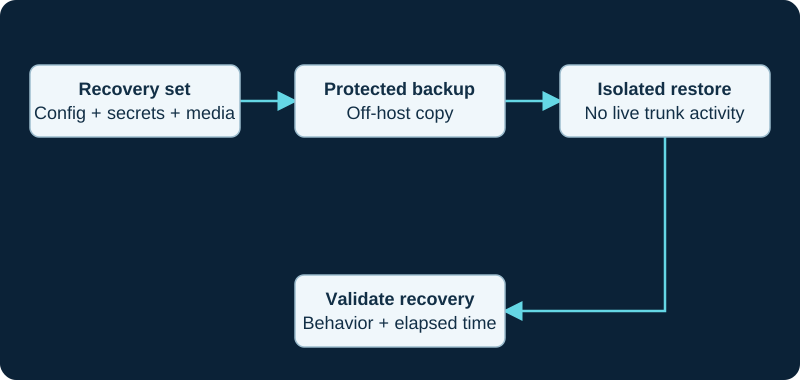
Keep production trunk identities from registering during a restore exercise. Include the dependencies needed to decrypt and use the backup.
Treat an archive as privileged, potentially hostile input
FreePBX advisories GHSA-5v7h-49gr-jcwr and GHSA-f6hc-rqxg-ch86 direct administrators to update Backup & Restore before restoring, restrict the administrator interface and restore function to trusted users, deny hostile networks and review archive authenticity and custody. The later advisory identifies affected versions below 17.0.30 and explains that a crafted archive could restore the Framework authentication type. Do not repeat an upload of unknown provenance merely because the first restore failed.
At archive creation, record a cryptographic hash, size, timestamp, job identity, storage destination and custody owner. Preserve the original bytes off-system with restricted credentials. Before restore, record the installed Backup & Restore and Filestore versions, signature state, repository channel and available update; update through supported Module Admin controls, then re-read the loaded versions. After restore, log out of the administrator interface and confirm that normal authentication still works, as the advisory recommends.
Prove job scope, archive manifest and storage separately
Create a job that selects the required modules and supported additional content, then run it once under change control. Preserve its output and error logs, the final artifact identity, and the destination evidence. FreePBX release/17.0 source places job and restore logs under the Asterisk log directory and reads archive metadata and module information from the manifest; those implementation details are investigation leads, not proof that a particular host used the same paths or completed successfully.
Filestore confirms where an artifact is stored, not what the archive contains or whether every module can restore it. Inspect the job definition and manifest against the recovery inventory. Protect remote-storage keys and archive encryption material without placing reusable credentials in screenshots or shared logs.
Restore through the target module owners
Build a separate supported target and keep it from reaching production carriers, phones, provisioning systems or scheduled destinations. Use the installed release's documented GUI or fwconsole backup --restore workflow and preserve its transaction identifier, output and error logs. The current restore implementation explicitly avoids uninstalling or reinstalling Backup & Restore while its own restore job is running; do not force module replacement in the middle of a transaction.
Reconcile each archived module with the installed, enabled, signed target module and its restore handler. Treat a skipped handler, unavailable target version, commercial activation gap, preserved target option or path/ownership problem as a named exception. A successful final banner does not prove that module data, files, generated configuration or loaded Asterisk state agree.
Keep version conversion separate from recovery success
For a FreePBX 16-to-17 migration, record any chan_sip-to-PJSIP conversion and target preservation option independently of the ordinary restore. Sangoma recommends Backup & Restore for moving an earlier FreePBX deployment to a newly installed FreePBX 17 target; it does not make a reverse 17-to-16 restore a supported rollback.
Compare the target module inventory, route order, schedules, certificates, recordings, voicemail, custom files and generated configuration with the source inventory. Correct persistent state through its FreePBX owner rather than editing generated Asterisk files or broadly changing ownership to make one symptom disappear.
Accept the isolated system, then rehearse cutover
Use internal test endpoints and a bounded matrix for internal calling, voicemail, DTMF, transfer, IVR, schedules, queues or ring groups, recordings, two-way audio and hangup. Admit an external path only through provider-approved test identity or a separately authorized route. Do not place an emergency call as a generic test.
Record restore duration, missing items, warnings and manual steps against the recovery-time and recovery-point objectives. Keep carrier failover and network recovery in the same continuity plan: restoring FreePBX alone may not restore the complete calling service. Production cutover remains a separate change with explicit registration, IP-authentication, number-routing, monitoring and rollback ownership.
Treat network isolation as a pre-restore control
Before importing an archive, use the restore-testing procedure to deny carrier, phone, provisioning and scheduled-work paths by default. If a recovery host reaches production, follow the containment diagnostic before deleting trunks or rotating evidence away.
When the job completes but content is missing
Use the missing settings or files diagnostic to trace one item from source job scope and archive manifest through its target module handler, transaction log, restored data, filesystem object, generated configuration and loaded runtime.
A restored custom file still needs engine-level compatibility
Use the FreePBX 17 restored-macro diagnostic to separate archive inclusion and extraction from loaded includes, unavailable Macro applications, Gosub conversion and final call routing.
Make the Filestore destination part of the recovery proof
Use the Filestore destination guide to keep destination configuration, archive creation, transfer, retention and retrieval separate. A passing handler probe or visible object does not prove archive scope or restore success.
Sources & applicability
Primary references for the technical details above. Operational examples and planning checklists are VoIP.info editorial guidance.
- Sangoma: Backup and Restore, version 15+ ↗
- Sangoma: FreePBX 17 installation ↗
- Sangoma: FreePBX 17 migration FAQ ↗
- FreePBX Backup & Restore 17 module metadata and security changelog ↗
- Sangoma Backup and Restore for FreePBX 15 and later ↗
- FreePBX Core release/17.0 metadata ↗
- Sangoma FreePBX 17 FAQ ↗
- Asterisk configuring outbound registrations ↗
- Asterisk PJSIP troubleshooting guide ↗
- Asterisk PJSIP objects and relationships ↗
- FreePBX Backup & Restore repository ↗
- FreePBX Backup & Restore job implementation — release/17.0 ↗
- FreePBX Backup & Restore restore implementation — release/17.0 ↗
- FreePBX security advisory GHSA-5v7h-49gr-jcwr ↗
- FreePBX security advisory GHSA-f6hc-rqxg-ch86 ↗
- Sangoma Filestore module ↗
- Sangoma fwconsole commands for FreePBX 15 and later ↗
- Sangoma Backup Information ↗
- Sangoma upgrading to FreePBX 17 ↗
- FreePBX module restore base — release/17.0 ↗
- Sangoma: upgrading to FreePBX 17 ↗
- Sangoma: FreePBX 17 platform overview ↗
- Asterisk 20 Macro application reference ↗
- Asterisk Gosub application reference ↗
- Asterisk Gosub subroutine guide ↗
- Asterisk Return application reference ↗
- Asterisk LOCAL function reference ↗
- Asterisk LOCAL_PEEK function reference ↗
- Asterisk StackPop application reference ↗
- FreePBX Filestore release/17.0 source ↗
- FreePBX Filestore release/17.0 module metadata ↗
Examples require adaptation to your topology. No live PBX or hardware testing is claimed.