Know the three states
A setting can exist in the form, be saved in FreePBX and then be applied to the running PBX. These are separate states. When a phone still behaves as before, establish which state actually changed before restarting services.
Use the supported FreePBX interface for managed settings. Direct edits to generated files can be overwritten and create an undocumented split between the GUI and runtime behavior.
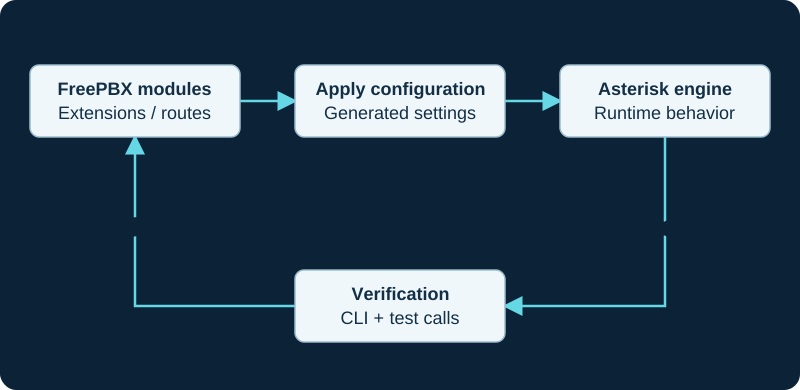
Use supported FreePBX controls and extension points. Direct edits to generated files can be replaced by the next configuration application.
Make one bounded change
Record the current value, intended outcome and affected call flows. Save a backup before substantial routing or platform changes. Submit the update and apply configuration through the application's normal process. Watch for errors rather than treating the disappearance of a notification as full validation.
Some operational changes or upgrades can require restarts and interrupt calls. Plan them according to the installed module's documentation and the business change window.
PJSIP transport changes have a distinct Asterisk reload boundary. The transport activation investigation keeps Apply Config, loaded transport state and any planned restart as separate evidence.
Verify a behavior, not a screenshot
If you changed an inbound destination, place an incoming call to that number. If you changed extension settings, verify the endpoint's actual contact and call behavior. If a schedule changed, test both sides of the condition using a controlled method.
Keep a neighboring regression check: another DID, another extension or an existing outgoing route. This helps detect broad effects from an apparently narrow edit.
Roll back cleanly
Restore the previous setting through the same supported path and apply it. Re-test the original workflow. Record any related firewall, phone-provisioning or carrier change, since reverting only the GUI may leave the wider system altered. Keep failed changes in the operating log so another administrator does not repeat them without the missing context.
Give channel-driver migration its own rollback boundary
A chan_sip-to-PJSIP trunk change affects listeners, generated objects, registration, identification and routes. Rehearse it on an isolated restore, cut over one bounded path and retain the previous route state until acceptance is complete.
Treat a Bulk Handler batch as a reconciled set of row changes
Bulk Handler adds file parsing, validation, per-row writes and update scope before the usual Apply Config and runtime states. The Bulk Handler guide and partial-import diagnostic preserve the exact artifact and reconcile changed, rejected and unknown rows before any retry.
Give SIP transport changes an explicit restart boundary
Asterisk SIP Settings can generate restart-sensitive listeners, NAT rewrites and certificate references. The dedicated guide preserves submitted, generated, loaded and listening state and defines a bounded acceptance matrix before the same supported rollback path is needed.
Include lookup sources in generated-to-runtime proof
For a Caller ID Lookup Sources change, preserve the saved source, inbound-route assignment, generated subroutine, loaded dialplan, cache state and one bounded call result.
Include pending reminder jobs in wake-up module changes
Before a Wake Up Calls module, prompt, timezone or feature-code change, inventory pending jobs and preserve their stored times, destinations and cancellation owner.
Include integrations in the change evidence set
Before an API module, certificate, proxy or schema change, preserve application IDs, non-secret credential fingerprints, scopes and one sanitized request. The API failure diagnostic traces the same request after the change.
Include external lookup dependencies in route changes
A Dynamic Route change can involve FreePBX configuration plus an ODBC source, URL, AGI script or variable producer. Preserve the source owner, sanitized contract, explicit fallback and four-outcome test from the Dynamic Routes guide.
Capture the complete Set CallerID rule in change evidence
A Set CallerID change includes description, name, number and next destination plus generated and loaded dialplan state. Use the guide to preserve those values, a control call and rollback without editing generated files.
Protect the administrator recovery path during identity changes
Before changing authorization type, SAML, User Management groups or deprecated administrator records, preserve a control account and follow the Admin login diagnostic.
Sources & applicability
Primary references for the technical details above. Operational examples and planning checklists are VoIP.info editorial guidance.
- Sangoma: PJSIP extensions ↗
- Sangoma: Backup and Restore, version 15+ ↗
- Sangoma: using FreePBX 17 with chan_sip ↗
- Asterisk: chan_sip status and support boundary ↗
- Asterisk: migrating from chan_sip to res_pjsip ↗
- Asterisk 21 chan_sip module removal ↗
- Asterisk PJSIP configuration objects and relationships ↗
- Asterisk PJSIP troubleshooting guide ↗
- Sangoma Bulk Handler user guide ↗
- FreePBX Bulk Handler release/17.0 metadata ↗
- Sangoma deprecated Bulk Extensions notice ↗
- Sangoma: PBX GUI Asterisk SIP Settings ↗
- Sangoma: Asterisk SIP Settings user guide ↗
- FreePBX Asterisk SIP Settings release/17.0 source ↗
- Asterisk: configuring res_pjsip overview ↗
- Asterisk: configuring res_pjsip through NAT ↗
- Asterisk 22 res_pjsip reference ↗
- Asterisk: PJSIP transport selection ↗
- FreePBX CallerID Lookup repository ↗
- FreePBX CallerID Lookup metadata — release/17.0 ↗
- FreePBX CallerID Lookup generated dialplan — release/17.0 ↗
- FreePBX CallerID Lookup configuration and inbound-route hook — release/17.0 ↗
- Asterisk CALLERID dialplan function ↗
- Asterisk party-ID manipulation ↗
- Asterisk internal database ↗
- Asterisk TXTCIDNAME dialplan function ↗
- FreePBX Hotel Wakeup repository ↗
- FreePBX Hotel Wakeup metadata — release/17.0 ↗
- FreePBX Hotel Wakeup configuration and call-file source — release/17.0 ↗
- FreePBX Hotel Wakeup feature-code dialplan — release/17.0 ↗
- Sangoma Wake Up Calls user guide ↗
- Asterisk Call Files ↗
- Asterisk directory and file structure ↗
- Sangoma FreePBX PBX API documentation ↗
- FreePBX PBX API module repository ↗
- FreePBX PBX API release/17.0 module metadata ↗
- FreePBX PBX API release/17.0 implementation ↗
- Sangoma FreePBX Dynamic Routes module ↗
- Sangoma FreePBX Dynamic Routes user guide ↗
- Sangoma FreePBX Dynamic Routes working examples ↗
- Sangoma FreePBX community-supported modules ↗
- Sangoma FreePBX Module Admin user guide ↗
- FreePBX Dynamic Routes call-flow article ↗
- FreePBX Contributed Modules dynroute repository ↗
- Sangoma FreePBX Set CallerID module ↗
- FreePBX Set CallerID release/17.0 repository ↗
- FreePBX Set CallerID release/17.0 metadata ↗
- FreePBX Set CallerID release/17.0 generated dialplan ↗
- Sangoma: FreePBX 17 installation ↗
- FreePBX official installation paths ↗
- Sangoma: User Management group and user settings ↗
- Sangoma: deprecated Administrators module ↗
- Sangoma: FreePBX 17 network configuration ↗
- Sangoma: System Admin HTTPS setup ↗
- Sangoma: PBX SAML ↗
- FreePBX User Management release/17.0 metadata ↗
Examples require adaptation to your topology. No live PBX or hardware testing is claimed.