Keep the documentation version visible
Sangoma's detailed Inbound Routes and Outbound Routes field guides are explicitly labelled for PBX GUI 13, while the current FreePBX 17 installation path uses Debian 12. Their routing model remains useful evidence, but an installed FreePBX 17 system can expose different fields through its module versions and licensed add-ons.
Confirm the running FreePBX, Core and route-module versions before following a screenshot or field location. This guide uses the older pages for documented semantics and does not present their interface as an exact FreePBX 17 screen map.
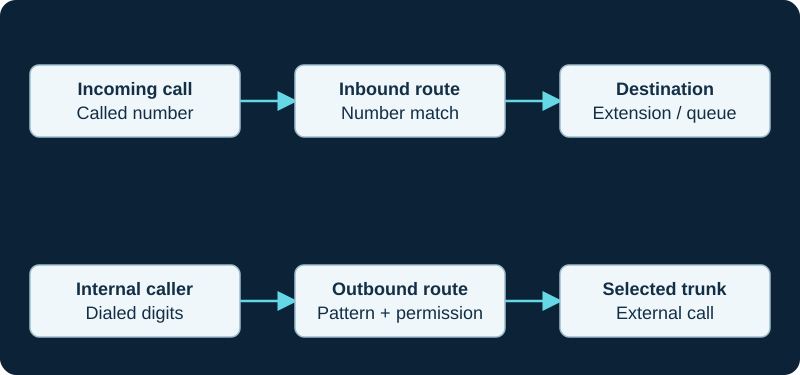
A working outbound call does not prove inbound number routing. Diagnose the direction and the matching rule independently.
Trace inbound DID and CID precedence
An inbound route can match the delivered DID, caller ID or both, then send the call to a destination such as a time condition, IVR or extension. The DID must match the format the provider actually sends; an account number or invoice display is not enough. A route with blank DID and CID fields matches calls with any or no such information and is therefore a catch-all, not proof that trunk identification is correct.
The version-13 guide documents this normal order: specific DID plus CID, specific DID alone, CID alone, then blank catch-all. CID Priority can move a CID-only route ahead of a DID-only route, but a specific DID-plus-CID route still wins. Capture the Request-URI, To header and caller identity from a redacted inbound attempt before changing these match fields.
Separate outbound route selection from trunk order
FreePBX evaluates outbound routes from highest to lowest priority and stops at the first route whose dial pattern matches; it does not continue looking for a more specific route below it. A broad earlier route can therefore intercept a later one. Time-group handling can make a route unavailable and allow evaluation to continue, so preserve the active time policy in the evidence.
Only after a route matches does its trunk sequence apply. That sequence is not another route search. Record the selected route, transformed number, first attempted trunk, response and any advance to a later trunk instead of describing every failed call as provider failover.
Write each number transformation once
An outbound route pattern can match a number, remove a prefix and prepend digits before handing the result to a trunk. The trunk can then perform another prefix, match and prepend transformation. Sangoma distinguishes their responsibilities: outbound routes decide what numbers are allowed and select a path, while trunk rules only add or subtract digits from the number already passed down.
Write a table containing the user-dialed value, matched route, route output, matched trunk rule and provider-facing value. Use constrained patterns where possible. Asterisk warns that dot and exclamation wildcards match characters as well as digits, so a broad pattern is also a security boundary rather than merely a dialing convenience.
Prove the trunk-advance trigger
Sangoma's trunk guide says a later trunk is normally tried when the current trunk is congested or unavailable. The separate Continue if Busy option can also advance after BUSY or INVALID NUMBER, and the guide says it should normally remain unchecked. Preserve that distinction: a destination rejection, user busy response and transport outage should not silently share one recovery policy.
The route can also have an optional congestion destination. Confirm the actual SIP or channel result that triggered the next trunk or destination, the caller ID used on that path, and whether the alternate trunk has compatible number, emergency and commercial policy.
Give emergency routing its own acceptance path
Sangoma documents a dedicated Emergency route near the top of the outbound-route order with a direct 911 match that does not require a prefix. The Emergency route type, route caller ID, per-extension Emergency CID, selected trunk and endpoint digit map are separate controls. The provider's registered dispatchable location and approved test procedure remain outside FreePBX route matching.
Do not place a live emergency call as an informal test. Validate direct dialing, location-specific caller identity, provider provisioning, on-site notification and an approved non-emergency test path with the responsible provider and emergency-program owner.
Apply, inspect and test a bounded matrix
Submit stores the route edit; Apply Config is the documented step that makes the change active. Saved GUI state, generated dialplan, loaded Asterisk state and a completed call are separate acceptance stages. Inspect the running route order and dialplan when runtime behavior differs rather than editing generated configuration as the durable source.
Test an allowed number, an intentionally denied number, overlap with a broader route, each intended trunk-advance condition, the exact incoming DID, a DID-plus-CID case, catch-all behavior and an after-hours destination. Record the observed route, trunk and final destination—not only ringing—and keep an export or rollback record before restructuring working routes.
Record the inbound-route music category as one precedence layer
The Music on Hold guide shows how a call-target category can temporarily override the category inherited from an inbound route. Trace the target entered and left before treating the route's selection as the runtime class.
Place PIN enforcement after a proven route match
The PIN Sets guide treats the selected set as a gate on the outbound route, not as the route selector itself. A broader earlier pattern can bypass the protected route; use the paired diagnostic to preserve route order, prompt result and trunk outcome as separate stages.
Prove where the inbound blacklist hook runs
Current FreePBX release/17.0 source inserts its blacklist check into generated inbound DID contexts, including a CID-priority route form. Use the Blacklist guide and paired diagnostic to prove the call selected that loaded route before changing the stored list.
Keep fax branch selection observable
For dedicated and mixed-use DIDs, the FreePBX fax guide records the normal and fax destinations separately from Asterisk transfer and later delivery. If ReceiveFAX succeeded but email or UCP did not, move to the post-receipt diagnostic.
Preserve both sides of a Callback
A FreePBX Callback ends an inbound leg and creates a chargeable outbound leg. The Callback guide keeps caller identity, number normalization, route authorization, carrier result and later destination separate.
Keep the route failure path distinct from its caller-facing message
After an outbound route and its ordered trunks fail, use the Route Congestion Messages guide to distinguish the route class, optional congestion destination, generated failure branch, selected recording or tone and original Dial result.
Trace caller-name lookup after the inbound route match
When an inbound route selects a lookup source, use the Caller ID Lookup Sources guide to preserve the received identity, selected source, cache decision, returned name and final display separately.
Trace external Misc Destinations as outbound calls
When an inbound route selects a Misc Destination containing an external number, preserve source authorization, exact digits, outbound route, caller-ID policy, trunk response and answer as separate evidence.
Document which inbound paths may assign elevated queue priority
A public DID or route can select a Queue Priorities object. Preserve eligibility and authorization rather than letting any caller inherit a privileged class.
Keep an inbound route handoff separate from a dynamic decision
An inbound route can hand a call to Dynamic Routes, but caller or DID selection is not the lookup result. The Dynamic Routes diagnostic follows the input, returned token, exact match and final destination separately.
Trace a Set CallerID destination as its own handoff
When a route or other call-flow object selects Set CallerID, prove the upstream selection, channel change and next destination separately. The module diagnostic continues into later outbound policy only after that handoff is correct.
Match the exact SIPStation DID after proving request receipt
Sangoma says the inbound-route DID must match the format supplied by the provider. Use the SIPStation diagnostic to preserve Request-URI, To identity, CID conditions, route priority and final destination.
Prove the route actually enters the time decision
Before changing hours, the Asterisk wrong-branch diagnostic confirms the inbound route reached the expected context and priority, then separates branch selection from final destination behavior.
ClearlyIP missing-DID automation uses a verification destination
The ClearlyIP diagnostic verifies that an auto-created inbound route was changed to the intended business destination.
Simwood Request-URI and To can carry different users
The Simwood diagnostic preserves Contact-derived addressing and the called number before route normalization.
Watch the explanation
Distinguishes the called DID from caller ID and follows inbound calls to a destination. The catch-all and exact-number examples help explain why a route matches unexpectedly.
Read applicability and editorial notes →Watch this video here
FreePBX 15 walkthrough. Our written administration baseline is FreePBX 17 on Debian 12. Review used the available transcript and primary references; audio and screen readability remain unverified.

The player loads only when you choose Watch here. Playback uses YouTube’s privacy-enhanced embed; YouTube processes playback data.
Explains conference numbers, separate user and leader PINs, leader wait/leave behavior and the inbound route that makes a room reachable. Useful preparation for testing who can enter and when a conference ends.
Read applicability and editorial notes →Watch this video here
Uploaded in October 2024, but the narration identifies FreePBX 16 as configured in June 2023. Use our FreePBX 17 guide alongside it. Review used the available transcript and primary references; audio and screen readability remain unverified.
The player loads only when you choose Watch here. Playback uses YouTube’s privacy-enhanced embed; YouTube processes playback data.
Sources & applicability
Primary references for the technical details above. Operational examples and planning checklists are VoIP.info editorial guidance.
- Sangoma: Inbound Route User Guide (PBX GUI 13) ↗
- Sangoma: Outbound Routes Module User Guide (PBX GUI 13) ↗
- Sangoma: Trunks Module User Guide ↗
- Sangoma: Emergency service calling requirements ↗
- Sangoma: FreePBX 17 installation ↗
- Asterisk: dialplan pattern matching ↗
- Sangoma FreePBX Music on Hold user guide ↗
- Sangoma FreePBX Music on Hold module ↗
- Asterisk MusicOnHold application ↗
- Asterisk CHANNEL function ↗
- Asterisk Dial application ↗
- Asterisk MusicOnHoldStart event ↗
- Asterisk res_pjsip configuration reference ↗
- Asterisk voice-prompt and music-on-hold licensing ↗
- Sangoma FreePBX standard PIN Sets module ↗
- Sangoma FreePBX PIN Sets admin guide (PBX GUI 13) ↗
- Sangoma Blacklist module user guide ↗
- Sangoma Blacklist GraphQL APIs ↗
- FreePBX Blacklist release/17.0 metadata ↗
- FreePBX Blacklist release/17.0 inbound-route hook ↗
- FreePBX Blacklist release/17.0 class and dialplan source ↗
- Asterisk BLACKLIST dialplan function ↗
- Asterisk CALLERID dialplan function ↗
- Asterisk party-ID information ↗
- Sangoma: Fax Pro Admin Guide ↗
- Sangoma: Fax Pro product boundary ↗
- FreePBX Fax Configuration release/17.0 source ↗
- Asterisk ReceiveFAX application ↗
- Asterisk SendFAX application ↗
- Asterisk FAXOPT function ↗
- Sangoma: PBX GUI Callback Module User Guide ↗
- FreePBX Callback release/17.0 source ↗
- FreePBX Callback release/17.0 metadata ↗
- FreePBX Callback dialplan generation ↗
- Asterisk call-file interface ↗
- FreePBX Route Congestion Messages repository ↗
- FreePBX Route Congestion Messages metadata — release/17.0 ↗
- FreePBX Route Congestion Messages generated dialplan — release/17.0 ↗
- FreePBX core outbound-routing component — release/17.0 ↗
- Sangoma Sample Route Configurations ↗
- Sangoma System Recordings ↗
- Asterisk Hangup Cause ↗
- Asterisk Hangup Cause Mappings ↗
- Asterisk Playback application ↗
- FreePBX CallerID Lookup repository ↗
- FreePBX CallerID Lookup metadata — release/17.0 ↗
- FreePBX CallerID Lookup generated dialplan — release/17.0 ↗
- FreePBX CallerID Lookup configuration and inbound-route hook — release/17.0 ↗
- Asterisk internal database ↗
- Asterisk TXTCIDNAME dialplan function ↗
- Sangoma FreePBX Misc Destinations overview ↗
- Sangoma FreePBX Misc Destinations user guide ↗
- FreePBX Misc Destinations release/17.0 repository ↗
- FreePBX Misc Destinations release/17.0 metadata ↗
- FreePBX Misc Destinations release/17.0 dialplan source ↗
- Sangoma FreePBX outbound routes ↗
- Asterisk contexts, extensions and priorities ↗
- Sangoma Queue Priorities user guide ↗
- Sangoma Queue Priorities module overview ↗
- FreePBX Queue Priorities release/17.0 repository ↗
- FreePBX Queue Priorities release/17.0 metadata ↗
- FreePBX Queue Priorities release/17.0 dialplan source ↗
- Asterisk standard channel variable QUEUE_PRIO ↗
- Asterisk Queue application ↗
- Sangoma FreePBX Dynamic Routes module ↗
- Sangoma FreePBX Dynamic Routes user guide ↗
- Sangoma FreePBX Dynamic Routes working examples ↗
- Sangoma FreePBX community-supported modules ↗
- Sangoma FreePBX Module Admin user guide ↗
- FreePBX Dynamic Routes call-flow article ↗
- FreePBX Contributed Modules dynroute repository ↗
- Sangoma FreePBX Set CallerID module ↗
- FreePBX Set CallerID release/17.0 repository ↗
- FreePBX Set CallerID release/17.0 metadata ↗
- FreePBX Set CallerID release/17.0 generated dialplan ↗
- Sangoma: Troubleshooting SIPStation ↗
- Sangoma: Failover of inbound SIPStation DIDs ↗
- Sangoma: SIPStation notifications and access restrictions ↗
- Sangoma: FreePBX SIPStation module ↗
- Sangoma: SIPStation PJSIP trunk setup ↗
- Sangoma: FreePBX inbound-route user guide ↗
- Sangoma: Configuring a PBX or device with SIPStation ↗
- Asterisk 22 GotoIfTime application ↗
- Asterisk 22 ExecIfTime application ↗
- Asterisk 22 IFTIME function ↗
- Asterisk 22 TESTTIME function ↗
- Asterisk 22 STRFTIME function ↗
- Sangoma: Time Conditions module overview ↗
- Sangoma: Time Conditions user guide ↗
- Sangoma: Time Group user guide ↗
- FreePBX Time Conditions release/17.0 metadata ↗
- ClearlyIP current SIP trunking product page ↗
- ClearlyIP current documentation destination ↗
- ClearlyIP legacy configuration-guide scope and freshness notice ↗
- ClearlyIP legacy trunk details and regional registrars ↗
- ClearlyIP legacy Location, number routing and failover reference ↗
- ClearlyIP legacy FreePBX automated-module reference ↗
- ClearlyIP legacy FreePBX PJSIP setup reference ↗
- ClearlyIP legacy common SIP issues reference ↗
- Simwood Hosted SIP Trunks ↗
- Simwood hosted trunks interop ↗
- Simwood hosted trunk overview ↗
- Simwood Asterisk 16 hosted trunk example ↗
- Simwood hosted TLS/SRTP settings ↗
- Simwood Partner and Direct IP addresses and whitelisting ↗
- Simwood portal overview ↗
- Simwood Carrier Services API v3 ↗
Examples require adaptation to your topology. No live PBX or hardware testing is claimed.