Write the menu before configuring it
An IVR maps caller digits to PBX destinations. Draft the spoken choices and the routes together: for example, 1 for sales, 2 for support and 0 for an attended fallback. Keep the first menu short enough that a caller can remember the choices.
A recording alone does not create the routing. System Recordings holds the audio asset; the IVR defines the digit behavior. Ensure each advertised department has a working destination before connecting the public number.
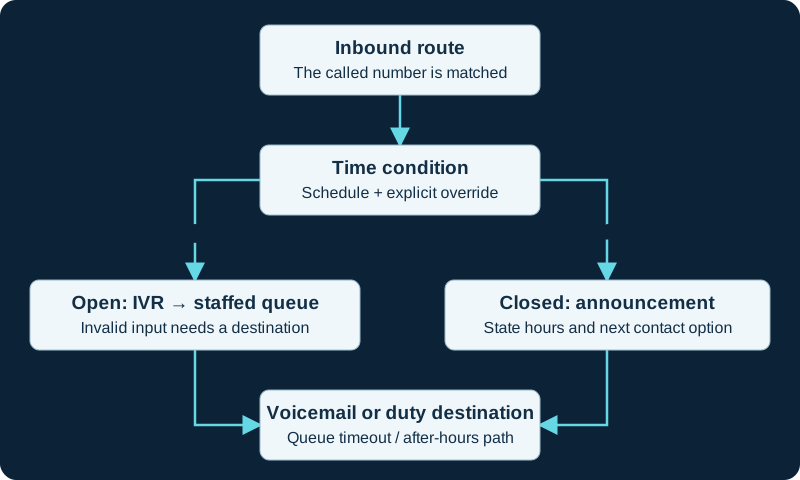
One routing design. Test holiday rules, manual overrides, invalid IVR input and queue overflow separately; the selected destinations depend on local policy.
Build and apply a small test menu
Create the prompt in System Recordings and select it in the IVR application. Add the digit-to-destination mappings, timeout behavior and invalid-input destination. Decide whether direct extension dialing is necessary; exposing arbitrary extensions is a separate access decision.
Submit and Apply Config, then route a test DID or internal test path to the menu. Avoid pointing the only business number to an untested IVR. Keep a direct-to-reception route ready as a rollback.
Exercise every branch
Press each valid digit, an invalid digit, nothing at all, a partial multi-digit choice and a digit during the prompt. Test from the real carrier path as well as an internal phone: local DTMF success does not establish carrier-side negotiation. Record the invalid-retry and timeout-retry counts, append-announcement behavior, final destinations and every submenu return action so a retry or parent return is not mistaken for random routing.
If callers hear the menu but digits do nothing, first establish whether Asterisk received them using DTMF negotiation and the affected call leg. If the digit is logged but the menu ignores it, delays it or reaches the wrong destination, use the focused FreePBX IVR keypress diagnostic. Transport, digit timing, direct dialing, menu matching and destination execution are different failure stages.
Keep a reachable exit
Use an attended destination, useful mailbox or clear final announcement after retries. Hidden digit choices are discoverable and must not replace authentication. Re-record the prompt when choices change, and call the public number after every routing update.
Verify Announcement return with and without IVR context
An Announcement can return to its originating IVR only when the call arrived with that IVR context. The Announcement diagnostic compares IVR and direct entry, repeat and skip handling, ordinary completion and the configured post destination so a context-dependent return is not mistaken for random routing.
Keep Directory return behavior inside the IVR path
The FreePBX Directory diagnostic compares direct entry with entry from an IVR. It proves whether Return to IVR overrides the Directory's invalid destination and maps any repeated path before prompts or retry counts are changed.
Keep IVR selection separate from shared recording content
An IVR can reference a System Recording whose media, language or feature-code replacement is owned outside the menu branches. Use the System Recordings guide to preserve that shared object, then test BackGround playback and digit collection in the actual IVR path.
Treat an IVR selection as a handoff, not authorization
The Misc Destinations guide keeps an IVR key, selected record, generated handoff and final feature or route independent. An obscure menu digit is not authentication for a privileged target.
Keep queue-priority selection separate from menu recognition
When an IVR branch assigns a caller class, the queue-priority diagnostic continues from the selected object through variable inheritance and queue admission.
Watch the explanation
Distinguishes the called DID from caller ID and follows inbound calls to a destination. The catch-all and exact-number examples help explain why a route matches unexpectedly.
Read applicability and editorial notes →Watch this video here
FreePBX 15 walkthrough. Our written administration baseline is FreePBX 17 on Debian 12. Review used the available transcript and primary references; audio and screen readability remain unverified.

The player loads only when you choose Watch here. Playback uses YouTube’s privacy-enhanced embed; YouTube processes playback data.
Walks a complete inbound design through weather overrides, holidays, business hours and fallback destinations. Watch before building the individual modules.
Read applicability and editorial notes →Watch this video here
Part of a FreePBX 15 series, but this lesson teaches call-flow design rather than relying on the old interface. Review used the available transcript and primary references; audio and screen readability remain unverified.

The player loads only when you choose Watch here. Playback uses YouTube’s privacy-enhanced embed; YouTube processes playback data.
Sources & applicability
Primary references for the technical details above. Operational examples and planning checklists are VoIP.info editorial guidance.
- Sangoma: IVR user guide ↗
- Sangoma: System Recordings ↗
- FreePBX 17 IVR module metadata and change history ↗
- Asterisk Background and WaitExten behavior ↗
- Asterisk special invalid and timeout extensions ↗
- Sangoma FreePBX Announcements user guide ↗
- Sangoma FreePBX Announcements module overview ↗
- FreePBX Announcements release/17.0 metadata ↗
- FreePBX Announcements release/17.0 dialplan source ↗
- Asterisk 23 BackGround application ↗
- Sangoma FreePBX Directory module user guide ↗
- FreePBX Directory release/17.0 metadata ↗
- FreePBX Directory release/17.0 source ↗
- Asterisk 23 Directory application ↗
- Sangoma System Recordings Module User Guide ↗
- Sangoma System Recordings GraphQL APIs ↗
- FreePBX System Recordings source ↗
- FreePBX Sound Languages release/17.0 metadata ↗
- Asterisk Playback application ↗
- Sangoma FreePBX Misc Destinations overview ↗
- Sangoma FreePBX Misc Destinations user guide ↗
- FreePBX Misc Destinations release/17.0 repository ↗
- FreePBX Misc Destinations release/17.0 metadata ↗
- FreePBX Misc Destinations release/17.0 dialplan source ↗
- Sangoma FreePBX outbound routes ↗
- Asterisk contexts, extensions and priorities ↗
- Sangoma Queue Priorities user guide ↗
- Sangoma Queue Priorities module overview ↗
- FreePBX Queue Priorities release/17.0 repository ↗
- FreePBX Queue Priorities release/17.0 metadata ↗
- FreePBX Queue Priorities release/17.0 dialplan source ↗
- Asterisk standard channel variable QUEUE_PRIO ↗
- Asterisk Queue application ↗
Examples require adaptation to your topology. No live PBX or hardware testing is claimed.