Model group, condition and call path separately
A Time Group defines one or more matching periods. A Time Condition evaluates the selected group and sends a call to either its matched or unmatched destination. The condition changes nothing unless an inbound route, IVR, announcement or another destination actually sends the call through it. Prove that complete path before changing the schedule.
Sangoma's public module and user-guide pages are explicitly labelled for PBX GUI version 13. Their object relationships and override semantics are useful evidence, but they are not an exact FreePBX 17 screen map. Record the installed Time Conditions and Time Groups module versions, FreePBX version, destination names and generated configuration owner.
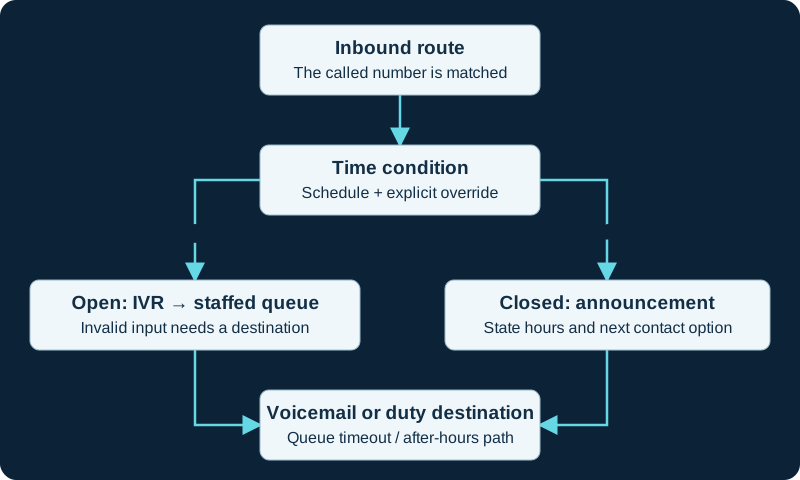
One routing design. Test holiday rules, manual overrides, invalid IVR input and queue overflow separately; the selected destinations depend on local policy.
Write the policy and timezone before entering ranges
Write the business timezone, ordinary hours, weekends, holidays and exceptional closures first. Check the PBX date, time, timezone and synchronization state because Time Groups use the PBX's time interpretation. Do not shift every range to compensate for a wrong system clock.
Use descriptive group and condition names. Sangoma's configuration guide documents multiple ranges for ordinary periods and blank start and finish times for date-based exclusions such as holidays. That version-labelled example is not permission to use blank fields without reviewing the installed module. Preserve the intended result for the instant before, at and after every opening, closing and seasonal transition.
Keep scheduled, matched and override states distinct
The schedule's current match result and the condition's active override are separate state. Sangoma documents temporary matched or unmatched overrides that end at the next applicable scheduled change, and permanent matched or unmatched overrides that persist until reset. Reset Override returns control to the schedule; it does not force a particular branch.
An override PIN can restrict the feature-code path. Record the exact condition, previous state, operator, time, reason and reset owner. A permanent override is an operational change, not a harmless lamp toggle. Include it in shift handover, incident review and restart or recovery acceptance.
Treat BLF and phone apps as operator interfaces
The version-13 user guide documents a BLF hint whose default INUSE state means the condition is not matched; the Invert BLF Hint control reverses that display. A lamp color remains phone- and template-dependent and is not proof of which destination an actual call reached. Label the button with the operational meaning and verify it against the condition's displayed state and a bounded call.
Sangoma's P-Series DPMA Time Conditions app is a separate documented control path for named phones on firmware 4.23.2 or later. It can expose authorized conditions and matched, unmatched, temporary, permanent and reset actions, including a Set All control. Do not transfer that workflow to an unsupported phone or firmware, and do not use a global action without enumerating every condition it will change.
Nest conditions with an explicit decision order
Sangoma documents a Time Condition as a destination and therefore allows one condition to send a branch into another. Use this deliberately for policy such as holiday first, then ordinary business hours, then evening or night handling. Draw the decision order and give every matched and unmatched branch a named final destination.
A holiday announcement that later enters the after-hours condition is different from a holiday branch that terminates in voicemail. Test the entire chain; verifying only the first condition can miss a wrong announcement exit, IVR timeout, queue fallback or nested permanent override. Avoid cycles and undocumented catch-all branches.
Apply, test boundaries and prove recovery
Submit and Apply Config through FreePBX, keeping form submission, successful reload, generated dialplan and call behavior as separate evidence states. Prefer isolated or temporary test destinations. Do not move the production server clock to test future behavior; use a staging copy or the bounded method in the wrong-route diagnostic.
Test ordinary open and closed periods, the exact opening and closing instants, weekends, holidays, nested destinations, temporary override expiry, permanent override reset and recovery after a service restart or restore. Confirm each affected public number from outside and preserve the prior ranges and destinations for rollback. No PBX, clock, group, condition, override, feature code, BLF, phone app, generated dialplan, route, destination or live call was tested for this guide.
Trace calendar-backed conditions before changing destinations
When a Time Condition uses a calendar or Calendar Event Group, the Calendar guide defines its retrieval and match boundaries. The calendar diagnostic follows one event through timezone, recurrence, group policy, generated state and the actual call branch.
Resolve each time-condition branch to the current destination ID
If a branch selects a Misc Destination, use the focused diagnostic to prove its saved ID, exact digits and loaded target before changing time rules.
Inspect the Asterisk primitive without taking ownership from FreePBX
When a generated branch is disputed, use the Asterisk time-routing guide to read timespec, explicit zone, true and false targets and TESTTIME() boundaries. Correct the owning Time Group, condition, override or destination through FreePBX rather than editing generated dialplan.
Watch the explanation
Walks a complete inbound design through weather overrides, holidays, business hours and fallback destinations. Watch before building the individual modules.
Read applicability and editorial notes →Watch this video here
Part of a FreePBX 15 series, but this lesson teaches call-flow design rather than relying on the old interface. Review used the available transcript and primary references; audio and screen readability remain unverified.

The player loads only when you choose Watch here. Playback uses YouTube’s privacy-enhanced embed; YouTube processes playback data.
Builds a weekly office schedule, then divides a holiday closure into a partial first day, complete middle days and a partial final day. Useful when a single time range cannot express the schedule clearly.
Read applicability and editorial notes →Watch this video here
Uploaded October 2023; the narration identifies a FreePBX 16 system from February 2023. Check controls on FreePBX 17. Review used the available transcript and primary references; audio and screen readability remain unverified.

The player loads only when you choose Watch here. Playback uses YouTube’s privacy-enhanced embed; YouTube processes playback data.
Sources & applicability
Primary references for the technical details above. Operational examples and planning checklists are VoIP.info editorial guidance.
- Sangoma: Time Conditions module overview ↗
- Sangoma: Time Conditions user guide, labelled for PBX GUI version 13 ↗
- Sangoma: Time Conditions example usage ↗
- Sangoma: PBX configuration guide for Time Groups, holidays and overrides ↗
- Sangoma: P-Series DPMA Time Conditions app ↗
- Sangoma: Calendar module ↗
- Sangoma: Calendar Event Groups module ↗
- Sangoma: local calendar ↗
- Sangoma: remote iCal calendar ↗
- Sangoma: remote CalDAV calendar ↗
- Sangoma: Outlook calendar OAuth 2.0 integration ↗
- FreePBX Calendar release/17.0 source ↗
- FreePBX Time Conditions release/17.0 metadata ↗
- Sangoma FreePBX Misc Destinations overview ↗
- Sangoma FreePBX Misc Destinations user guide ↗
- FreePBX Misc Destinations release/17.0 repository ↗
- FreePBX Misc Destinations release/17.0 metadata ↗
- FreePBX Misc Destinations release/17.0 dialplan source ↗
- Sangoma FreePBX outbound routes ↗
- Asterisk contexts, extensions and priorities ↗
- Asterisk 22 GotoIfTime application ↗
- Asterisk 22 ExecIfTime application ↗
- Asterisk 22 IFTIME function ↗
- Asterisk 22 TESTTIME function ↗
- Asterisk 22 STRFTIME function ↗
- Sangoma: Time Group user guide ↗
Examples require adaptation to your topology. No live PBX or hardware testing is claimed.