Keep the recording and call-flow object separate
Sangoma's public documentation separates System Recordings from Announcements. System Recordings records, uploads or exposes a named prompt for reuse; an Announcement selects one of those prompts and then controls repeat, skip, answer behavior and the next destination. Creating or replacing an audio asset does not prove that the intended Announcement references it or that any route reaches that Announcement.
The public System Recordings overview is explicitly labelled for PBX GUI version 13. Preserve its object relationship as conceptual evidence, but verify the installed FreePBX 17 module, fields, accepted file formats and generated behavior before treating the old screenshots or menu placement as an exact current interface. Name a new recording by purpose and revision, preserve the previous asset, and map every module that still references it before deletion.
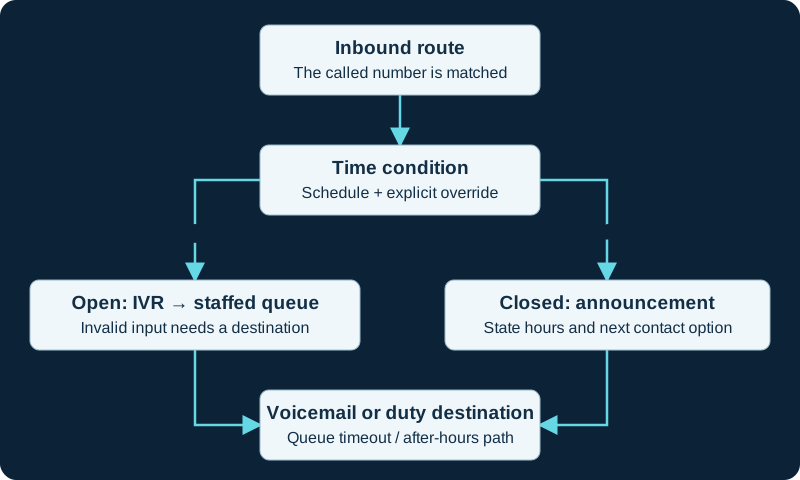
One routing design. Test holiday rules, manual overrides, invalid IVR input and queue overflow separately; the selected destinations depend on local policy.
Model repeat, skip and destination precedence
Repeat accepts one DTMF key from 0-9, star or pound; the recording must tell callers which key is active. Allow Skip is broader: any key ends playback and advances the call. Treat the transmitted digit, Asterisk reception, Announcement match and next destination as separate evidence when a key appears not to work. A successful repeat test does not prove skip behavior or another carrier's DTMF path.
Return to IVR changes destination precedence. When enabled and the caller actually arrived from an IVR, FreePBX returns that caller to the originating IVR instead of the configured Destination after Playback. A direct inbound route has no such originating-IVR state. Draw both entry paths and the resulting destination before enabling the option; a single Announcement otherwise has one defined post-playback destination.
Keep answer state and audible media separate
The documented normal and recommended behavior answers the channel before playing the recording. Don't Answer Channel instead attempts early media, which Sangoma warns many carriers do not support for audio messages. A SIP 183 response, an SDP body, inbound RTP and a caller who actually hears the complete prompt are separate observations.
Choose early media only for an explicit requirement and run an authorized carrier-specific test. Preserve billing, ringback, call-detail and abandonment expectations as separate acceptance questions. Falling back to answered playback is a call-flow decision, not proof that the early-media path worked.
Prove save, apply and loaded behavior separately
The public workflow distinguishes Submit from Apply Config. Treat the saved form, successful Apply Config operation, generated dialplan, loaded runtime and completed caller path as separate states. Do not edit FreePBX-generated dialplan to repair an Announcement; change the owning module and reapply through the supported path.
Use a bounded matrix covering direct entry, IVR entry, repeat, skip, ordinary completion, invalid or unreceived DTMF and every configured destination. Confirm the caller hears the intended revision from an ordinary external telephone, including a narrowband path, and check start silence, clipping and intelligibility. A correct local file or browser playback is not call-path evidence.
Replace and roll back without orphaning callers
Create a new named recording, verify it, switch the Announcement during an approved window and retain the former selection until the new call matrix passes. Recheck IVRs, queues, ring groups, Follow Me and other consumers before removing a shared System Recording. Confirm that deletion of an Announcement or recording does not leave an inbound route or time condition pointing at a missing destination.
Keep the prior prompt, Announcement settings and route map as the rollback unit. Use IVR guidance when callers must make a choice rather than only hear information. No PBX, module, recording, generated dialplan, DTMF path, carrier early-media path or caller outcome was tested for this guide.
Diagnose the selected prompt, digit branch and destination in order
When an Announcement plays the wrong recording, ignores a key, repeats unexpectedly or exits incorrectly, use the focused Announcement diagnostic. It follows one caller through route selection, the recording reference, answer or progress handling, BackGround digit reception, IVR return and the post destination without overwriting a shared prompt first.
Resolve the shared recording before changing Announcement flow
An Announcement selects a reusable System Recording, but the recording object can also serve other call flows. The System Recordings guide inventories ordered media, language and replacement ownership; the recording diagnostic isolates shared-content failure from Announcement repeat, DTMF and destination behavior.
Watch the explanation
Walks a complete inbound design through weather overrides, holidays, business hours and fallback destinations. Watch before building the individual modules.
Read applicability and editorial notes →Watch this video here
Part of a FreePBX 15 series, but this lesson teaches call-flow design rather than relying on the old interface. Review used the available transcript and primary references; audio and screen readability remain unverified.

The player loads only when you choose Watch here. Playback uses YouTube’s privacy-enhanced embed; YouTube processes playback data.
Explains the relationship between a system recording, an announcement and the next destination. The voicemail examples show how to avoid playing two greetings in succession.
Read applicability and editorial notes →Watch this video here
FreePBX 15 interface from 2021; the routing concept remains useful on the FreePBX 17 baseline. Review used the available transcript and primary references; audio and screen readability remain unverified.
The player loads only when you choose Watch here. Playback uses YouTube’s privacy-enhanced embed; YouTube processes playback data.
Sources & applicability
Primary references for the technical details above. Operational examples and planning checklists are VoIP.info editorial guidance.
- Sangoma: System Recordings ↗
- Sangoma FreePBX Announcements user guide ↗
- Sangoma FreePBX Announcements module overview ↗
- FreePBX Announcements release/17.0 metadata ↗
- FreePBX Announcements release/17.0 dialplan source ↗
- Asterisk 23 BackGround application ↗
- Sangoma System Recordings Module User Guide ↗
- Sangoma System Recordings GraphQL APIs ↗
- FreePBX System Recordings source ↗
- FreePBX IVR release/17.0 metadata ↗
- FreePBX Sound Languages release/17.0 metadata ↗
- Asterisk Playback application ↗
Examples require adaptation to your topology. No live PBX or hardware testing is claimed.