Define the carrier contract before opening the form
Confirm that the account is a SIP trunk intended for a customer PBX, not a hosted-user credential. Record whether the carrier expects outbound registration, source-IP identification, digest authentication or a combination; its signaling hosts and ports; inbound source ranges; media ranges; codecs; DTMF; number formats; caller-identity policy; capacity and emergency procedure. A provider example can illustrate fields but cannot define another carrier's contract.
Use PJSIP as the normal FreePBX 17 trunk path. Sangoma documents that FreePBX 17 defaults to Asterisk 22, where chan_sip is unavailable, and strongly discourages the legacy driver even when an older Asterisk version is selected. Preserve any migration reason and do not downgrade the engine merely to copy an obsolete trunk recipe.
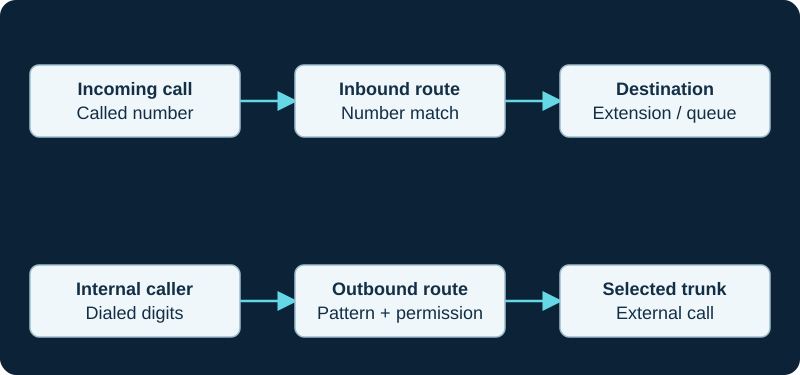
A working outbound call does not prove inbound number routing. Diagnose the direction and the matching rule independently.
Map GUI fields to separate PJSIP responsibilities
In Connectivity → Trunks, create a descriptive PJSIP trunk and map only the carrier's current values. Authentication and registration are separate choices. The SIP server or outbound proxy selects a signaling target; an AoR gives Asterisk a contact to call; outbound auth answers a challenge; a registration creates a provider-side binding; Match Permit or another identify rule can associate inbound requests with the endpoint. Do not use a broad permit range or anonymous acceptance to conceal a missing identify rule.
Asterisk documents endpoint, AoR, auth, identify, transport and registration as distinct objects. FreePBX generates those objects and owns their durable configuration. Use GUI fields or supported custom include boundaries rather than hand-editing generated files. Protect secrets in screenshots, backups, console output and tickets.
Keep the trunk, inbound route and outbound route separate
Sangoma's module documentation separates the Trunks module from inbound and outbound routes. A trunk defines the remote connection. An outbound route decides which dialed numbers and callers may use which trunk sequence. An inbound route matches the delivered number and chooses the local destination. Until an outbound route selects the trunk, an available endpoint does not place outside calls.
Capture the carrier's actual called-number format before adding the inbound route. For outbound service, state permitted users, prefixes, normalized digits, trunk order and the terminal outcome when every trunk fails. Keep ordinary, international, premium and emergency permissions explicit. A catch-all can make one test pass while silently authorizing unrelated calls.
Submit, apply and prove the running objects
Submit saves module data; Apply Config generates and loads Asterisk configuration. Preserve both outcomes, then inspect the running PJSIP endpoint, AoR, contacts, auth references, identify match and outbound registration that the installed module generated. A successful reload does not prove the intended trunk object loaded, and a registration indicator proves only the registration transaction.
For one authorized call in each direction, correlate route selection, PJSIP endpoint, Request-URI, final response, negotiated SDP and both media directions. Diagnose endpoint identification, digest authentication, registration, dialplan routing and media as different stages. Return temporary protocol logging to its normal level after the bounded capture.
Verify identity, capacity and failure behavior
Test caller identity against the carrier's authorized-number policy without forcing an arbitrary value just to complete a call. Keep asserted identity, displayed caller ID, privacy and emergency callback identity separate. Confirm active-call capacity and call-start limits independently; a registered trunk name, Maximum Channels field or green dashboard state does not prove the account entitlement.
Exercise the intended new-call failure path with a noncritical number. Outbound trunk sequence cannot protect inbound delivery unless the carrier separately routes the number to another reachable destination. Record the first failing SIP response or timeout, the component that chose the next path and the rollback trigger. Do not test by weakening the firewall or accepting arbitrary internet sources.
Complete acceptance without overclaiming
Verify inbound and outbound calls, expected busy or rejection behavior, two-way audio, DTMF, hold, transfer, forwarding, ordinary hangup and call records. Qualify fax, recording, encryption and number porting only when they are required and separately documented. Confirm emergency service through the carrier's current approved non-live process; never infer it from an ordinary call or place an uncoordinated live emergency test.
Record installed FreePBX, framework, core, trunk-module and Asterisk versions with the carrier document date, applied configuration and rollback. Sangoma's generic module documentation can establish responsibility boundaries without proving an exact current field order. No FreePBX host, module, account, credential, trunk, route, registration, number, identity, call, media path, failover, capacity, emergency workflow or compatibility was tested for this guide.
Migrate a legacy trunk by responsibility, not by field name
For an existing chan_sip trunk, use the migration guide to preserve the provider contract, route dependencies and rollback boundary. A converter or Registered label does not prove endpoint identification, route selection, media or emergency behavior.
Keep SIPStation module state and loaded PJSIP objects distinct
The SIPStation inbound diagnostic correlates the module account and DID state with the running registration, endpoint, AoR, packet and first dialplan match.
Start a Voximplant trunk with the chosen trust model
The Voximplant provider record distinguishes IP allowlisting, endpoint-style registration and scenario-originated authenticated SIP. Match the selected model to the generated FreePBX objects instead of adding every possible field.
Use VoIP Much account-issued values, then inspect the loaded object
VoIP Much’s FreePBX guide supplies placeholders for its account-issued host, username and password. The provider profile keeps that example distinct from the selected FreePBX release, driver, route and observed registration and call state.
Bind a VoIPline trunk to the issued order
The VoIPline profile keeps the loaded FreePBX trunk, selected operation mode, ordered channels, numbers and observed calls separate.
Bind a Voip Unlimited trunk to the issued registration and numbers
The Voip Unlimited guide keeps credentials, Contact, headline number, DDI aliases, channels and loaded FreePBX routing as separate evidence.
Bind SignalWire FreePBX routing to the assigned resource
The SignalWire diagnostic verifies number assignment, from-signalwire, DID extraction, from-pstn routing and media after registration.
Prove Telnyx delivery before changing a FreePBX route
The Telnyx inbound-route diagnostic preserves the provider attempt, delivered Request-URI, first FreePBX object or context, normalized DID and first matching destination.
Prove Bandwidth delivery before changing a FreePBX route
The Bandwidth inbound-route diagnostic retains the provider attempt, delivered Request-URI, normalized DID and first matching FreePBX destination.
Inspect the delivered Voipfone identity before changing FreePBX
The Voipfone inbound-number diagnostic compares the portal route, delivered Request-URI, normalized DID and first matching FreePBX route.
Inspect the delivered VoIP.ms number form before changing FreePBX
The VoIP.ms DID diagnostic compares POP, Request-URI, NANPA or E.164 form, normalization and first matching FreePBX route.
Match a Twilio origination attempt before changing FreePBX
The Twilio origination diagnostic follows URL selection, edge source, Request-URI, FreePBX endpoint identification and the first matching inbound route.
Match the Plivo attempt before changing FreePBX
The Plivo inbound diagnostic aligns trunk ID, primary or fallback URI, SIP Call-ID, endpoint identification and the first matching inbound route.
Prove the Vonage attempt before changing FreePBX
The Vonage inbound diagnostic aligns number link, URI priority, SIP Call-ID, PJSIP identification and the first matching inbound route.
Prove Voxtelesys delivery before changing a FreePBX route
The Voxtelesys diagnostic follows DID assignment, provider destination, delivered Request-URI, normalization and first matching FreePBX destination.
Prove didlogic delivery before changing FreePBX routing
Start with the purchased DID destination and customer-edge INVITE, then record the identified trunk and delivered number form. The didlogic diagnostic avoids using outbound success as inbound proof.
A Callcentric direct forward can bypass FreePBX entirely
Before changing a FreePBX inbound route, use the Callcentric diagnostic to prove whether the provider attempted the PBX or applied a higher-priority DID Forward.
Trace Anveo Direct before broadening FreePBX matches
The Anveo Direct diagnostic proves whether the provider attempted the configured URI and which signaling and media addresses arrived before a FreePBX trunk or route is widened.
Keep CarrierX provider selection apart from FreePBX routing
The CarrierX diagnostic separates DID assignment and trunk-group decisions from customer-edge receipt, FreePBX trunk matching and the inbound route.
Keep AVOXI target selection apart from FreePBX routing
The AVOXI diagnostic separates the provider’s number rule and SIP URI from FreePBX trunk matching and the inbound route.
Keep Easybell target selection apart from FreePBX routing
The Easybell diagnostic separates the provider identity mode and attempt from FreePBX trunk matching and the inbound route.
Separate SIP.US provider routing from FreePBX matching
The SIP.US diagnostic keeps Forward, Backup, trunk identity and capacity distinct from FreePBX trunk matching and the inbound route.
Keep Flowroute route evidence separate from FreePBX media evidence
After the correct number route reaches FreePBX, preserve SDP, NAT settings and observed RTP with the Flowroute audio diagnostic.
Do not copy the Bulk Solutions FreePBX 14 chan_sip template into FreePBX 17
Map the provider requirements to current PJSIP owners, then use the inbound diagnostic to compare generated and loaded state.
Do not copy the Yay.com chan_sip-style example into FreePBX 17
Map current provider requirements to supported PJSIP owners, then use the paired diagnostic to compare generated and loaded state.
Treat the ClearlyIP module as a generated configuration owner
The ClearlyIP guide requires installed-version evidence and review of generated trunks, outbound routes and inbound destinations.
Do not paste the Simwood Asterisk 16 sample into FreePBX
The Simwood diagnostic compares GUI ownership, generated files and loaded PJSIP objects.
Keep Sinch application ownership outside the FreePBX template
The Sinch diagnostic joins portal state to generated and loaded FreePBX PJSIP objects.
Match the SIPTRUNK inbound To value in loaded FreePBX state
Use the SIPTRUNK diagnostic before changing a GUI route or broadening trunk identification.
Sources & applicability
Primary references for the technical details above. Operational examples and planning checklists are VoIP.info editorial guidance.
- Sangoma FreePBX Trunks module ↗
- Sangoma FreePBX Trunks module user guide ↗
- Sangoma FreePBX Outbound Routes module ↗
- Sangoma FreePBX 17 and chan_sip boundary ↗
- Asterisk current res_pjsip configuration reference ↗
- Sangoma: using FreePBX 17 with chan_sip ↗
- Asterisk: chan_sip status and support boundary ↗
- Asterisk: migrating from chan_sip to res_pjsip ↗
- Asterisk 21 chan_sip module removal ↗
- Asterisk PJSIP configuration objects and relationships ↗
- Asterisk PJSIP troubleshooting guide ↗
- Sangoma: Troubleshooting SIPStation ↗
- Sangoma: Failover of inbound SIPStation DIDs ↗
- Sangoma: SIPStation notifications and access restrictions ↗
- Sangoma: FreePBX SIPStation module ↗
- Sangoma: SIPStation PJSIP trunk setup ↗
- Sangoma: FreePBX inbound-route user guide ↗
- Sangoma: Configuring a PBX or device with SIPStation ↗
- Voximplant SIP trunking solution ↗
- Voximplant SIP trunk connection FAQ ↗
- Voximplant SIP phone registration FAQ ↗
- Voximplant processing calls in scenarios ↗
- Voximplant CallSIP parameters ↗
- Voximplant telephony and SIP capabilities FAQ ↗
- Voximplant pricing ↗
- Voximplant service status ↗
- VoIP Much SIP Trunks ↗
- VoIP Much 3CX Phone System guide ↗
- VoIP Much FreePBX trunk guide ↗
- VoIP Much UniFi Talk guide ↗
- VoIP Much IP blocking guidance ↗
- VoIP Much SIP ALG guidance ↗
- VoIP Much supported audio codecs ↗
- VoIP Much quality suggestions ↗
- VoIP Much network status ↗
- VoIP Much service agreement ↗
- VoIPline Telecom SIP trunking ↗
- VoIPline Telecom pricing and rates ↗
- VoIPline Telecom legal documents ↗
- VoIPline Voice and SMS (IP) service schedule ↗
- VoIPline SIP trunks critical information summary ↗
- VoIPline Telecom network ↗
- VoIPline Telecom number porting ↗
- VoIPline Telecom service status ↗
- Voip Unlimited SIP Trunks ↗
- Voip Unlimited voice portfolio ↗
- Voip Unlimited partner operations and support tools ↗
- Voip Unlimited legal and regulatory documents ↗
- Voip Unlimited Master Services Agreement V3.0 ↗
- RFC 3263: Locating SIP Servers ↗
- RFC 2782: DNS SRV resource records ↗
- RFC 3403: DDDS DNS database and NAPTR records ↗
- SignalWire SIP trunking ↗
- SignalWire SIP credentials ↗
- SignalWire Get SIP credential API ↗
- SignalWire Update SIP profile API ↗
- SignalWire FreePBX integration ↗
- SignalWire caller ID and CNAM ↗
- SignalWire rate limits ↗
- SignalWire E911 ↗
- SignalWire rates ↗
- Telnyx SIP trunking service objects ↗
- Telnyx authentication methods ↗
- Telnyx failover and retries ↗
- Telnyx SIP response codes ↗
- Telnyx Outbound Voice Profiles ↗
- Telnyx round-robin routing ↗
- Telnyx current SIP network information ↗
- Telnyx machine-readable voice network data ↗
- Telnyx configuration-guide boundary ↗
- Bandwidth Build SIP trunking setup ↗
- Bandwidth number feature and Final Destination URI management ↗
- Voipfone FreePBX configuration guide ↗
- Voipfone inbound routing control ↗
- Voipfone phone-number routing controls ↗
- Voipfone PBX call-divert and PSTN-failover controls ↗
- Voipfone number porting ↗
- VoIP.ms DID routing, failover, POP and inbound format ↗
- VoIP.ms subaccount authentication and registration ↗
- VoIP.ms server and DID POP selection ↗
- VoIP.ms DID troubleshooting ↗
- VoIP.ms incoming-call troubleshooting ↗
- VoIP.ms registration troubleshooting ↗
- Twilio Elastic SIP Trunking configuration ↗
- Twilio OriginationUrl resource ↗
- Twilio Programmable Voice failover best practices ↗
- Twilio Elastic SIP Trunking IP addresses ↗
- Twilio Elastic SIP Trunking troubleshooting ↗
- Twilio Trunk resource ↗
- Plivo Zentrunk quickstart ↗
- Plivo Zentrunk technical specifications ↗
- Plivo SIP Trunking account limits ↗
- Plivo Zentrunk hangup codes ↗
- Plivo Zentrunk debug logs ↗
- Vonage SIP technical details ↗
- Vonage SIP Dashboard guide ↗
- Vonage Asterisk PJSIP configuration ↗
- Vonage FreePBX configuration ↗
- Vonage Voice Logs guide ↗
- Voxtelesys DID and number routing ↗
- Voxtelesys SIP Trunk Registrar ↗
- Voxtelesys portal IP-address routing ↗
- Voxtelesys registration ACL ↗
- Voxtelesys failover transfer ↗
- Voxtelesys call records ↗
- didlogic SIP credentials ↗
- didlogic outbound calling and regional gateways ↗
- didlogic inbound setup and destination routing ↗
- didlogic SIP trunking and PBX setup ↗
- didlogic Asterisk configuration and troubleshooting ↗
- didlogic direct interconnection requirements ↗
- Callcentric SIP trunking ↗
- Callcentric registration credentials ↗
- Callcentric DID forwarding ↗
- Callcentric DID-forward precedence ↗
- Callcentric network-down forward ↗
- Callcentric forwarded-call billing ↗
- Anveo Direct FAQ ↗
- Anveo Direct inbound DID service ↗
- Anveo Direct call termination ↗
- Anveo Direct network ↗
- Anveo Direct services ↗
- CarrierX trunk-group object ↗
- CarrierX trunk object ↗
- CarrierX SIP trunk quick start ↗
- CarrierX receive and place calls ↗
- CarrierX phone-number model ↗
- AVOXI outbound SIP trunk configuration ↗
- AVOXI inbound SIP URI forwarding ↗
- AVOXI outbound SIP trunk diagnostic ↗
- AVOXI SIP forwarding and trunking overview ↗
- Easybell general VoIP configuration ↗
- Easybell Trusted IP authentication ↗
- Easybell SIP-trunk authentication by trusted FQDN ↗
- Easybell automatic fallback routing ↗
- SIP.US IP authentication guide ↗
- SIP.US registration status guide ↗
- SIP.US current gateways and interconnection requirements ↗
- SIP.US call failover options ↗
- SIP.US inbound call troubleshooting ↗
- SIP.US channel-limit guidance ↗
- SIP.US E911 information ↗
- Flowroute current PoP interconnection requirements ↗
- Flowroute direct-media firewall requirements ↗
- Flowroute current PoP and DNS guidance ↗
- Flowroute inbound route and number-assignment guide ↗
- Flowroute preferred inbound PoP behavior ↗
- Flowroute TLS signaling scope ↗
- Flowroute inbound SRV routing example ↗
- Flowroute connection options ↗
- Bulk Solutions service overview ↗
- Bulk Solutions inbound IP-authenticated setup ↗
- Bulk Solutions outbound IP-authenticated setup ↗
- Bulk Solutions current IP-authentication workflow ↗
- Bulk Solutions current registration workflow ↗
- Bulk Solutions direction-split Retell integration ↗
- Bulk Solutions legacy FreePBX 14 IP-authentication template ↗
- Bulk Solutions E911 FAQ ↗
- Yay.com SIP Trunks for business phone systems ↗
- Yay.com create a SIP trunk ↗
- Yay.com SIP trunks and how to use them ↗
- Yay.com call encryption, TLS and SRTP ↗
- Yay.com firewall guide ↗
- Yay.com legacy FreePBX configuration example ↗
- Yay.com trunk-authentication API ↗
- ClearlyIP current SIP trunking product page ↗
- ClearlyIP current documentation destination ↗
- ClearlyIP legacy configuration-guide scope and freshness notice ↗
- ClearlyIP legacy trunk details and regional registrars ↗
- ClearlyIP legacy Location, number routing and failover reference ↗
- ClearlyIP legacy FreePBX automated-module reference ↗
- ClearlyIP legacy FreePBX PJSIP setup reference ↗
- ClearlyIP legacy common SIP issues reference ↗
- Simwood Hosted SIP Trunks ↗
- Simwood hosted trunks interop ↗
- Simwood hosted trunk overview ↗
- Simwood Asterisk 16 hosted trunk example ↗
- Simwood hosted TLS/SRTP settings ↗
- Simwood Partner and Direct IP addresses and whitelisting ↗
- Simwood portal overview ↗
- Simwood Carrier Services API v3 ↗
- Sinch Voice API SIP Trunking reference ↗
- Sinch Voice API callback reference ↗
- Sinch Voice API authentication reference ↗
- Sinch Voice API call headers ↗
- Sinch Voice API call detail records ↗
- Sinch Voice API release notes ↗
- Sinch Elastic SIP Trunking product overview ↗
- Sinch BYOC SIP Trunking overview ↗
- SIPTRUNK general SIP device configuration ↗
- SIPTRUNK registration connection troubleshooting ↗
- SIPTRUNK inbound-call troubleshooting ↗
- SIPTRUNK IP authentication ↗
- SIPTRUNK call failover options ↗
- SIPTRUNK registration-status reference ↗
- SIPTRUNK interconnection and network requirements ↗
- SIPTRUNK direct-media delivery and missing audio ↗
Examples require adaptation to your topology. No live PBX or hardware testing is claimed.