Freeze the intended registration path
Record the exact phone model and firmware, account slot, FreePBX extension, registrar name or address, port, transport, network location and provisioning owner before changing anything. The handset needs power, addressing, name resolution when used, reachability to the intended PJSIP listener and an applied extension configuration. A reachable web interface or ICMP response does not prove that SIP reaches the correct listener.
For the first acceptance, use an authorized, restricted local path where practical. Treat a later remote path as a separate design covering NAT, VPN or TLS. Do not temporarily expose the PBX broadly, disable certificate validation or leave SIP ALG changes undocumented merely to make an endpoint register.
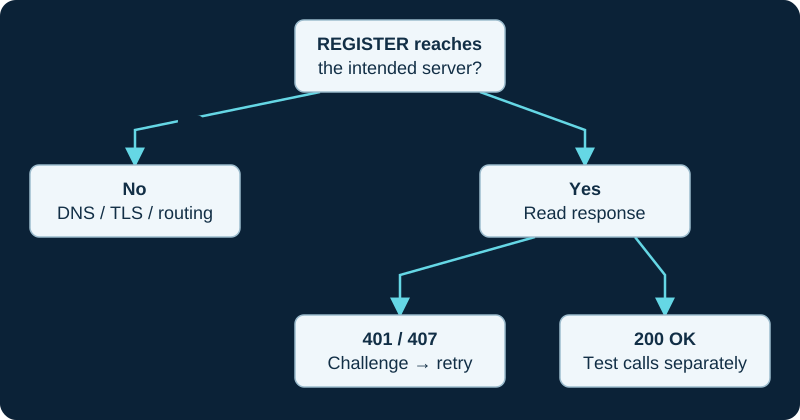
A first 401 challenge can be normal. Read the response to the authenticated retry before changing credentials.
Map labels to SIP roles, not guesses
Use the intended PBX name or address as the registrar and enter the extension's SIP identity, authentication username and device secret in the fields required by the exact phone. Never substitute the FreePBX administrator or User Manager password. Manufacturer labels vary, so server, registrar, proxy, outbound proxy, user ID, auth ID and display name must be mapped with the endpoint's own administration guide.
In Asterisk, the endpoint profile, auth object, AOR and dynamic contact are related but distinct. Max Contacts limits how many contacts REGISTER may create for the AOR; it does not describe simultaneous calls. Transport selection must match a configured PBX listener and, for TLS, the intended trust and name-validation path.
Classify the failure by the last proven boundary
A phone that sends no request, a request that never reaches the PBX, an unanswered request, a normal authentication challenge, a rejected credential, an interval-policy failure and a successful REGISTER with the wrong contact are different symptoms. Capture one bounded attempt and correlate handset time, PBX time, source address, transport, response code and the expected endpoint/AOR.
A handset's registered icon should correspond to the expected current contact on the intended AOR. Qualification or contact reachability remains separate from authentication, dialplan selection and media. Before changing routes, inspect identity, auth username, secret, registrar, port and transport, then check whether a firewall or intrusion-prevention rule reacted to earlier failures.
Prove call behavior beyond registration
Call a known internal destination in both directions and record alerting, answer, bidirectional audio and hangup separately. Then check hold, attended and blind transfer, voicemail deposit and retrieval, and message-waiting indication only when those features are in scope. Registration and a completed SIP dialog do not prove RTP, decoded audio or correct caller identity.
Restart the handset and verify both registration recovery and configuration persistence. A provisioning service may restore older values after reboot, so identify the authoritative source before accepting a manual change. Add external and emergency calling only after permissions, asserted identity and location policy are understood and the provider's authorized test path is documented. No phone, PBX listener, certificate, extension, auth object, AOR, contact, call, media path, voicemail, provisioning service or emergency route was tested for this review.
Keep registration separate from provisioning state
A phone can register with an old label, button map, firmware or server URL. Use the Endpoint Manager pipeline and old-configuration diagnostic to trace MAC mapping, template, generated file, fetch and runtime without changing extension authentication first.
Trace a FreePBX phone into the loaded dynamic contact
The AMI inbound-registration diagnostic reconciles generated ownership, AoR limits, dynamic contact and endpoint relationship.
Verify generated endpoint relationships after registration
The AMI endpoint-state diagnostic compares the FreePBX owner with loaded endpoint, AoR, auth, transport and contact rows.
Trace a generated FreePBX AoR to the loaded inventory
The AMI AoR-list diagnostic checks the generator, loaded object, registrar and contact lifecycle before changing the extension.
Sources & applicability
Primary references for the technical details above. Operational examples and planning checklists are VoIP.info editorial guidance.
- Sangoma: PJSIP extensions ↗
- Asterisk: PJSIP configuration objects and relationships ↗
- IETF RFC 3261 — SIP, including linked updates ↗
- Sangoma Endpoint Manager ↗
- Sangoma Endpoint Manager admin guide ↗
- Sangoma EPM and DPMA for D and P phones ↗
- Sangoma Endpoint Manager custom firmware ↗
- Sangoma Option 66 precedence after EPM provisioning ↗
- FreePBX Endpoint module password advisory ↗
- Asterisk 23 PJSIPShowRegistrationsInbound action ↗
- Asterisk 22 PJSIPShowRegistrationsInbound action ↗
- Asterisk 23 PJSIPShowRegistrationInboundContactStatuses action ↗
- Asterisk 22 PJSIPShowRegistrationInboundContactStatuses action ↗
- Asterisk 23 PJSIPShowContacts action ↗
- Asterisk 23 InboundRegistrationDetail event ↗
- Asterisk 23 ContactStatusDetail event ↗
- Asterisk AMI v2 specification ↗
- Asterisk 23 PJSIPShowEndpoints action ↗
- Asterisk 23 PJSIPShowEndpoint action ↗
- Asterisk 23 EndpointList event ↗
- Asterisk 23 EndpointListComplete event ↗
- Asterisk 23 EndpointDetail event ↗
- Asterisk 23 EndpointDetailComplete event ↗
- Asterisk 23 res_pjsip configuration reference ↗
- Asterisk 23 PJSIPShowAors action ↗
- Asterisk 23 AorList event ↗
- Asterisk 23 AorListComplete event ↗
- Asterisk 23 AorDetail event ↗
- Asterisk 23 PJSIP_AOR function ↗
- Asterisk 23 PJSIP_CONTACT function ↗
- Asterisk PJSIP troubleshooting guide ↗
Examples require adaptation to your topology. No live PBX or hardware testing is claimed.