Define the missing call and prove that it reaches this PBX
Record one authorized outside call with the calling number, dialed public number, exact time, expected destination and actual result. Capture the provider or SBC correlation identifier when available. First establish whether an INVITE reached the expected public address and Asterisk transport. If no request arrives, preserve the provider route, DNS, firewall and packet evidence before editing an inbound route.
A carrier portal showing a number as active does not prove delivery to this PBX. Likewise, a SIP request at the interface does not prove that Asterisk accepted it, identified the intended trunk or entered the FreePBX inbound-route context.
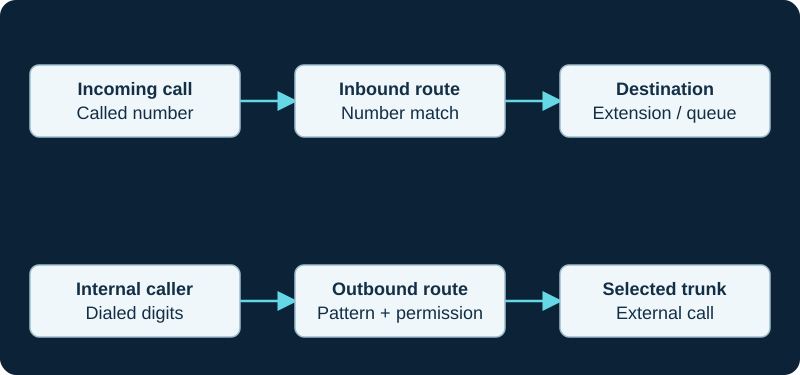
A working outbound call does not prove inbound number routing. Diagnose the direction and the matching rule independently.
Prove endpoint and trunk identity before DID matching
Use bounded PJSIP logging and the loaded object views to identify the request's source, transport and selected endpoint. Asterisk documents multiple endpoint identifiers and a configured identifier order; inspect the running order rather than assuming that source IP, username or another header matched first. Preserve the request, selected endpoint and resulting context together.
A rejected or unidentified request has not reached a FreePBX DID rule. Do not widen a catch-all route, enable anonymous calling or change authentication to conceal a trunk-identification failure. Continue with the inbound-trunk identity investigation when that boundary fails.
Compare the delivered called identity with the route DID
Inspect the called identity FreePBX actually receives after the trunk and any provider normalization. Keep the Request-URI user, To header, asserted identities and the DID presented to generated dialplan logic as separate fields. A leading plus, country code, national prefix, extension suffix or provider account identifier can make the stored route value differ from the business-facing number.
Compare exact values and use the provider's current delivery format. Change one supported normalization owner at a time. A route with no DID constraint may be useful as a deliberately controlled diagnostic, but it broadens the call surface and is not proof that the intended number format is understood.
Test DID and caller-ID constraints independently
Sangoma documents inbound routing by the called DID and optional caller ID. Preserve the route's DID, CID, CID Priority setting and generated result instead of reasoning from route names. A CID-specific route can fail because the provider withheld, reformatted or asserted the caller differently even when the DID is correct.
Use distinct authorized cases for a known caller, another caller and withheld identity. Do not normalize away privacy indicators or trust an asserted identity solely to make a route match. Confirm the loaded dialplan after applying the change and retain the exact route that selected the destination.
Follow the selected destination through every downstream branch
An inbound route can match correctly while a time condition, IVR, ring group, queue, extension state, follow-me rule or voicemail destination produces the unwanted result. Record the selected route and each following destination until the call alerts, answers, diverts or ends. Test the destination internally only as a separate control; that does not reproduce the carrier, trunk or caller-identity path.
Keep answer, early media, endpoint alerting, bridge and usable audio outside the route-match verdict. A route is proven when the expected branch is selected; the complete call still needs its own signaling and media acceptance.
Validate the repair without leaving a broad bypass
After the supported apply step, inspect the loaded route and repeat the affected DID, another DID, known and withheld caller identities, and the relevant open and closed schedule. Preserve an unaffected inbound call as the control. Remove temporary catch-all or relaxed matching unless it is an intentional documented business rule.
Rollback the authoritative FreePBX setting if route selection or a control call regresses, then prove the prior state again. Record provider delivery format, selected endpoint, DID and CID evidence, destination path, change, result and rollback. No provider account, number, trunk, PBX, route, destination, endpoint, schedule, call or media path was inspected or tested for this guide.
Continue into caller-name enrichment only after the route matches
Once the intended inbound route is proven, use the caller-name diagnostic to verify its source assignment, exact input number, cached or live result and endpoint display.
Continue past the inbound route into a dynamic branch
When the inbound route selects Dynamic Routes correctly but the final destination is wrong, use the Dynamic Routes diagnostic to inspect input, substitution, lookup result, exact entry and fallback.
Add the SIPStation provider attempt to the route-mismatch evidence
For SIPStation, the provider-specific diagnostic establishes which server or configured failover path delivered the request before the FreePBX DID, CID and destination checks begin.
Add Voip Unlimited headline and alias evidence before route edits
For Voip Unlimited, the provider-specific workflow preserves the active binding, DDI alias, delivered identity and first FreePBX match.
Check the ClearlyIP provider owner before broadening the route
The ClearlyIP diagnostic compares the number-selected Location and actual identity with the first loaded FreePBX match.
Match the actual Simwood To value without broadening trust
The Simwood diagnostic compares Request-URI, To, identify, context and the first loaded FreePBX match.
Sources & applicability
Primary references for the technical details above. Operational examples and planning checklists are VoIP.info editorial guidance.
- Sangoma FreePBX inbound-route user guide ↗
- Sangoma FreePBX inbound-route examples ↗
- Asterisk PJSIP troubleshooting guide ↗
- Asterisk current res_pjsip configuration reference ↗
- IETF RFC 3261 — SIP ↗
- FreePBX CallerID Lookup metadata — release/17.0 ↗
- FreePBX CallerID Lookup generated dialplan — release/17.0 ↗
- FreePBX CallerID Lookup configuration and inbound-route hook — release/17.0 ↗
- Asterisk CALLERID dialplan function ↗
- Asterisk party-ID manipulation ↗
- Asterisk internal database ↗
- Sangoma FreePBX Dynamic Routes module ↗
- Sangoma FreePBX Dynamic Routes user guide ↗
- Sangoma FreePBX Dynamic Routes working examples ↗
- Sangoma FreePBX community-supported modules ↗
- Sangoma FreePBX Module Admin user guide ↗
- FreePBX Dynamic Routes call-flow article ↗
- FreePBX Contributed Modules dynroute repository ↗
- Sangoma: Troubleshooting SIPStation ↗
- Sangoma: Failover of inbound SIPStation DIDs ↗
- Sangoma: SIPStation notifications and access restrictions ↗
- Sangoma: FreePBX SIPStation module ↗
- Sangoma: SIPStation PJSIP trunk setup ↗
- Sangoma: FreePBX inbound-route user guide ↗
- Sangoma: Configuring a PBX or device with SIPStation ↗
- Voip Unlimited SIP Trunks ↗
- Voip Unlimited voice portfolio ↗
- Voip Unlimited partner operations and support tools ↗
- Voip Unlimited legal and regulatory documents ↗
- Voip Unlimited Master Services Agreement V3.0 ↗
- RFC 3263: Locating SIP Servers ↗
- RFC 2782: DNS SRV resource records ↗
- RFC 3403: DDDS DNS database and NAPTR records ↗
- ClearlyIP current SIP trunking product page ↗
- ClearlyIP current documentation destination ↗
- ClearlyIP legacy configuration-guide scope and freshness notice ↗
- ClearlyIP legacy trunk details and regional registrars ↗
- ClearlyIP legacy Location, number routing and failover reference ↗
- ClearlyIP legacy FreePBX automated-module reference ↗
- ClearlyIP legacy FreePBX PJSIP setup reference ↗
- ClearlyIP legacy common SIP issues reference ↗
- Simwood Hosted SIP Trunks ↗
- Simwood hosted trunks interop ↗
- Simwood hosted trunk overview ↗
- Simwood Asterisk 16 hosted trunk example ↗
- Simwood hosted TLS/SRTP settings ↗
- Simwood Partner and Direct IP addresses and whitelisting ↗
- Simwood portal overview ↗
- Simwood Carrier Services API v3 ↗
Examples require adaptation to your topology. No live PBX or hardware testing is claimed.