Classify one registration attempt before changing settings
Choose one extension and one device, record the time, source network, server name, port and transport, then preserve the complete REGISTER transaction. No packet at the PBX points to DNS, routing, firewall, wrong destination or client execution. A request with no reply, an initial 401 or 407 challenge, an authenticated retry, a final rejection and a 200 response are different checkpoints. An expected challenge is not itself an authentication failure.
Use a short, access-controlled trace and redact Authorization material before sharing it. Do not expose a broad packet capture or entire PBX configuration when the Call-ID, source tuple, Request-URI, response sequence and timestamps are enough to establish the failing stage.
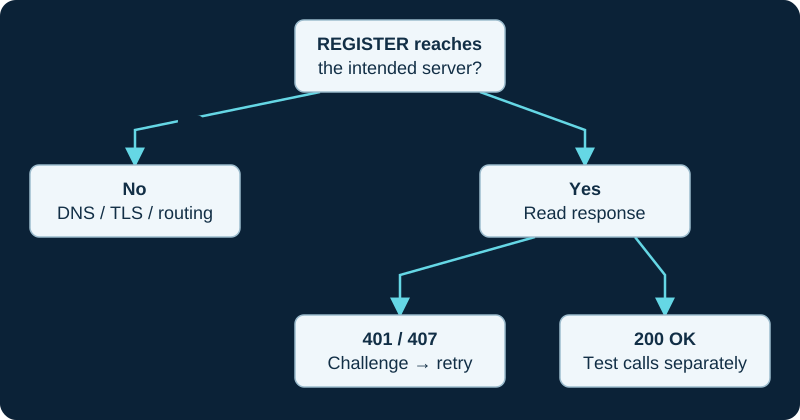
A first 401 challenge can be normal. Read the response to the authenticated retry before changing credentials.
Prove that FreePBX generated and Asterisk loaded the intended objects
Confirm the extension was submitted and Apply Config completed without an error. Then inspect the running endpoint rather than treating the saved GUI row as runtime proof. Asterisk's troubleshooting guide uses pjsip show endpoints and pjsip show endpoint <name> to distinguish a missing or rejected object from a loaded endpoint. The endpoint, inbound authentication object and AoR retain separate responsibilities.
Sangoma's detailed PJSIP-extension page documents the device secret and many extension controls, but explicitly identifies itself as a PBX GUI version-13 guide. Use it for field semantics, not as an exact FreePBX 17 screen or default map. Keep repairs in FreePBX's supported interface; generated pjsip.conf output is evidence, not the configuration owner.
Compare the client identity, secret and transport owners
Match the selected client account, SIP server, port, transport, user or extension identity, authentication username and device secret to the intended FreePBX extension. The administrator login, User Management password, voicemail PIN and SIP device secret are separate credentials. Confirm whether endpoint provisioning, a vendor cloud or a restored template is replacing the values after a manual edit.
For a received request, compare the challenge realm and algorithm with the authenticated retry before rotating the secret. Repeated challenges can reflect an incorrect username, secret, realm handling or digest support; a final policy rejection has a different owner. If protection controls blocked the source after repeated failures, correct the cause and release only the intended address or device. Do not disable the firewall or intrusion protection globally.
Inspect the AoR and Contact result separately
Asterisk documents the AoR as the endpoint's reachable-location owner and creates a dynamic Contact when an inbound registration is accepted. Use pjsip show aor <name> and pjsip show contacts to confirm the expected Contact URI, expiry and availability. A 200 response proves acceptance of that REGISTER transaction; it does not prove that a later inbound call selects a current Contact or that media works.
Check max_contacts, remove_existing, remove_unavailable, rewrite_contact and qualification as distinct policies. Asterisk warns that a rewritten Contact can change across refreshes and exceed max_contacts; the removal controls define which old Contact may be displaced. Do not delete every Contact or raise the limit until the intended device count and refresh behavior are known.
Separate registration, qualification, routing and media
Qualification sends OPTIONS to assess Contact reachability when configured. Its frequency, timeout and optional 2xx-only policy do not authenticate a new REGISTER or prove that an inbound INVITE reaches the correct extension. Likewise, a current Contact does not establish outbound authorization, caller identity, codec agreement, bidirectional RTP or audible speech.
After registration is stable, place one controlled call in each authorized direction and record the chosen Contact, final SIP response, answer state and media evidence. Investigate failed calls as a later routing or media stage instead of reopening working registration settings.
Verify persistence and retain a bounded rollback
Correct only the demonstrated owner: client destination, transport, credential, FreePBX extension record, Apply Config failure, Contact policy or security block. Repeat registration after an ordinary refresh, client restart, device reboot and the network transition that originally failed. Confirm one unaffected extension still registers and calls normally.
Record the previous and new values, FreePBX and Asterisk versions, affected template, Contact evidence and rollback. No PBX, extension, client, credential, firewall, provisioning service, REGISTER exchange, Contact, qualification, call, media path or emergency workflow was inspected or tested for this guide.
core show version
pjsip show endpoint <extension>
pjsip show aor <extension>
pjsip show contacts
pjsip set logger on
# Reproduce one authorized REGISTER attempt; retain the Call-ID and response sequence.
pjsip set logger off
Verify the registration object behind the report label
A blank or stale Asterisk Info row may be a report problem rather than the registration failure. Use the report discrepancy diagnostic to compare module, provider, loaded object and time before changing credentials or contacts.
Confirm a dynamic contact with the correct list action
Use the AMI inbound-registration diagnostic before changing credentials, NAT or max-contact settings.
Check loaded endpoint detail before changing registration
Use the AMI endpoint-state diagnostic to find the first mismatch in generation, loading, AoR ownership, contact or state.
Investigate the loaded AoR before rebuilding an extension
The AMI AoR-list diagnostic finds the first mismatch in generation, naming, registrar state, contact limits or replacement policy.
Sources & applicability
Primary references for the technical details above. Operational examples and planning checklists are VoIP.info editorial guidance.
- Sangoma: PBX GUI PJSIP extension controls (version-13-scoped guide) ↗
- Asterisk: PJSIP configuration objects and relationships ↗
- Asterisk: PJSIP troubleshooting guide ↗
- Asterisk: current res_pjsip object and Contact options ↗
- FreePBX 17 platform overview ↗
- Sangoma FreePBX Asterisk Info module ↗
- Sangoma FreePBX Asterisk Info module user guide ↗
- FreePBX Asterisk Info release/17.0 source ↗
- FreePBX Asterisk Info release/17.0 module metadata ↗
- FreePBX Asterisk Info release/17.0 module class ↗
- FreePBX ARI Manager release/17.0 source ↗
- Asterisk command-line interface overview ↗
- Asterisk 23 PJSIPShowRegistrationsInbound action ↗
- Asterisk 22 PJSIPShowRegistrationsInbound action ↗
- Asterisk 23 PJSIPShowRegistrationInboundContactStatuses action ↗
- Asterisk 22 PJSIPShowRegistrationInboundContactStatuses action ↗
- Asterisk 23 PJSIPShowContacts action ↗
- Asterisk 23 InboundRegistrationDetail event ↗
- Asterisk 23 ContactStatusDetail event ↗
- Asterisk AMI v2 specification ↗
- Asterisk 23 PJSIPShowEndpoints action ↗
- Asterisk 23 PJSIPShowEndpoint action ↗
- Asterisk 23 EndpointList event ↗
- Asterisk 23 EndpointListComplete event ↗
- Asterisk 23 EndpointDetail event ↗
- Asterisk 23 EndpointDetailComplete event ↗
- Asterisk 23 PJSIPShowAors action ↗
- Asterisk 23 AorList event ↗
- Asterisk 23 AorListComplete event ↗
- Asterisk 23 AorDetail event ↗
- Asterisk 23 PJSIP_AOR function ↗
- Asterisk 23 PJSIP_CONTACT function ↗
Examples require adaptation to your topology. No live PBX or hardware testing is claimed.