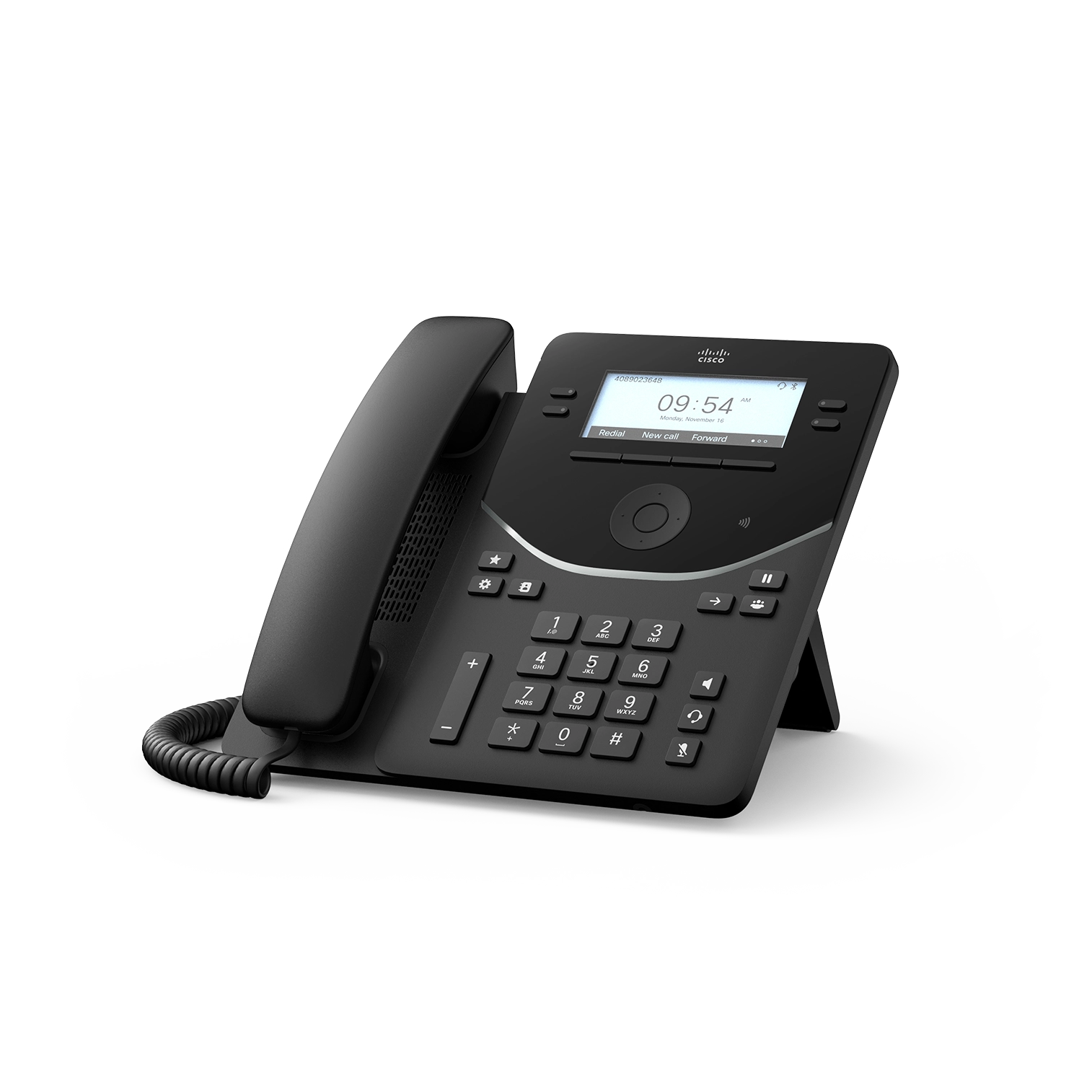
Documented specifications
Cisco · Cisco's current support index lists the 9800 Series as available and includes the 9861 at review; regional stock, exact SKU, calling-platform entitlement, approved firmware and remaining support period were not established.
| Specification | Documented value |
|---|---|
| Display | 5-inch backlit color LCD, 800 × 480; not a touch display Source ↗ |
| Line and SIP limits | 10 physical line keys; Cisco lists up to 130 line or programmable-line keys, 130 SIP lines on CUCM/Webex DI, and 16 SIP lines on Webex Calling/Open SIP Source ↗ |
| Ethernet | Internal two-port 10/100/1000BASE-T switch for the phone and a co-located device Source ↗ |
| Wireless variants | Standard 9861 includes dual-band 802.11a/b/g/n/ac Wi-Fi and Bluetooth 5.2; 9861NR ordering variants omit radios Source ↗ |
| USB | One USB-A and one USB-C; USB-A provides 2.5 W under PoE or 6.5 W with Cisco Power Adapter 3, while USB-C provides 2.5 W in either listed power mode Source ↗ |
| Power and expansion | IEEE PoE class 3 enables one 9800 KEM; Cisco Power Adapter 3 enables up to three KEMs Source ↗ |
| Audio | Wideband-capable handset supplied; family codec list includes Opus, G.722, G.722.2, iSAC, G.711, G.729a/b and iLBC, subject to platform and call negotiation Source ↗ |
| Security inputs | Family documentation lists TPM 2.0, secure boot, TLS 1.3 capability, TLS signaling and SRTP media; deployed policy and negotiation require verification Source ↗ |
Unlisted fields remain unverified. Platform compatibility and remaining support life require confirmation for the exact ordered model.
Choose it for the physical workflow, not a family headline
The 9861 combines a non-touch 5-inch color display with ten physical line keys, calendar and call-control buttons, a four-way navigation control and status lighting. Record the actual user workflow: primary lines, shared appearances, monitored destinations, directories, accessibility, headset, meetings and emergency-location needs. Ten physical keys are not ten SIP credentials, ten concurrent calls or a guarantee that every platform exposes the same line state.
Cisco lists up to 130 line or programmable-line keys, but that figure includes expansion behavior and is not the same as the SIP-line limit. The March 2026 datasheet lists 130 SIP lines on CUCM and Webex Dedicated Instance and 16 on Webex Calling and Open SIP platforms. Validate the intended calling platform, KEM layout and user acceptance instead of quoting the largest family number as an installed capacity.
Match the exact radio and network variant
Cisco's standard 9861 ordering entries include Bluetooth 5.2 and dual-band 802.11a/b/g/n/ac Wi-Fi, while 9861NR entries are explicitly no-radio variants. Match the full SKU, color, regional or TAA requirement and radio policy before purchase. A reseller title or family photograph is not enough to establish Wi-Fi, Bluetooth, NFC or the permitted frequencies in a deployment country.
The phone also provides a two-port Gigabit Ethernet switch. For a wired desk, verify voice and PC VLANs, 802.1X, LLDP-MED, DHCP or static addressing, QoS and the effect of a phone restart on any co-located device. For Wi-Fi, validate SSID, EAP method, certificate lifecycle, roaming, power-loss recovery and approved fallback. A link, association or registration is not a complete call-path test.
Budget USB and KEM power together
The 9861 has USB-A and USB-C ports, but their output is bounded and changes with the power source. Cisco lists 2.5 W from USB-A under PoE and 6.5 W with Power Adapter 3; USB-C remains 2.5 W in the listed modes. Record every headset, adapter, charging load and KEM before calculating power. A connector's presence does not prove accessory compatibility, call control or sufficient output.
PoE class 3 enables one 9800 KEM on the 9861; Cisco Power Adapter 3 enables up to three. The KEM has no independent local supply and draws from the host phone. Test the exact module count, programmed pages, BLF or shared-line behavior, cold boot, restart and accessory load. Preserve the approved power arrangement instead of treating three KEMs as a PoE-only capability.
Pin PhoneOS and calling-platform evidence together
Cisco's platform table lists Webex Calling, CUCM, Webex Dedicated Instance, BroadWorks and Asterisk as tested and certified paths, with Microsoft SIP Gateway compatibility. That is manufacturer evidence, not a VoIP.info laboratory result or proof that features are identical. Record the exact PhoneOS build, platform release, device package, onboarding method, provisioning owner, certificates and required functions. Cisco notes that native support is not present in every CUCM release and a device package may be needed.
The current feature table flags many functions as platform-dependent and assigns transcription, meeting summary, headset smart pairing and ThousandEyes integration to specific models or contexts. Confirm each required function against the current per-platform release notes. A successful registration does not prove transfer, shared-line state, meeting control, directory, emergency location, analytics, certificate renewal or upgrade recovery.
Treat protection and emergency location as deployed states
The family documentation lists secure boot, TPM 2.0, credential protection, TLS signaling, SRTP media, configurable minimum TLS and E911 location mechanisms. These are capabilities, not evidence that an installed phone validated the right certificate, negotiated protected media or sent the right location. Retain the platform security profile, trust chain, provisioning transport, negotiated signaling and media, and any downgrade behavior.
Verify the configured location URI, civic address, outbound identity and callback number through the organization's provider-approved non-live emergency procedure. Keep a separately available fallback. The action button and on-device emergency notification features require their own policy, platform configuration, accidental-activation and recovery tests; do not represent them as a substitute for regulated emergency calling.
Pilot the complete desk and retain diagnostics before restart
Pilot incoming and outgoing calls, two-way audio, mute, hold, resume, blind and attended transfer, conference, line selection, shared-line or BLF state, call waiting, DND, voicemail, directories, headset controls, Wi-Fi where applicable, KEM pages, restart and network recovery. Test smart-power and deep-sleep behavior against scheduled calls, paging, emergency availability and co-located devices. Use remote listeners for audio judgments rather than turning codec or noise-removal claims into measured quality.
Cisco's Unified CM guide says Problem Report Tool logs are cleared when the phone restarts, so collect the bounded report before rebooting. Treat device name, serial, user, configuration, logs and captures as sensitive support artifacts: record the incident time, restrict access, use an approved upload path and delete exports on schedule. No phone, firmware, calling platform, network, radio, accessory, KEM, feature, emergency workflow, availability, price or live call was tested for this guide.
Sources & applicability
Primary references for the technical details above. Operational examples and planning checklists are VoIP.info editorial guidance.
- Cisco Desk Phone 9800 Series datasheet ↗
- Cisco Desk Phone 9800 Series support index ↗
- Cisco PhoneOS 9800 and 8875 release notes ↗
- Cisco: get started with Desk Phone 9800 Series ↗
- Cisco Desk Phone 9800 Series KEM guide ↗
- Cisco: configure 9800 and 8875 phones on Unified CM ↗
Examples require adaptation to your topology. No live PBX or hardware testing is claimed.