Segmentation has several purposes
A voice VLAN can group phones into a distinct network segment for addressing, policy and management. It does not inherently encrypt calls or guarantee quality. Inter-VLAN routing and firewall policy determine what the separated devices can actually reach.
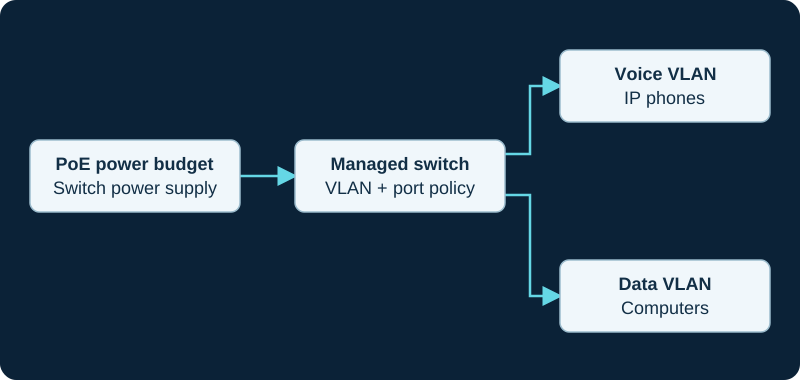
VLANs separate traffic; they do not encrypt it. PoE capacity must cover all powered devices and their per-port requirements.
Plan phone and workstation behavior
Many desks connect a workstation through a phone's pass-through port. Verify the exact handset and switch behavior for tagged voice and ordinary data traffic. A powered phone on the wrong segment can obtain an address yet fail to reach provisioning or the PBX.
Document discovery and addressing
Use the switch and phone's supported VLAN-discovery or manual configuration method. Confirm DHCP, DNS, time and provisioning availability on the voice segment. Do not move every switch port at once before a pilot handset proves the design.
Verify the boundary
Test phone registration and media, workstation connectivity, management access restrictions and behavior after reboot. Inspect actual VLAN membership and QoS classification. Keep emergency recovery access available through the authorized network design rather than temporarily flattening the entire network.
Test Fanvil wired and wireless paths as different access states
The V62 Pro documents dual Gigabit Ethernet; the V66 Pro also documents dual-band Wi-Fi 6. A working wired VLAN does not establish wireless authentication, roaming, policy or voice quality. Record and test each authorized path separately.
Trace the GRP2624 interface before blaming the voice VLAN
The GRP2624 Wi-Fi diagnostic records the active interface, SSID or switch port, VLAN, address, DNS, time, provisioning and registration. A wired policy does not automatically describe the wireless path.
Watch the explanation
This demonstration makes a useful separation: a programmable key originates the page, while receiving phones need a matching listening configuration. That distinction helps explain a common failure in which the page button exists but nothing is heard. Read the paging and VLAN guides alongside it before deciding which devices should receive announcements.
Read applicability and editorial notes →Watch this video here
Grandstream desk-phone example in a US Technologies/CoreDial environment. Menu labels and provisioning ownership vary by model and firmware. Review used the available transcript and primary references; audio and screen readability remain unverified.

The player loads only when you choose Watch here. Playback uses YouTube’s privacy-enhanced embed; YouTube processes playback data.
Sources & applicability
Primary references for the technical details above. Operational examples and planning checklists are VoIP.info editorial guidance.
- IETF RFC 4594 — service-class guidance ↗
- Fanvil V62 Pro product page ↗
- Fanvil V62 Pro datasheet ↗
- Fanvil V62 Pro document centre ↗
- Fanvil V62 Pro firmware page ↗
- Fanvil V66 Pro product page ↗
- Fanvil V66 Pro datasheet — Android wording ↗
- Fanvil V66 Pro datasheet — Linux wording ↗
- Fanvil V66 Pro document centre ↗
- Fanvil V66 Pro firmware page ↗
- Fanvil Security Center support-period statement ↗
- Grandstream GRP2624 product page ↗
- Grandstream GRP2624 datasheet ↗
- Grandstream GRP2624 quick installation guide ↗
- Grandstream GRP26xx administration guide ↗
- Grandstream GRP26xx firmware upgrade guide ↗
- Grandstream current firmware and release-notes index ↗