Define the missing direction
Write down who cannot hear whom and preserve one exact call's time, endpoints, dialog identifiers and PBX channel or leg names. If the customer cannot hear the office, follow media sent by the office toward the customer. Avoid the ambiguous statement that the customer has no audio. Registration and a completed SIP dialog prove neither media direction.
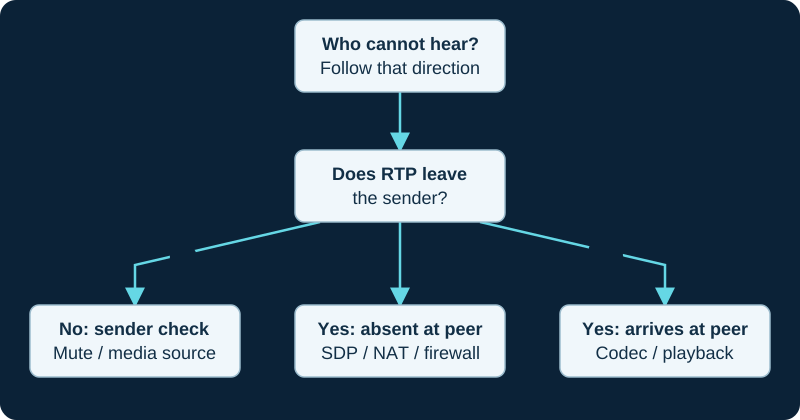
Follow one missing direction. Repeat on each PBX call leg and verify hold and transfer after a repair.
Separate the endpoint from the path
Check mute, handset, speaker and selected headset before changing network settings. Compare an internal call, an external call and another endpoint on the same network. A working internal call narrows the investigation toward the path or policy that changes at the carrier or remote-network boundary; it does not identify that boundary by itself.
Follow offer, answer and packets
For every affected leg, read the final SDP offer and answer rather than the first SDP body alone. Record the advertised receive address, port, codec, direction attribute and media-security profile, then compare those destinations with packets observed at paired capture points. Determine whether the expected stream leaves its sender, reaches the PBX, leaves the PBX and reaches its receiver. On a relaying PBX, the carrier-facing and endpoint-facing streams can have different addresses, ports and SSRC values; evidence on one leg is not proof of the other.
RTP sequence numbers can expose gaps and timestamps describe sampling progression, but packet presence does not prove audible payload. With SRTP, visible headers and timing can still support path analysis while media content and successful decryption depend on the negotiated security context.
Map evidence to the control
In Asterisk 22, inspect the loaded endpoint and transport before changing topology-specific PJSIP options. rtp_symmetric sends RTP back to the address and port from which RTP arrived; force_rport concerns SIP response routing; rewrite_contact concerns later SIP requests; media_address changes the media address placed in SDP; and direct_media decides whether media may bypass Asterisk. These controls are not interchangeable. Check transport local_net and external media or signaling settings against the real interface and NAT boundaries. In FreePBX, use the supported GUI or generated configuration ownership path rather than pasting fragments into managed files. On a FreePBX-managed PJSIP system, use the FreePBX-specific media investigation to preserve GUI intent, generated state and loaded state before changing transport, endpoint or Strict RTP controls.
Capture narrowly and confirm
Use a bounded diagnostic window. Asterisk's pjsip set logger on exposes sensitive SIP and SDP, while RTP debugging can be high volume; restrict access, reproduce one authorized call and turn temporary logging off. If a capture shows no stream, first confirm the interface, mirror direction, filter, dropped-packet counter and direct-media topology.
Change only the setting supported by the evidence. Re-test both audio directions plus hold, resume and transfer because a re-INVITE or UPDATE can change the media path. Keep the firewall and intended media protection enabled. Registration, an answered call and a decoded packet capture remain separate acceptance states.
Check whether a completed in-dialog offer moved the stream
For Asterisk PJSIP, the direct-media guide follows re-INVITE or UPDATE, accepted SDP and observed RTP. The PBX can legitimately stop seeing packets after a successful direct-media move; an incomplete or rejected offer leaves the earlier session in force.
Use the Asterisk PJSIP address path when SDP and packets disagree
On chan_pjsip, use the wrong-media-address diagnostic to separate the advertised media destination, actual RTP source, symmetric return address, direct-media change and SIP Contact routing.
Trace the missing Asterisk WebRTC direction
When one side is a registered Asterisk WebRTC endpoint, the browser-media diagnostic keeps the selected ICE tuple and protected browser-facing stream separate from the PBX's other call leg.
Apply Zen’s documented signaling and media boundary
For a Zen Business Talk SIP call, use the provider-specific no-audio workflow to compare the actual SDP and packets with Zen’s published signaling address and UDP 20000–30000 media range.
Trace both Baresip device and network media boundaries
Use the Baresip symptom diagnostic to compare capture, playback, account overrides, negotiated addresses and RTP directions without changing devices, codecs and NAT controls together.
Check the exact channel stream before changing NAT
The Asterisk RTP value diagnostic proves leg, stream, bridge phase, SDP interval and capture direction before treating an address as wrong.
Keep IP Telecom signaling success separate from media
The IP Telecom service record requires SDP, RTP tuples, NAT, QoS and decoded audio from the authorized path; a successful trunk transaction or provider quality statement does not prove two-way media.
Keep Clearfly signaling and portal state separate from RTP
The Clearfly service record requires SDP, RTP tuples, NAT, QoS and decoded audio from the authorized path; a portal registration label or completed SIP transaction does not prove two-way media.
Keep Redcentric access and signaling separate from RTP
The Redcentric service record requires SDP, RTP tuples, NAT, QoS and decoded audio from the authorized current path; managed access, registration or a completed SIP transaction does not prove two-way media.
Do not use buffering to explain a missing media path
The Asterisk jitter-buffer diagnostic first proves RTP presence and direction; a read-side buffer cannot create packets that never reach the channel.
Do not confuse CommPeak registration with media success
The CommPeak service record keeps registration or peer state separate from SDP, NAT, RTP tuples, firewall state, loss, jitter and decoded audio on each authorized direction.
Inspect every Voximplant media boundary
The Voximplant provider record keeps platform codec support separate from each negotiated offer, answer, transcode point, encryption profile, RTP tuple, firewall state and decoded direction.
A media wait can reveal the wrong or silent call leg
The silence and noise diagnostic proves received frames on the exact waiting channel before any duration or timeout change.
Observe the TelVox media path behind successful call state
TelVox call status can reach in-progress or completed without documenting the negotiated codec, RTP tuples, SRTP or decoded user result. The provider record requires path-specific SDP and media evidence before attribution.
Compare VoIPstudio device state with each RTP direction
VoIPstudio separates microphone, call output and ringer selections. Use the desktop diagnostic to correlate those controls with current network policy, SDP and packet direction before changing SIP ALG or firewall rules.
Prove the rewrite before blaming SIP ALG on VoIP Much calls
VoIP Much warns that SIP ALG can cause one-way audio and dropped calls. Its focused workflow requires the altered signaling, SDP or packet path to be demonstrated before network policy changes.
Separate VoIPline network claims from the failed media path
The VoIPline workflow requires the actual SDP, addresses and packet directions before network-policy changes.
Correlate Webex device selection with both media directions
The Webex App diagnostic records ringer, speaker, microphone, processing, SDP where accessible and per-direction statistics before changing network policy.
Expect Anveo Direct RTP to differ from signaling
Anveo Direct does not proxy RTP. Use the focused diagnostic to compare SDP and observed carrier media without treating the signaling allowlist as the RTP source list.
Do not confuse an AVOXI routing pass with media success
A passing URI test or accepted INVITE does not prove RTP in both directions. The AVOXI diagnostic carries the call into SDP and decoded-audio evidence.
Apply the Flowroute Direct Media boundary
Flowroute signaling sources and RTP sources are different evidence sets. The Flowroute diagnostic pairs SDP with edge and PBX packet direction.
Yay.com inbound SRTP requires both sides to agree
The Yay.com workflow separates TLS, dashboard encryption, SDP, SRTP packets and decoded audio.
Sinch signaling and media use different current ranges
The Sinch diagnostic separates SIP, TLS, SDP, SRTP and both RTP directions.
Trace the SIPTRUNK direct-media leg independently
The SIPTRUNK diagnostic separates successful SIP from the first RTP packet and decoded audio in each direction.
Watch the explanation
Compares an intact RTP capture with a copy containing deliberately removed packets. The stream list and detailed analysis show how gaps become loss indicators and how burst patterns differ from scattered loss.
Read applicability and editorial notes →Watch this video here
A 2024 Wireshark demonstration; menu placement can change. The second capture is a teaching fixture with simulated loss. Review used the available transcript and primary references; audio and screen readability remain unverified.

The player loads only when you choose Watch here. Playback uses YouTube’s privacy-enhanced embed; YouTube processes playback data.
Sources & applicability
Primary references for the technical details above. Operational examples and planning checklists are VoIP.info editorial guidance.
- IETF RFC 3264 — SDP offer/answer model ↗
- IETF RFC 3550 — RTP and RTCP ↗
- IETF RFC 3711 — Secure RTP ↗
- Asterisk: configuring res_pjsip through NAT ↗
- Asterisk: PJSIP troubleshooting guide ↗
- Asterisk 22 res_pjsip configuration reference ↗
- Sangoma PBX GUI Asterisk SIP Settings ↗
- Sangoma FreePBX 12 SIP audio issues (legacy context) ↗
- Asterisk res_pjsip NAT configuration ↗
- Asterisk PJSIP troubleshooting guide ↗
- Asterisk bounded debug-information collection ↗
- Asterisk CHANNEL function ↗
- Asterisk CHANNEL dialplan-function reference ↗
- RFC 3264: SDP offer/answer model ↗
- Asterisk latest res_pjsip reference ↗
- Asterisk PJSIP with proxies ↗
- Asterisk chan_sip to res_pjsip migration guide ↗
- Asterisk WebRTC client configuration ↗
- RFC 8445: Interactive Connectivity Establishment ↗
- RFC 5764: DTLS-SRTP ↗
- RFC 8842: SDP offer/answer for DTLS ↗
- W3C WebRTC Statistics API ↗
- Zen General SIP Settings ↗
- Zen Business SIP Trunking ↗
- Zen Business Talk SIP specific terms ↗
- Baresip project repository and feature and module list ↗
- Baresip 4.12.0 release ↗
- Baresip account-file reference ↗
- Baresip configuration reference ↗
- Baresip module catalogue ↗
- Asterisk bridge media paths ↗
- RFC 3264: SDP offer-answer model ↗
- RFC 3711: Secure RTP ↗
- RFC 6337: SIP usage of offer-answer ↗
- IP Telecom SIP Trunks ↗
- IP Telecom terms and SIP Trunking product schedule ↗
- IP Telecom Fair Use Policy ↗
- IP Telecom Ireland copper switch-off guidance ↗
- IP Telecom contact and support ↗
- Clearfly voice services and SIP trunking ↗
- Clearfly service FAQs ↗
- Clearfly partner programme and portal ↗
- Clearfly support contacts ↗
- Clearfly legal and regulatory index ↗
- Clearfly Acceptable Use Policy ↗
- Redcentric voice modernisation ↗
- Redcentric communications services ↗
- Redcentric customer support ↗
- Redcentric service status ↗
- Redcentric SIP Trunking Service Description SD032 v2.1 (legacy public PDF) ↗
- Redcentric Hays telephony customer case study ↗
- Asterisk 23 JITTERBUFFER dialplan function ↗
- Asterisk ConfBridge configuration ↗
- Asterisk IP Quality of Service ↗
- Asterisk packet-loss concealment overview ↗
- Asterisk media-experience score implementation ↗
- CommPeak SIP trunking ↗
- CommPeak documentation and developer hub ↗
- CommPeak SIP account configuration ↗
- CommPeak FreePBX SIP trunk guide ↗
- CommPeak Asterisk PBX SIP trunk guide ↗
- CommPeak pricing overview ↗
- CommPeak service status ↗
- Voximplant SIP trunking solution ↗
- Voximplant SIP trunk connection FAQ ↗
- Voximplant SIP phone registration FAQ ↗
- Voximplant processing calls in scenarios ↗
- Voximplant CallSIP parameters ↗
- Voximplant telephony and SIP capabilities FAQ ↗
- Voximplant pricing ↗
- Voximplant service status ↗
- Asterisk 23 WaitForSilence application ↗
- Asterisk 23 WaitForNoise application ↗
- Asterisk 22 WaitForSilence application ↗
- Asterisk 22 WaitForNoise application ↗
- Asterisk 23 BackgroundDetect application ↗
- TelVox Connect SIP trunks API reference ↗
- TelVox Connect authentication and API keys ↗
- TelVox Connect Calls API reference ↗
- TelVox Connect phone numbers reference ↗
- TelVox Connect recordings API reference ↗
- TelVox Connect webhooks API reference ↗
- TelVox Connect pricing ↗
- TelVox security and compliance ↗
- Renav Limited TelVox products ↗
- VoIPstudio desktop and mobile downloads ↗
- VoIPstudio Desktop Softphone manual ↗
- VoIPstudio user-manual introduction and platform requirements ↗
- VoIPstudio user, endpoint, SIP Test and MTR administration ↗
- VoIPstudio network, media, encryption and SIP ALG guidance ↗
- VoIP Much SIP Trunks ↗
- VoIP Much 3CX Phone System guide ↗
- VoIP Much FreePBX trunk guide ↗
- VoIP Much UniFi Talk guide ↗
- VoIP Much IP blocking guidance ↗
- VoIP Much SIP ALG guidance ↗
- VoIP Much supported audio codecs ↗
- VoIP Much quality suggestions ↗
- VoIP Much network status ↗
- VoIP Much service agreement ↗
- VoIPline Telecom SIP trunking ↗
- VoIPline Telecom pricing and rates ↗
- VoIPline Telecom legal documents ↗
- VoIPline Voice and SMS (IP) service schedule ↗
- VoIPline SIP trunks critical information summary ↗
- VoIPline Telecom network ↗
- VoIPline Telecom number porting ↗
- VoIPline Telecom service status ↗
- Supported calling options in Webex App ↗
- Webex App: find out what calling service you have ↗
- Webex App system requirements and support policy ↗
- Download the Webex desktop and mobile apps ↗
- Webex App: change your audio settings ↗
- Webex App: test your connection with the Health Checker ↗
- Webex App: troubleshoot connection issues with the Diagnostics tool ↗
- Webex App: error messages for Calling ↗
- Advanced diagnostics and troubleshooting in Control Hub ↗
- Anveo Direct FAQ ↗
- Anveo Direct inbound DID service ↗
- Anveo Direct call termination ↗
- Anveo Direct network ↗
- Anveo Direct services ↗
- AVOXI outbound SIP trunk configuration ↗
- AVOXI inbound SIP URI forwarding ↗
- AVOXI outbound SIP trunk diagnostic ↗
- AVOXI SIP forwarding and trunking overview ↗
- Flowroute current PoP interconnection requirements ↗
- Flowroute direct-media firewall requirements ↗
- Flowroute current PoP and DNS guidance ↗
- Flowroute inbound route and number-assignment guide ↗
- Flowroute preferred inbound PoP behavior ↗
- Flowroute TLS signaling scope ↗
- Flowroute inbound SRV routing example ↗
- Flowroute connection options ↗
- Yay.com SIP Trunks for business phone systems ↗
- Yay.com create a SIP trunk ↗
- Yay.com SIP trunks and how to use them ↗
- Yay.com call encryption, TLS and SRTP ↗
- Yay.com firewall guide ↗
- Yay.com legacy FreePBX configuration example ↗
- Yay.com trunk-authentication API ↗
- Sinch Voice API SIP Trunking reference ↗
- Sinch Voice API callback reference ↗
- Sinch Voice API authentication reference ↗
- Sinch Voice API call headers ↗
- Sinch Voice API call detail records ↗
- Sinch Voice API release notes ↗
- Sinch Elastic SIP Trunking product overview ↗
- Sinch BYOC SIP Trunking overview ↗
- SIPTRUNK general SIP device configuration ↗
- SIPTRUNK registration connection troubleshooting ↗
- SIPTRUNK inbound-call troubleshooting ↗
- SIPTRUNK IP authentication ↗
- SIPTRUNK call failover options ↗
- SIPTRUNK registration-status reference ↗
- SIPTRUNK interconnection and network requirements ↗
- SIPTRUNK direct-media delivery and missing audio ↗
Examples require adaptation to your topology. No live PBX or hardware testing is claimed.