Start with traffic roles
The administration interface is not the SIP listener, and the SIP listener is not the RTP media range. Build an inventory of each required service, its source, destination, protocol and purpose. A generic instruction to open VoIP ports is too imprecise for a secure deployment.
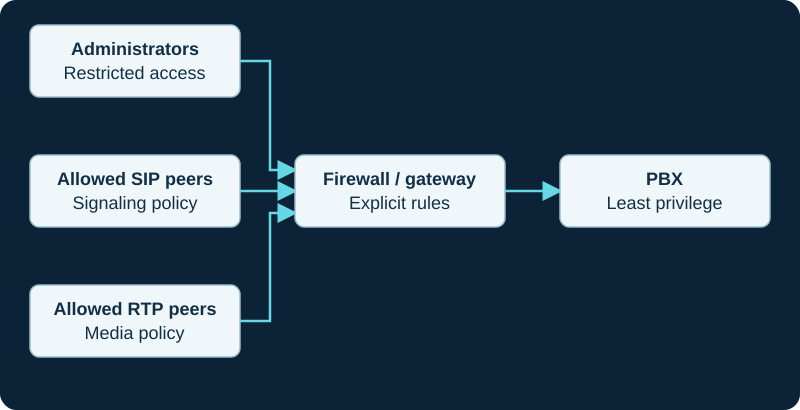
Example defensive architecture. Source restrictions, authentication, update policy and call permissions work together.
Use the actual configuration
Read the PBX's configured listeners and media range and the carrier's documented signaling and media networks. Defaults in another tutorial may not match your installation. Remote phones can have a different access design from a fixed-address carrier.
Diagnose with observations
Review relevant allow/deny counters and a bounded packet trace around one failed call. Confirm whether traffic reaches the boundary and whether the return path is valid. A lack of replies can also involve routing, DNS or a service that is not listening.
Keep management restricted
Do not expose administrative services just because phones need to register. Apply the smallest justified change and test the intended call flow. Remove temporary diagnostic rules afterward and retain the reason for each permanent rule in the operating record.
Verify negotiated UDPTL addresses before changing rules
The T38Fax diagnostic compares the re-INVITE SDP, NAT state, provider and customer port ranges, ALG behavior and packets in both directions.
Use current VoIPstudio destinations and the built-in test together
VoIPstudio’s current network guide separates signaling and media destinations, while the desktop client exposes a per-port WebRTC Test. The client diagnostic records the live documentation, test result and actual call flow rather than turning a static address list into permanent policy.
Constrain VoIP Much network changes to observed flows
VoIP Much documents server-port and source-blocking behavior, but not a universal customer RTP rule in the reviewed pages. The provider profile keeps local source ports, provider destination, registration responses, SDP and media flows distinct.
Use the selected VoIPline interconnect boundary
VoIPline supports public-internet and ordered private-IP delivery. The provider profile avoids inventing one universal customer firewall or RTP policy.
Use Webex Health Checker as bounded evidence
Cisco states that Health Checker cloud results show cloud status rather than the client connection to the cloud. The Webex App diagnostic pairs it with the assigned service and observed call.
Allow for Twilio edge movement without calling the path proven
Twilio advises allowing all published origination signaling and media ranges because traffic may move between edges. Pair firewall evidence with the Twilio diagnostic.
Correlate Plivo URI reachability with the observed packet source
Pair current Plivo address ranges, destination URI, firewall decision and packet arrival with the Plivo inbound diagnostic.
Correlate the selected Vonage URI with packet arrival
Pair URI destination, transport, current service-address evidence, firewall decision and observed packet source with the Vonage inbound diagnostic.
Keep Voxtelesys registration ACL and Customer IP distinct
A registration ACL controls which sources may register; a Customer IP is an inbound route destination. The Voxtelesys diagnostic checks each control without broadening both.
Scope Amazon Chime firewall evidence to the selected Region and IP family
Use the current AWS signaling and media ranges, actual connector Region, IPv4 or dual-stack behavior and DNS TTL. The diagnostic avoids broadening unrelated paths.
Anveo Direct signaling addresses are not an RTP inventory
Anveo Direct says media is sent directly by the underlying carrier. The diagnostic derives bounded signaling and media rules from current SDP and observed packets.
Do not diagnose CarrierX routing from firewall state alone
The CarrierX diagnostic pairs provider attempt and response with customer-edge packets, PBX handling, SDP and observed media.
Use current AVOXI data-center evidence
Pair the selected AVOXI data center and provider attempt with customer-edge packets before changing rules. The diagnostic keeps signaling, PBX handling and media distinct.
Correlate Easybell address or FQDN with packets
Pair the effective Easybell inbound target with customer-edge evidence before changing rules. The diagnostic keeps DNS, transport, PBX and media distinct.
Pair SIP.US portal state with packets
Retain identity mode, current gateway, DID assignment and the provider attempt, then pair them with bounded edge evidence. The diagnostic separates firewall, PBX and media results.
Flowroute Direct Media is not limited to signaling proxy ranges
The current provider page says RTP can arrive from any source IP to the PBX public media range. Use the focused diagnostic to scope destination ports and confirm observed traffic.
Pair Bulk Solutions provider attempts with the customer edge
The Bulk Solutions diagnostic separates current signaling sources, destination reachability, listener, PBX match and negotiated media ports.
Compare Yay.com published ranges with the actual call boundary
The Yay.com diagnostic joins dated source guidance, destination resolution, edge receipt, signaling response and negotiated media.
Simwood address lists are service- and date-scoped
The Simwood guide distinguishes the current Partner and Direct page from the older Asterisk 16 sample and requires current Hosted policy.
Sinch address ranges are regional and date-scoped
The Sinch guide treats the current SIP and RTP tables as change-controlled inputs rather than permanent copied facts.
Treat dialplan HTTP as explicit egress
The Asterisk CURL guide requires an approved destination and bounded outbound policy while keeping DNS, connect, TLS, HTTP and body evidence separate.
Scope SIPTRUNK gateway rules and direct-media policy separately
The SIPTRUNK guide preserves signaling allowlists while treating varied RTP sources as a local security-design decision.
Prove where Blink registration traffic stops
The Blink registration diagnostic separates host policy, network policy, registrar silence and an explicit SIP response.
Sources & applicability
Primary references for the technical details above. Operational examples and planning checklists are VoIP.info editorial guidance.
- Asterisk — PJSIP through NAT ↗
- Testing a Power-T.38 SIP trunk ↗
- T38Fax recommended firewall settings ↗
- T38Fax SIP ALG guidance ↗
- T38Fax packet-capture guidance ↗
- T38Fax ECM guidance ↗
- T38Fax voice-call policy and UDPTL boundary ↗
- VoIPstudio desktop and mobile downloads ↗
- VoIPstudio Desktop Softphone manual ↗
- VoIPstudio user-manual introduction and platform requirements ↗
- VoIPstudio user, endpoint, SIP Test and MTR administration ↗
- VoIPstudio network, media, encryption and SIP ALG guidance ↗
- VoIP Much SIP Trunks ↗
- VoIP Much 3CX Phone System guide ↗
- VoIP Much FreePBX trunk guide ↗
- VoIP Much UniFi Talk guide ↗
- VoIP Much IP blocking guidance ↗
- VoIP Much SIP ALG guidance ↗
- VoIP Much supported audio codecs ↗
- VoIP Much quality suggestions ↗
- VoIP Much network status ↗
- VoIP Much service agreement ↗
- VoIPline Telecom SIP trunking ↗
- VoIPline Telecom pricing and rates ↗
- VoIPline Telecom legal documents ↗
- VoIPline Voice and SMS (IP) service schedule ↗
- VoIPline SIP trunks critical information summary ↗
- VoIPline Telecom network ↗
- VoIPline Telecom number porting ↗
- VoIPline Telecom service status ↗
- Supported calling options in Webex App ↗
- Webex App: find out what calling service you have ↗
- Webex App system requirements and support policy ↗
- Download the Webex desktop and mobile apps ↗
- Webex App: change your audio settings ↗
- Webex App: test your connection with the Health Checker ↗
- Webex App: troubleshoot connection issues with the Diagnostics tool ↗
- Webex App: error messages for Calling ↗
- Advanced diagnostics and troubleshooting in Control Hub ↗
- Twilio Elastic SIP Trunking configuration ↗
- Twilio OriginationUrl resource ↗
- Twilio Programmable Voice failover best practices ↗
- Twilio Elastic SIP Trunking IP addresses ↗
- Twilio Elastic SIP Trunking troubleshooting ↗
- Twilio Trunk resource ↗
- Plivo Zentrunk quickstart ↗
- Plivo Zentrunk technical specifications ↗
- Plivo SIP Trunking account limits ↗
- Plivo Zentrunk hangup codes ↗
- Plivo Zentrunk debug logs ↗
- Vonage SIP technical details ↗
- Vonage SIP Dashboard guide ↗
- Vonage Asterisk PJSIP configuration ↗
- Vonage FreePBX configuration ↗
- Vonage Voice Logs guide ↗
- Voxtelesys DID and number routing ↗
- Voxtelesys SIP Trunk Registrar ↗
- Voxtelesys portal IP-address routing ↗
- Voxtelesys registration ACL ↗
- Voxtelesys failover transfer ↗
- Voxtelesys call records ↗
- AWS: Managing Amazon Chime SDK Voice Connectors ↗
- AWS: Editing Voice Connector settings ↗
- AWS: Creating a Voice Connector and encryption scope ↗
- AWS: Managing Voice Connector groups ↗
- AWS: Amazon Chime SDK endpoints and quotas ↗
- AWS: Voice Connector network and bandwidth requirements ↗
- Anveo Direct FAQ ↗
- Anveo Direct inbound DID service ↗
- Anveo Direct call termination ↗
- Anveo Direct network ↗
- Anveo Direct services ↗
- CarrierX trunk-group object ↗
- CarrierX trunk object ↗
- CarrierX SIP trunk quick start ↗
- CarrierX receive and place calls ↗
- CarrierX phone-number model ↗
- AVOXI outbound SIP trunk configuration ↗
- AVOXI inbound SIP URI forwarding ↗
- AVOXI outbound SIP trunk diagnostic ↗
- AVOXI SIP forwarding and trunking overview ↗
- Easybell general VoIP configuration ↗
- Easybell Trusted IP authentication ↗
- Easybell SIP-trunk authentication by trusted FQDN ↗
- Easybell automatic fallback routing ↗
- SIP.US IP authentication guide ↗
- SIP.US registration status guide ↗
- SIP.US current gateways and interconnection requirements ↗
- SIP.US call failover options ↗
- SIP.US inbound call troubleshooting ↗
- SIP.US channel-limit guidance ↗
- SIP.US E911 information ↗
- Flowroute current PoP interconnection requirements ↗
- Flowroute direct-media firewall requirements ↗
- Flowroute current PoP and DNS guidance ↗
- Flowroute inbound route and number-assignment guide ↗
- Flowroute preferred inbound PoP behavior ↗
- Flowroute TLS signaling scope ↗
- Flowroute inbound SRV routing example ↗
- Flowroute connection options ↗
- Bulk Solutions service overview ↗
- Bulk Solutions inbound IP-authenticated setup ↗
- Bulk Solutions outbound IP-authenticated setup ↗
- Bulk Solutions current IP-authentication workflow ↗
- Bulk Solutions current registration workflow ↗
- Bulk Solutions direction-split Retell integration ↗
- Bulk Solutions legacy FreePBX 14 IP-authentication template ↗
- Bulk Solutions E911 FAQ ↗
- Yay.com SIP Trunks for business phone systems ↗
- Yay.com create a SIP trunk ↗
- Yay.com SIP trunks and how to use them ↗
- Yay.com call encryption, TLS and SRTP ↗
- Yay.com firewall guide ↗
- Yay.com legacy FreePBX configuration example ↗
- Yay.com trunk-authentication API ↗
- Simwood Hosted SIP Trunks ↗
- Simwood hosted trunks interop ↗
- Simwood hosted trunk overview ↗
- Simwood Asterisk 16 hosted trunk example ↗
- Simwood hosted TLS/SRTP settings ↗
- Simwood Partner and Direct IP addresses and whitelisting ↗
- Simwood portal overview ↗
- Simwood Carrier Services API v3 ↗
- Sinch Voice API SIP Trunking reference ↗
- Sinch Voice API callback reference ↗
- Sinch Voice API authentication reference ↗
- Sinch Voice API call headers ↗
- Sinch Voice API call detail records ↗
- Sinch Voice API release notes ↗
- Sinch Elastic SIP Trunking product overview ↗
- Sinch BYOC SIP Trunking overview ↗
- Asterisk CURL dialplan function ↗
- Asterisk CURLOPT dialplan function ↗
- Asterisk JSON_DECODE dialplan function ↗
- Asterisk URIENCODE dialplan function ↗
- Asterisk command-line interface ↗
- Asterisk func_curl implementation ↗
- libcurl CURLOPT_TIMEOUT reference ↗
- libcurl CURLOPT_CONNECTTIMEOUT reference ↗
- SIPTRUNK general SIP device configuration ↗
- SIPTRUNK registration connection troubleshooting ↗
- SIPTRUNK inbound-call troubleshooting ↗
- SIPTRUNK IP authentication ↗
- SIPTRUNK call failover options ↗
- SIPTRUNK registration-status reference ↗
- SIPTRUNK interconnection and network requirements ↗
- SIPTRUNK direct-media delivery and missing audio ↗
- Blink product overview ↗
- Blink Help Center ↗
- Blink SIP account setup and registration status ↗
- Blink problem solving on Linux and Windows ↗
- Blink problem solving on Mac ↗
- Blink platform downloads ↗
- Blink platform-specific changelog index ↗
- RFC 3261 SIP response and transaction behavior ↗
- RFC 3263 SIP server discovery ↗
- RFC 5626 registration flow recovery and Retry-After ↗