Capture where the question is observable
A normal switch port does not show all other ports' unicast traffic. Use an authorized endpoint capture, switch mirror, network TAP or supported virtual capture path. For a border or relaying-PBX problem, paired observations on the relevant sides can reveal where addresses change or packets disappear. Record which direction each point can see; inside, outside, PBX and phone are locations, not media directions.
Confirm mirror direction and capacity. An overloaded mirror destination can drop copies even when production packets arrive successfully, and host offload can create checksum or segmentation artifacts not present on the wire. A capture gap is evidence about the capture until corroborated by another vantage point, interface counter or endpoint statistic.
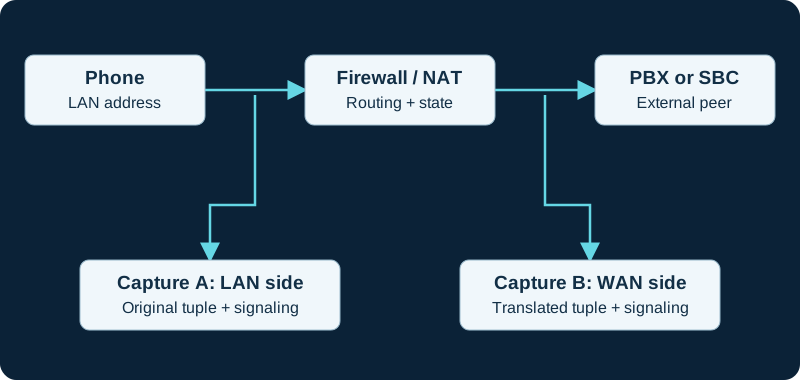
Paired observations help locate a change or loss. Account for clock offset, NAT and capture drops before attributing a difference to the network.
Set scope before starting
Record the authorized test endpoints, incident window, expected signaling transport and likely topology before starting. A SIP-port-only capture filter can omit RTP, SRTP and signaling on another port. A host-only filter can miss direct media between endpoints. Begin broad enough to retain the complete call, then use display filters after collection; a display filter does not recover packets excluded at capture time.
Use synchronized clocks, a bounded duration and a rotating or size-limited output. Leave enough packet data for the intended decoder; truncated packets can prevent SDP or RTP interpretation. Record the interface, filter, snap length, file format, tool version and capture-drop counters with the file. Wireshark's pcapng format may be required when collecting multiple interfaces.
Correlate signaling and media
Preserve one exact dialog and match packets by Call-ID, tags, branches and content while allowing for NAT and back-to-back user agent transformations. Read the final SDP offer and answer on every call leg, then compare advertised receive addresses with observed packet sources and destinations. For RTP, separate streams by address, port, SSRC and payload mapping; inspect sequence progression and timestamps rather than treating a packet count as audio proof. Wireshark's VoIP Calls, RTP Streams and Stream Analysis views organize captured evidence but do not validate the endpoint's playout or microphone.
Keep encryption and absence claims bounded
SRTP is designed to add confidentiality, authentication and replay protection. A capture without the applicable keying context can still show useful network and timing metadata, but payload playback or decryption is not an expected acceptance step. Do not weaken the production security policy just to make a trace readable.
If an expected stream is absent, state not observed at this capture point rather than not sent until the interface, mirror direction, filter, dropped-packet counters and actual direct-media or relay path have been checked at a second point.
Protect and close the evidence
Stop the capture after the controlled test, record the incident time range and secure the original. SIP headers, SDP, numbers, addresses, credentials and media can be sensitive even when some transport is encrypted. Share only an access-controlled, minimally sufficient redacted extract, preserving an integrity hash or immutable original when the incident process requires it. Document what each vantage point could not see before using the capture to justify a configuration change.
Validate a dialplan header against one bounded response
The PJSIP response-header diagnostic correlates the function result with one sanitized 200 response by Call-ID and CSeq before changing dialplan ownership.
Correlate stored contact evidence with one signaling exchange
The PJSIP AoR/contact diagnostic compares the stored URI and lifecycle with bounded REGISTER, OPTIONS or INVITE evidence while keeping each transaction distinct.
Correlate endpoint policy with the exact SIP session
The PJSIP endpoint diagnostic compares loaded fields with bounded identification, SIP and SDP evidence on the same channel and Call-ID.
Distinguish RFC 4733, SIP INFO and in-band evidence
Use the PJSIP DTMF override diagnostic to compare the runtime mode with the exact SDP, RTP event, INFO request or audio observation on the same leg.
Keep SIP transfer signaling beside ARI and bridge evidence
Use the Asterisk transfer diagnostic to align REFER, 202, NOTIFY and new-dialog messages with the matching ChannelTransfer event and bridge actions.
Compare From placement at Asterisk and the next hop
Use the PJSIP_HEADER_PARAM diagnostic to distinguish dialplan output from SBC or provider rewriting.
Use one bounded capture for the NOTIFY transaction
Follow the Asterisk PJSIP NOTIFY diagnostic to preserve request URI, Event, content type, body boundary and response before moving to device evidence.
Capture both phases of a forced re-registration
Use the Asterisk registration-control diagnostic to preserve any unregister exchange and the later registration attempt instead of sampling only one packet.
Do not use an encrypted payload as peer-identity proof
For a Linphone security symptom, preserve sanitized SDP and transport evidence but keep it separate from ZRTP SAS verification. The Linphone encryption diagnostic treats capture visibility, negotiated media protection and authenticated peer identity as different states and warns against exposing SDES key material.
Compare Asterisk output with intermediary header policy
Use the PJSIP inheritable-header diagnostic to distinguish source-channel inheritance, duplicate dialplan stores and later SBC or carrier rewriting.
Capture the complete in-dialog offer-answer exchange
Use the Asterisk session-refresh diagnostic to compare request and response SDP with both RTP directions before and after the transaction.
Validate one inventory against the bounded INVITE
The PJSIP header-list diagnostic correlates Asterisk output with one sanitized request by Call-ID, CSeq and channel before interpreting missing names.
Capture one bounded hold and resume exchange
The PJSIP hold diagnostic correlates channel state, re-INVITE, offer-answer direction, RTP owner and audible result without treating one packet as the whole call.
Correlate Linphone ICE state with the captured media tuple
For a Linphone traversal failure, preserve sanitized candidate types, checklist state and the selected pair, then compare them with packet source and destination and media counters. The focused diagnostic warns against exposing ICE passwords, TURN credentials or unnecessary payloads.
Capture both sides when a PJSIP rejection appears rewritten
The PJSIPHangup diagnostic keeps the Asterisk-side final response, intermediary behavior and caller-side result distinct; a translated cause alone cannot prove the wire code.
Match PJSIP channel context to the same wire leg
The focused diagnostic compares Call-ID, tags, URI meaning, transport security and socket direction with the corresponding SIP exchange.
Choose a capture point from the active media topology
The PJSIP RTP context workflow explains why an Asterisk-host capture may not see endpoint-to-endpoint packets during remote native bridging.
Do not expect a phone-side SIP capture to contain the push hop
A Linphone background-call investigation needs adjacent proxy, platform, device and SIP evidence. The focused diagnostic uses timestamps and bounded identifiers to correlate them without exposing a full push token, credential or unnecessary payload.
Capture Request-URI, headers and body boundaries for MESSAGE
The Asterisk MessageSend diagnostic compares final routing and identity fields, full request size and response without publishing message content unnecessarily.
Correlate DIDWW packets with provider attempt records
A local capture can show which endpoint received an INVITE and what it returned, but DIDWW records each routing attempt separately. The DIDWW diagnostic joins packet evidence to routing_attempt, is_last_cdr, destination and disconnect fields.
Do not substitute internal frames for wire packets
Use the FRAME_TRACE diagnostic to correlate channel-internal frames with the exact signaling or media capture point without collapsing those evidence layers.
Join SessionTalk SIP evidence to the out-of-band push stages
A phone-side packet capture cannot by itself prove APNs or FCM delivery. The SessionTalk diagnostic correlates PBX, push-server, platform, device and direct-media evidence by timestamp without exposing full tokens or credentials.
Correlate one SIPStation attempt across signaling and media
The SIPStation inbound workflow uses one timestamped capture to distinguish absent delivery, rejected signaling, DID mismatch and RTP failure while keeping payload and customer data protected.
Choose the observation point before collecting SIP
The PJSIP History guide distinguishes messages retained inside the Asterisk PJSIP stack from packets observed on one network interface.
Capture only the VoIPstudio failure interval
The VoIPstudio Desktop diagnostic narrows evidence to one application session, endpoint record, call identifier, offer and answer, and RTP interval. Credentials, customer numbers and audio remain sensitive, and product encryption claims are not represented as end-to-end capture results.
Capture one VoIP Much registration and failed call interval
The VoIP Much workflow correlates one REGISTER exchange, INVITE, response, SDP and RTP interval while keeping credentials and personal numbers redacted.
Capture one VoIPline transaction without exposing identity data
The VoIPline workflow correlates registration or diversion, INVITE, response, SDP and RTP while redacting credentials and personal numbers.
Protect Webex diagnostics and trace exports
The Webex App workflow correlates a narrow call interval with local and administrator evidence while treating exported diagnostic ZIPs as confidential network data.
Capture the exact Voip Unlimited inbound attempt
The Voip Unlimited workflow correlates the provider log, edge packet, Request-URI, endpoint identity, response, route and media while protecting credentials and caller data.
Correlate the SignalWire log with one bounded SIP and media trace
The SignalWire workflow preserves provider resource IDs, edge receipt, SIP result, SDP and both media directions while redacting secrets and personal data.
Correlate a Telnyx route with the observed provider edge
Capture the selected region, current DNS or voice.json evidence, packet source, request, response and next attempt. The Telnyx diagnostic preserves the current first-party Canada-address disagreement instead of silently choosing one list.
Correlate each Bandwidth route attempt with the packet evidence
Capture the number, route priority, endpoint target, provider source, request, response or timeout and any later attempt. The Bandwidth diagnostic avoids inventing undocumented failover triggers.
Correlate the Voipfone attempt with number and divert state
Pair packet evidence with the dialed number, effective portal route, enabled divert, provider call identifier and first PBX match. The Voipfone diagnostic supplies the bounded sequence.
Correlate a VoIP.ms capture with DID and POP state
Pair packet evidence with the dialed DID, primary route, POP hostname, registration target, delivered number form and failover state. The VoIP.ms diagnostic supplies the sequence.
Correlate each Twilio origination attempt across the edge
Pair the capture with the number, Trunk SID, OriginationUrl SID, priority, weight, selected edge, response and any next attempt using the Twilio diagnostic.
Join Plivo and customer captures by call identity
Use the call UUID, SIP Call-ID, timestamps, trunk ID, URI and hangup evidence to align provider and customer views with the Plivo inbound diagnostic.
Join Vonage and customer evidence by call identity
Use timestamps, SIP Call-ID, selected URI, transport and PBX result to align provider and customer views with the Vonage inbound diagnostic.
Correlate packets and security events without collapsing clocks
Use exact host, interface and timezone evidence when comparing a packet capture with the Asterisk security-event pipeline.
Correlate each Voxtelesys destination attempt
Pair packet evidence with the DID, route profile, destination priority, registration Contact or Customer IP, provider result and any later Transfer. The Voxtelesys diagnostic provides the sequence.
Correlate Amazon Chime routing with the customer-edge trace
Pair AWS call and connector identifiers with the selected origination host, edge receipt, Request-URI, PBX match and media. The diagnostic supplies the evidence sequence.
Correlate the didlogic number destination with the captured INVITE
Use the didlogic diagnostic to connect the purchased-number target, provider attempt, edge packet, Asterisk match, answer and RTP.
A missing Callcentric INVITE may be provider-side precedence
Pair a bounded capture with the DID Forward and Call Treatment export. The Callcentric diagnostic distinguishes provider forwarding from customer-edge loss.
Capture Anveo Direct signaling and direct RTP separately
Pair the DID and URI export with bounded SIP and RTP evidence. The Anveo Direct diagnostic preserves primary and backup attempts, SDP and observed carrier-media endpoints.
Correlate CarrierX object state with packet evidence
Export the effective group and trunks, then pair each provider attempt with bounded edge capture. The diagnostic preserves responses, OPTIONS probes, PBX handling and RTP separately.
Correlate AVOXI portal and edge evidence
Retain the number rule, URI, data center and terminal list, then pair each provider attempt with a bounded edge capture. The diagnostic separates response, PBX and media results.
Pair Easybell portal state with edge evidence
Retain the selected mode, stored address order or FQDN and provider attempt, then pair it with a bounded edge capture. The diagnostic separates PBX and media results.
Correlate SIP.US control state with one call
Capture the provider gateway, selected trunk, customer-edge packet, PBX result and media only after preserving Forward, Backup and identity mode. The diagnostic provides the evidence order.
Pair Flowroute signaling with the negotiated Direct Media ports
Use one Call-ID to join provider edge, route result, SDP, SSRC and packet direction. The Flowroute diagnostic keeps signaling success separate from audio.
Correlate one Bulk Solutions provider attempt with the PBX result
Use the Bulk Solutions diagnostic to join portal assignment, DNS, customer-edge packet, PJSIP match, response, SDP and RTP.
Correlate one Yay.com attempt across signaling and media
Use the Yay.com diagnostic to join number assignment, DNS, customer-edge request, PBX result, SDP and both media directions.
Correlate one ClearlyIP attempt from Location to destination
Use the ClearlyIP diagnostic to join number routing, registration, provider attempt, edge receipt, PBX response and media.
Correlate one Simwood inbound attempt end to end
Use the Simwood diagnostic to join provider evidence, edge receipt, PBX response, answer and media.
Correlate Sinch with call ID and UTC time
The Sinch diagnostic joins callback or CDR evidence to edge receipt, PBX response and media.
Capture one SIPTRUNK attempt from REGISTER through RTP
Use the SIPTRUNK diagnostic to correlate provider evidence, SIP results, SDP and both media directions.
Capture one bounded Blink REGISTER transaction
The Blink registration diagnostic joins client logs, DNS, packet direction, response class and retry timing.
Watch the explanation
Explains how the problem determines where to capture, including switch mirroring and paired client/server observations. A useful first step before collecting a VoIP trace.
Read applicability and editorial notes →Watch this video here
Recorded in 2021; capture-placement principles remain useful. Exact operating-system and switch controls vary. Review used the available transcript and primary references; audio and screen readability remain unverified.

The player loads only when you choose Watch here. Playback uses YouTube’s privacy-enhanced embed; YouTube processes playback data.
Demonstrates selecting an interface, writing captures to disk and rotating a ring buffer. Helpful when a GUI capture is impractical or an intermittent fault needs a longer observation window.
Read applicability and editorial notes →Watch this video here
The capture concepts still apply; Windows and macOS path examples are from 2021. Review used the available transcript and primary references; audio and screen readability remain unverified.

The player loads only when you choose Watch here. Playback uses YouTube’s privacy-enhanced embed; YouTube processes playback data.
Sources & applicability
Primary references for the technical details above. Operational examples and planning checklists are VoIP.info editorial guidance.
- Wireshark: capture filters ↗
- Wireshark: capture options ↗
- Wireshark: VoIP Calls window ↗
- Wireshark: playing and analysing VoIP calls ↗
- IETF RFC 3264 — SDP offer/answer model ↗
- IETF RFC 3550 — RTP and RTCP ↗
- IETF RFC 3711 — Secure RTP ↗
- Asterisk PJSIP_RESPONSE_HEADER dialplan function ↗
- Asterisk PJSIP_RESPONSE_HEADERS dialplan function ↗
- Asterisk pre-bridge handlers ↗
- Asterisk 22 Dial application ↗
- Asterisk res_pjsip header-function source ↗
- RFC 3261: SIP Session Initiation Protocol ↗
- Asterisk PJSIP_AOR dialplan function ↗
- Asterisk PJSIP_CONTACT dialplan function ↗
- Asterisk PJSIP_DIAL_CONTACTS dialplan function ↗
- Asterisk PJSIP configuration sections and relationships ↗
- Asterisk PJSIP troubleshooting guide ↗
- Asterisk PJSIP_ENDPOINT dialplan function ↗
- Asterisk CHANNEL dialplan function ↗
- Asterisk res_pjsip endpoint configuration reference ↗
- Asterisk PJSIP_DTMF_MODE dialplan function ↗
- Asterisk Dial application and pre-dial handler guidance ↗
- Asterisk AMI DTMFBegin event ↗
- Asterisk AMI DTMFEnd event ↗
- Asterisk PJSIP_TRANSFER_HANDLING dialplan function ↗
- Asterisk ARI transfer handling guide ↗
- Asterisk REST data models including ChannelTransfer ↗
- Asterisk res_pjsip remote attended transfers ↗
- Asterisk PJSIP_HEADER_PARAM dialplan function ↗
- Asterisk PJSIP_HEADER dialplan function ↗
- Asterisk pre-dial handlers ↗
- Asterisk Dial application ↗
- Asterisk PJSIP_PARSE_URI_FROM dialplan function ↗
- RFC 3261: SIP ↗
- Asterisk PJSIPNotify dialplan application ↗
- Asterisk PJSIPNotify AMI action ↗
- Asterisk res_pjsip_notify configuration reference ↗
- Asterisk PJSIPNotify application introduction ↗
- RFC 6665: SIP-Specific Event Notification ↗
- Asterisk PJSIPRegister AMI action ↗
- Asterisk PJSIPUnregister AMI action ↗
- Asterisk PJSIPShowRegistrationsOutbound AMI action ↗
- Asterisk OutboundRegistrationDetail AMI event ↗
- Asterisk Registry AMI event ↗
- Asterisk res_pjsip_outbound_registration configuration reference ↗
- Asterisk outbound-registration configuration guide ↗
- Linphone softphone security architecture ↗
- Liblinphone 5.5 media parameters ↗
- Liblinphone 5.5 call control ↗
- Liblinphone provisioning configuration keys ↗
- RFC 3711 Secure RTP ↗
- RFC 6189 ZRTP ↗
- Asterisk PJSIP_INHERITABLE_HEADER dialplan function ↗
- Asterisk 20 PJSIP_INHERITABLE_HEADER reference ↗
- Asterisk 22 PJSIP_INHERITABLE_HEADER reference ↗
- Asterisk 23 PJSIP_INHERITABLE_HEADER reference ↗
- Asterisk PJSIP_SEND_SESSION_REFRESH dialplan function ↗
- Asterisk 22 PJSIP_SEND_SESSION_REFRESH reference ↗
- Asterisk PJSIP_MEDIA_OFFER dialplan function ↗
- RFC 3311: SIP UPDATE method ↗
- RFC 3264: SDP offer/answer model ↗
- Asterisk PJSIP_HEADERS dialplan function ↗
- Asterisk PJSIP_MOH_PASSTHROUGH dialplan function ↗
- Asterisk pjsip.conf sample ↗
- RFC 6337: SIP usage of the offer-answer model ↗
- Liblinphone latest NatPolicy API ↗
- Liblinphone 5.5 network parameters ↗
- Linphone ICE feature guide ↗
- RFC 8445: Interactive Connectivity Establishment ↗
- RFC 8489: Session Traversal Utilities for NAT ↗
- RFC 8656: Traversal Using Relays around NAT ↗
- RFC 8839: SDP offer-answer procedures for ICE ↗
- Asterisk PJSIPHangup dialplan application ↗
- Asterisk Hangup dialplan application ↗
- Asterisk hangup-cause inspection guide ↗
- Asterisk hangup-cause mappings ↗
- Asterisk PJSIP_PARSE_URI dialplan function ↗
- Asterisk bridge media paths ↗
- RFC 3711: Secure RTP ↗
- Linphone supported platforms and downloads ↗
- Linphone SIP account and interoperability FAQ ↗
- Linphone Flexisip push-notification specification ↗
- Liblinphone 5.4 AccountParams push controls ↗
- Liblinphone 5.4 PushNotificationConfig ↗
- Liblinphone 5.4 Core push processing ↗
- RFC 8599: Push Notification with SIP ↗
- Asterisk MessageSend dialplan application ↗
- Asterisk MESSAGE dialplan function ↗
- Asterisk MESSAGE_DATA dialplan function ↗
- Asterisk 22 PJSIP_ENDPOINT reference ↗
- RFC 3428: SIP MESSAGE method ↗
- DIDWW service failover and load balancing ↗
- DIDWW inbound trunk groups ↗
- DIDWW inbound SIP trunk configuration ↗
- DIDWW SIP response codes in call logs ↗
- DIDWW Voice IN CDR streaming attributes ↗
- Asterisk FRAME_TRACE dialplan function ↗
- Asterisk FRAME_DROP dialplan function ↗
- Asterisk logging overview ↗
- Asterisk collecting debug information ↗
- SessionTalk push notifications overview ↗
- SessionTalk push registration modes ↗
- SessionTalk multiple-registrations push mode ↗
- SessionTalk synchronous push registration ↗
- SessionTalk single-register push mode ↗
- SessionTalk incoming push-call sequence ↗
- SessionTalk incoming push-call troubleshooting ↗
- SessionCloud SIP and push settings ↗
- Sangoma: Troubleshooting SIPStation ↗
- Sangoma: Failover of inbound SIPStation DIDs ↗
- Sangoma: SIPStation notifications and access restrictions ↗
- Sangoma: FreePBX SIPStation module ↗
- Sangoma: SIPStation PJSIP trunk setup ↗
- Sangoma: FreePBX inbound-route user guide ↗
- Sangoma: Configuring a PBX or device with SIPStation ↗
- Asterisk PJSIP History how-to ↗
- Asterisk res_pjsip_history source and CLI definitions ↗
- VoIPstudio desktop and mobile downloads ↗
- VoIPstudio Desktop Softphone manual ↗
- VoIPstudio user-manual introduction and platform requirements ↗
- VoIPstudio user, endpoint, SIP Test and MTR administration ↗
- VoIPstudio network, media, encryption and SIP ALG guidance ↗
- VoIP Much SIP Trunks ↗
- VoIP Much 3CX Phone System guide ↗
- VoIP Much FreePBX trunk guide ↗
- VoIP Much UniFi Talk guide ↗
- VoIP Much IP blocking guidance ↗
- VoIP Much SIP ALG guidance ↗
- VoIP Much supported audio codecs ↗
- VoIP Much quality suggestions ↗
- VoIP Much network status ↗
- VoIP Much service agreement ↗
- VoIPline Telecom SIP trunking ↗
- VoIPline Telecom pricing and rates ↗
- VoIPline Telecom legal documents ↗
- VoIPline Voice and SMS (IP) service schedule ↗
- VoIPline SIP trunks critical information summary ↗
- VoIPline Telecom network ↗
- VoIPline Telecom number porting ↗
- VoIPline Telecom service status ↗
- Supported calling options in Webex App ↗
- Webex App: find out what calling service you have ↗
- Webex App system requirements and support policy ↗
- Download the Webex desktop and mobile apps ↗
- Webex App: change your audio settings ↗
- Webex App: test your connection with the Health Checker ↗
- Webex App: troubleshoot connection issues with the Diagnostics tool ↗
- Webex App: error messages for Calling ↗
- Advanced diagnostics and troubleshooting in Control Hub ↗
- Voip Unlimited SIP Trunks ↗
- Voip Unlimited voice portfolio ↗
- Voip Unlimited partner operations and support tools ↗
- Voip Unlimited legal and regulatory documents ↗
- Voip Unlimited Master Services Agreement V3.0 ↗
- RFC 3263: Locating SIP Servers ↗
- RFC 2782: DNS SRV resource records ↗
- RFC 3403: DDDS DNS database and NAPTR records ↗
- SignalWire SIP trunking ↗
- SignalWire SIP credentials ↗
- SignalWire Get SIP credential API ↗
- SignalWire Update SIP profile API ↗
- SignalWire FreePBX integration ↗
- SignalWire caller ID and CNAM ↗
- SignalWire rate limits ↗
- SignalWire E911 ↗
- SignalWire rates ↗
- Telnyx SIP trunking service objects ↗
- Telnyx authentication methods ↗
- Telnyx failover and retries ↗
- Telnyx SIP response codes ↗
- Telnyx Outbound Voice Profiles ↗
- Telnyx round-robin routing ↗
- Telnyx current SIP network information ↗
- Telnyx machine-readable voice network data ↗
- Telnyx configuration-guide boundary ↗
- Bandwidth Build SIP trunking setup ↗
- Bandwidth number feature and Final Destination URI management ↗
- Voipfone FreePBX configuration guide ↗
- Voipfone inbound routing control ↗
- Voipfone phone-number routing controls ↗
- Voipfone PBX call-divert and PSTN-failover controls ↗
- Voipfone number porting ↗
- VoIP.ms DID routing, failover, POP and inbound format ↗
- VoIP.ms subaccount authentication and registration ↗
- VoIP.ms server and DID POP selection ↗
- VoIP.ms DID troubleshooting ↗
- VoIP.ms incoming-call troubleshooting ↗
- VoIP.ms registration troubleshooting ↗
- Twilio Elastic SIP Trunking configuration ↗
- Twilio OriginationUrl resource ↗
- Twilio Programmable Voice failover best practices ↗
- Twilio Elastic SIP Trunking IP addresses ↗
- Twilio Elastic SIP Trunking troubleshooting ↗
- Twilio Trunk resource ↗
- Plivo Zentrunk quickstart ↗
- Plivo Zentrunk technical specifications ↗
- Plivo SIP Trunking account limits ↗
- Plivo Zentrunk hangup codes ↗
- Plivo Zentrunk debug logs ↗
- Vonage SIP technical details ↗
- Vonage SIP Dashboard guide ↗
- Vonage Asterisk PJSIP configuration ↗
- Vonage FreePBX configuration ↗
- Vonage Voice Logs guide ↗
- Asterisk: Security Event Logger ↗
- Asterisk: Security Event Generation ↗
- Asterisk: Security Framework Overview ↗
- Asterisk: Logging Configuration ↗
- Asterisk: Basic Logging Commands ↗
- Asterisk: Main Configuration File ↗
- Asterisk source: res_security_log ↗
- Asterisk source: logger.conf sample ↗
- Voxtelesys DID and number routing ↗
- Voxtelesys SIP Trunk Registrar ↗
- Voxtelesys portal IP-address routing ↗
- Voxtelesys registration ACL ↗
- Voxtelesys failover transfer ↗
- Voxtelesys call records ↗
- AWS: Managing Amazon Chime SDK Voice Connectors ↗
- AWS: Editing Voice Connector settings ↗
- AWS: Creating a Voice Connector and encryption scope ↗
- AWS: Managing Voice Connector groups ↗
- AWS: Amazon Chime SDK endpoints and quotas ↗
- AWS: Voice Connector network and bandwidth requirements ↗
- didlogic SIP credentials ↗
- didlogic outbound calling and regional gateways ↗
- didlogic inbound setup and destination routing ↗
- didlogic SIP trunking and PBX setup ↗
- didlogic Asterisk configuration and troubleshooting ↗
- didlogic direct interconnection requirements ↗
- Callcentric SIP trunking ↗
- Callcentric registration credentials ↗
- Callcentric DID forwarding ↗
- Callcentric DID-forward precedence ↗
- Callcentric network-down forward ↗
- Callcentric forwarded-call billing ↗
- Anveo Direct FAQ ↗
- Anveo Direct inbound DID service ↗
- Anveo Direct call termination ↗
- Anveo Direct network ↗
- Anveo Direct services ↗
- CarrierX trunk-group object ↗
- CarrierX trunk object ↗
- CarrierX SIP trunk quick start ↗
- CarrierX receive and place calls ↗
- CarrierX phone-number model ↗
- AVOXI outbound SIP trunk configuration ↗
- AVOXI inbound SIP URI forwarding ↗
- AVOXI outbound SIP trunk diagnostic ↗
- AVOXI SIP forwarding and trunking overview ↗
- Easybell general VoIP configuration ↗
- Easybell Trusted IP authentication ↗
- Easybell SIP-trunk authentication by trusted FQDN ↗
- Easybell automatic fallback routing ↗
- SIP.US IP authentication guide ↗
- SIP.US registration status guide ↗
- SIP.US current gateways and interconnection requirements ↗
- SIP.US call failover options ↗
- SIP.US inbound call troubleshooting ↗
- SIP.US channel-limit guidance ↗
- SIP.US E911 information ↗
- Flowroute current PoP interconnection requirements ↗
- Flowroute direct-media firewall requirements ↗
- Flowroute current PoP and DNS guidance ↗
- Flowroute inbound route and number-assignment guide ↗
- Flowroute preferred inbound PoP behavior ↗
- Flowroute TLS signaling scope ↗
- Flowroute inbound SRV routing example ↗
- Flowroute connection options ↗
- Bulk Solutions service overview ↗
- Bulk Solutions inbound IP-authenticated setup ↗
- Bulk Solutions outbound IP-authenticated setup ↗
- Bulk Solutions current IP-authentication workflow ↗
- Bulk Solutions current registration workflow ↗
- Bulk Solutions direction-split Retell integration ↗
- Bulk Solutions legacy FreePBX 14 IP-authentication template ↗
- Bulk Solutions E911 FAQ ↗
- Yay.com SIP Trunks for business phone systems ↗
- Yay.com create a SIP trunk ↗
- Yay.com SIP trunks and how to use them ↗
- Yay.com call encryption, TLS and SRTP ↗
- Yay.com firewall guide ↗
- Yay.com legacy FreePBX configuration example ↗
- Yay.com trunk-authentication API ↗
- ClearlyIP current SIP trunking product page ↗
- ClearlyIP current documentation destination ↗
- ClearlyIP legacy configuration-guide scope and freshness notice ↗
- ClearlyIP legacy trunk details and regional registrars ↗
- ClearlyIP legacy Location, number routing and failover reference ↗
- ClearlyIP legacy FreePBX automated-module reference ↗
- ClearlyIP legacy FreePBX PJSIP setup reference ↗
- ClearlyIP legacy common SIP issues reference ↗
- Simwood Hosted SIP Trunks ↗
- Simwood hosted trunks interop ↗
- Simwood hosted trunk overview ↗
- Simwood Asterisk 16 hosted trunk example ↗
- Simwood hosted TLS/SRTP settings ↗
- Simwood Partner and Direct IP addresses and whitelisting ↗
- Simwood portal overview ↗
- Simwood Carrier Services API v3 ↗
- Sinch Voice API SIP Trunking reference ↗
- Sinch Voice API callback reference ↗
- Sinch Voice API authentication reference ↗
- Sinch Voice API call headers ↗
- Sinch Voice API call detail records ↗
- Sinch Voice API release notes ↗
- Sinch Elastic SIP Trunking product overview ↗
- Sinch BYOC SIP Trunking overview ↗
- SIPTRUNK general SIP device configuration ↗
- SIPTRUNK registration connection troubleshooting ↗
- SIPTRUNK inbound-call troubleshooting ↗
- SIPTRUNK IP authentication ↗
- SIPTRUNK call failover options ↗
- SIPTRUNK registration-status reference ↗
- SIPTRUNK interconnection and network requirements ↗
- SIPTRUNK direct-media delivery and missing audio ↗
- Blink product overview ↗
- Blink Help Center ↗
- Blink SIP account setup and registration status ↗
- Blink problem solving on Linux and Windows ↗
- Blink problem solving on Mac ↗
- Blink platform downloads ↗
- Blink platform-specific changelog index ↗
- RFC 5626 registration flow recovery and Retry-After ↗
Examples require adaptation to your topology. No live PBX or hardware testing is claimed.