Find the last successful boundary
Call the published number from an independent outside service. Record the source, destination, exact time, caller experience and carrier call identifier. At the PBX edge, capture whether an INVITE arrived and retain its Call-ID, source address, Request-URI and To header. Protect the trace because signaling can contain identities, dialed numbers and credentials.
If no request reaches the managed edge, move upstream through number assignment, provider route, provider trace and firewall or SBC admission. Do not change the PBX dialplan to compensate for an INVITE that was never delivered.
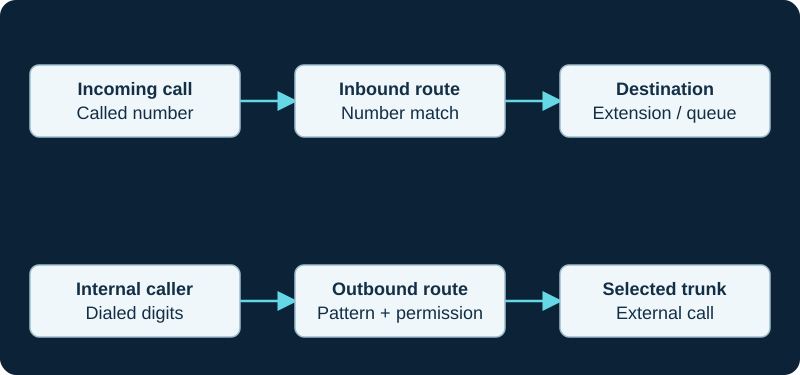
A working outbound call does not prove inbound number routing. Diagnose the direction and the matching rule independently.
Prove which endpoint Asterisk selected
Every inbound SIP request must be associated with an Asterisk endpoint before it can enter that endpoint's context. Use the live logger and pjsip show endpoint evidence to confirm the selected endpoint, loaded Identify object and expected source match. Asterisk can identify by the From user or by an IP Identify object depending on loaded modules and configuration.
Do not interpret every 401 response as a bad password: Asterisk documents a dummy challenge when it cannot identify an endpoint. Prove endpoint recognition first, then examine any real authentication exchange. Avoid enabling an anonymous endpoint as a shortcut unless anonymous admission is an intentional, restricted design.
Follow the delivered number into the running dialplan
Record the number format actually delivered in the Request-URI and compare it with the endpoint context and inbound-route match. Country code, leading plus, national prefix and provider-added digits can select a different extension. Caller-ID screening is a separate decision from the called number.
Asterisk's rejection notice names the selected endpoint, requested extension and context when no extension exists. Use dialplan show <context> to inspect the running dialplan. In FreePBX, verify the intended route and destination were saved and applied; generated dialplan is runtime evidence, not the durable edit surface.
Follow the destination
After a route matches, follow time conditions, manual overrides, ring-group membership, queue admission, extension dialing and voicemail fallback. A correct DID match can still lead to an unavailable extension or an after-hours destination the caller did not expect. Keep a dial attempt, provisional response, answered bridge and usable media as separate outcomes.
Retest narrowly
Test the repaired number from an outside service, then test another existing number to detect an overly broad match. Confirm the expected daytime or after-hours destination without leaving a catch-all route in place merely because it masks an unexplained mismatch. Keep the carrier and SIP identifiers with the incident if upstream escalation is required.
When more than the intended PBX rings
Use the A&A target-graph diagnostic when one inbound call alerts an old device and the PBX. It resolves provider-side branches before changing the PBX route.
Separate Zen inbound signaling from the later audio path
If a Zen call reaches and answers on the PBX but audio is missing, continue with the Zen media diagnostic rather than changing inbound routing that already completed.
When a SureVoIP alternate destination never receives an attempt
The SureVoIP destination diagnostic follows one number from the configured route order through the first outcome, timeout trigger, next attempt and recovery.
Keep caller-name lookup after carrier delivery and route matching
If an inbound call reaches FreePBX but displays the wrong name, follow the CallerID Lookup diagnostic from the matched route through the source, cache and destination channel.
When Magrathea does not send a call to one nominated IP
Follow the Magrathea SIP Resilience workflow from the selected number and address pool through health probes, distribution, INVITE arrival and PBX route.
When an NFON backup PBX receives no inbound calls
Follow one number through NFON trunk-set membership, endpoint selection and PBX routing before changing registration or firewall state.
Trace SIPTRUNK delivery from the selected authentication mode
For registered service, SIPTRUNK uses the REGISTER Contact for inbound delivery; for IP authentication it uses the stored public address and port. The mode-mismatch diagnostic follows that destination through DID assignment, INVITE, number format and the first PBX route.
Trace Blink Reject or Busy before changing inbound routing
When one Blink user action stops parallel phones or voicemail, use the Blink inbound-disposition diagnostic to preserve the 603, 486 or absent response, identify which proxy cancelled branches and compare the final caller treatment.
Trace SIP.US inbound delivery beyond the working primary gateway
The SIP.US failover diagnostic follows current gateway acceptance, registered Contact or stored IP, DID primary and secondary trunk assignment, eleven-digit called number and first PBX rule before any fallback change.
Prove a Flowroute failover assignment before changing the PBX
The Flowroute inbound-failover diagnostic follows the number's primary and failover relationship IDs, destination types, first provider attempt, Request-URI and first PBX rule.
Prove DIDWW group policy before changing an inbound route
The DIDWW trunk-group diagnostic follows one DID through assignment, group membership, policy, first result, every later CDR and PBX handling.
Trace SIPStation delivery before changing a general inbound route
Use the SIPStation inbound diagnostic to prove account mode, registration address, provider fallback, first PBX request and DID match.
Trace an IP Telecom port and inbound target independently
For an IP Telecom number, use the provider record to preserve the accepted port state, delivered Request-URI and identity, first PBX match and final destination without assuming a general portability statement proves live routing.
Trace Clearfly inbound delivery through every routing layer
Use the Clearfly service record to preserve the public number, port state, delivered Request-URI and identity, PBX match, forwarding or attendant control and final destination without assuming a portal label proves delivery.
Trace Redcentric inbound delivery after number migration
Use the Redcentric service record to preserve port state, provider route, delivered Request-URI and identity, PBX match, call-flow object, destination, answer and media without treating project completion as delivery proof.
Verify that CommPeak DID service is actually in scope
CommPeak lists DIDs separately from SIP termination. Use the provider record to prove number ownership, provider route, delivered Request-URI and identity, PBX match, destination, answer and media before changing the trunk.
Trace Voximplant ingress beyond the IP allowlist
Use the Voximplant provider record to compare source address, Request-URI, identity, application-rule match, scenario event, next leg, destination answer and media before changing the trunk.
Trace TelVox SIP delivery and webhook execution separately
For TelVox Connect, use the provider record to correlate trunk state, SIP dialog, voice-webhook request, five-second application response, returned markup, later callback and media outcome without treating any one layer as end-to-end proof.
Do not let VoIP Much registration stand in for number routing
For VoIP Much, prove the owned number, provider route, delivered identity, selected PBX rule and destination separately with the provider-specific diagnostic.
Prove the VoIPline number route after registration
The VoIPline diagnostic separates an active or ported number, provider route, delivered identity, PBX rule and final destination.
Trace one Voip Unlimited DDI from alias to destination
The Voip Unlimited diagnostic proves provider assignment and delivery before changing a general inbound route.
Prove the SignalWire resource assignment before widening a route
The SignalWire diagnostic distinguishes a phone number assigned to a SIP endpoint from a Resource SIP Address and then traces the PBX context and DID.
Prove Telnyx number assignment, region and first attempt
The Telnyx inbound-route diagnostic compares the number-to-Connection relationship, selected inbound region, current network evidence, delivered request and first PBX match.
Prove the Bandwidth number, routes and first attempt
The Bandwidth inbound-route diagnostic compares number voice mode, effective routes, weighted endpoints, actual attempts and the first PBX match.
Prove the Voipfone portal route before changing the PBX
The Voipfone inbound-number diagnostic starts with the number’s effective destination, then follows provider attempt, delivered identity and PBX match.
Prove the VoIP.ms DID route and POP before changing the PBX
The VoIP.ms DID diagnostic starts with the number’s effective route and POP, then follows provider attempt and PBX match.
Prove Twilio URL selection before changing the inbound route
The Twilio origination diagnostic begins with the number, Trunk SID and effective OriginationUrl resources before the PBX match.
Prove the Plivo number-to-URI chain before changing routing
The Plivo inbound diagnostic starts with number assignment and the effective primary and fallback URI before the PBX match.
Prove the Vonage number-to-URI chain first
The Vonage inbound diagnostic starts with the number link and effective priority and timeout before the PBX match.
Start a Voxtelesys inbound incident at the DID route profile
The Voxtelesys diagnostic proves number assignment and effective destinations before changing registration, firewall or PBX routing.
Start Amazon Chime inbound incidents at number assignment
The Amazon Chime diagnostic proves the assigned connector or group before changing origination routes, firewall or PBX routing.
Begin a didlogic inbound incident at the purchased number
The didlogic diagnostic proves the destination type and target before changing registration, firewall or PBX routing.
Check Callcentric DID Forward before the PBX path
Callcentric direct DID Forward rules outrank Call Treatments. The diagnostic establishes whether an INVITE should have reached the customer edge at all.
Trace an Anveo Direct DID to its exact SIP URI
A working outbound trunk and an absent REGISTER status do not explain inbound routing. Use the Anveo Direct diagnostic to follow the DID, primary URI, provider attempt and PBX match.
Follow a CarrierX DID through its assigned group
Use the CarrierX trunk-group diagnostic to distinguish number assignment, provider selection, edge receipt, PBX matching and media.
Follow an AVOXI number through its enabled rule
Use the AVOXI SIP URI diagnostic to distinguish number mapping, URI configuration, provider attempt, PBX matching and media.
Do not let an Easybell registration hide the inbound mode
Use the Easybell diagnostic to distinguish credential registration, IP-only delivery, FQDN targeting, PBX matching and Offline forwarding.
Check SIP.US Forward and Backup before rewriting routes
A DID can intentionally bypass the PBX through PSTN Forward, while Backup has a narrower trigger. Use the SIP.US diagnostic to preserve precedence and capacity evidence.
A correct Flowroute route can still have a separate media failure
First prove number relationship and provider edge, then use the Flowroute audio diagnostic if signaling completes without sound.
A Bulk Solutions outbound success does not establish inbound DID assignment
Use the Bulk Solutions diagnostic to trace trunk-group ownership, edge receipt, Request-URI and route matching.
A Yay.com trunk can exist while its number routes elsewhere
Use the Yay.com diagnostic to prove number assignment, delivered identity, destination and first PBX route.
A ClearlyIP DID can select another Location or identity
Use the ClearlyIP diagnostic to prove Primary or Smart Routing ownership and the delivered number form.
A working Simwood outbound call does not prove inbound registration
Use the Simwood diagnostic to prove the provider binding and attempt before PBX route changes.
A working Sinch termination leg does not prove origination
Use the Sinch diagnostic to prove the number's origination application and actual customer-facing attempt.
A registered SIPTRUNK Contact can still point to the wrong destination
The SIPTRUNK diagnostic compares Contact, provider source, attempt and first PBX response.
Watch the explanation
Learn the difference between turning Do Not Disturb off and removing the user controls that enable it. The demonstration examines the idle mute-key action and the separate DND feature setting, which can matter when users accidentally stop their phones ringing.
Read applicability and editorial notes →Watch this video here
GRP-family web interface; the spoken model number is unclear. Match the controls to your exact model and firmware before applying a policy change. Review used the available transcript and primary references; audio and screen readability remain unverified.

The player loads only when you choose Watch here. Playback uses YouTube’s privacy-enhanced embed; YouTube processes playback data.
Sources & applicability
Primary references for the technical details above. Operational examples and planning checklists are VoIP.info editorial guidance.
- IETF RFC 3261 — SIP, including linked updates ↗
- Asterisk PJSIP troubleshooting guide ↗
- Asterisk PJSIP configuration objects and relationships ↗
- A&A: VoIP SIP Trunks ↗
- A&A: multiple inbound targets and Also Ring ↗
- A&A: VoIP technical information ↗
- A&A: VoIP security controls and registration visibility ↗
- Zen General SIP Settings ↗
- Zen Business SIP Trunking ↗
- Zen Business Talk SIP specific terms ↗
- SureVoIP number destinations ↗
- SureVoIP SIP traces ↗
- SureVoIP terms and conditions ↗
- FreePBX CallerID Lookup metadata — release/17.0 ↗
- FreePBX CallerID Lookup generated dialplan — release/17.0 ↗
- FreePBX CallerID Lookup configuration and inbound-route hook — release/17.0 ↗
- Asterisk CALLERID dialplan function ↗
- Asterisk party-ID manipulation ↗
- Asterisk internal database ↗
- Magrathea SIP resilience ↗
- Magrathea Numbering in the UK & Ireland ↗
- Magrathea Voice Connectivity ↗
- NFON SIP Trunk Flexx product page ↗
- NFON SIP Trunk Flexx technical manual v3.1 (DE) ↗
- NFON SIP Trunk Flexx SLA v1 (EN) ↗
- NFON service status ↗
- SIPTRUNK IP authentication setup ↗
- SIPTRUNK registration connection issues ↗
- SIPTRUNK inbound-call troubleshooting ↗
- SIPTRUNK registration status ↗
- SIPTRUNK call failover options ↗
- SIPTRUNK interconnection and gateway addresses ↗
- SIPTRUNK general SIP device configuration ↗
- Blink incoming-call alert choices ↗
- Blink SIP accounts and registration state ↗
- Blink main interface and outbound account selection ↗
- Blink audio-call controls and preferences ↗
- Blink platform-specific changelog ↗
- RFC 3261 SIP response and proxy-branch behavior ↗
- SIP.US current gateways and interconnection requirements ↗
- SIP.US general device configuration ↗
- SIP.US registration status guide ↗
- SIP.US call failover options ↗
- SIP.US SIP glossary and routing model ↗
- SIP.US IP authentication guide ↗
- SIP.US Asterisk registration guide ↗
- Flowroute inbound route and failover assignment guide ↗
- Flowroute current PoP and DNS guidance ↗
- Flowroute interconnection options ↗
- DIDWW service failover and load balancing ↗
- DIDWW inbound trunk groups ↗
- DIDWW inbound SIP trunk configuration ↗
- DIDWW SIP response codes in call logs ↗
- DIDWW Voice IN CDR streaming attributes ↗
- Sangoma: Troubleshooting SIPStation ↗
- Sangoma: Failover of inbound SIPStation DIDs ↗
- Sangoma: SIPStation notifications and access restrictions ↗
- Sangoma: FreePBX SIPStation module ↗
- Sangoma: SIPStation PJSIP trunk setup ↗
- Sangoma: FreePBX inbound-route user guide ↗
- Sangoma: Configuring a PBX or device with SIPStation ↗
- IP Telecom SIP Trunks ↗
- IP Telecom terms and SIP Trunking product schedule ↗
- IP Telecom Fair Use Policy ↗
- IP Telecom Ireland copper switch-off guidance ↗
- IP Telecom contact and support ↗
- Clearfly voice services and SIP trunking ↗
- Clearfly service FAQs ↗
- Clearfly partner programme and portal ↗
- Clearfly support contacts ↗
- Clearfly legal and regulatory index ↗
- Clearfly Acceptable Use Policy ↗
- Redcentric voice modernisation ↗
- Redcentric communications services ↗
- Redcentric customer support ↗
- Redcentric service status ↗
- Redcentric SIP Trunking Service Description SD032 v2.1 (legacy public PDF) ↗
- Redcentric Hays telephony customer case study ↗
- CommPeak SIP trunking ↗
- CommPeak documentation and developer hub ↗
- CommPeak SIP account configuration ↗
- CommPeak FreePBX SIP trunk guide ↗
- CommPeak Asterisk PBX SIP trunk guide ↗
- CommPeak pricing overview ↗
- CommPeak service status ↗
- Voximplant SIP trunking solution ↗
- Voximplant SIP trunk connection FAQ ↗
- Voximplant SIP phone registration FAQ ↗
- Voximplant processing calls in scenarios ↗
- Voximplant CallSIP parameters ↗
- Voximplant telephony and SIP capabilities FAQ ↗
- Voximplant pricing ↗
- Voximplant service status ↗
- TelVox Connect SIP trunks API reference ↗
- TelVox Connect authentication and API keys ↗
- TelVox Connect Calls API reference ↗
- TelVox Connect phone numbers reference ↗
- TelVox Connect recordings API reference ↗
- TelVox Connect webhooks API reference ↗
- TelVox Connect pricing ↗
- TelVox security and compliance ↗
- Renav Limited TelVox products ↗
- VoIP Much SIP Trunks ↗
- VoIP Much 3CX Phone System guide ↗
- VoIP Much FreePBX trunk guide ↗
- VoIP Much UniFi Talk guide ↗
- VoIP Much IP blocking guidance ↗
- VoIP Much SIP ALG guidance ↗
- VoIP Much supported audio codecs ↗
- VoIP Much quality suggestions ↗
- VoIP Much network status ↗
- VoIP Much service agreement ↗
- VoIPline Telecom SIP trunking ↗
- VoIPline Telecom pricing and rates ↗
- VoIPline Telecom legal documents ↗
- VoIPline Voice and SMS (IP) service schedule ↗
- VoIPline SIP trunks critical information summary ↗
- VoIPline Telecom network ↗
- VoIPline Telecom number porting ↗
- VoIPline Telecom service status ↗
- Voip Unlimited SIP Trunks ↗
- Voip Unlimited voice portfolio ↗
- Voip Unlimited partner operations and support tools ↗
- Voip Unlimited legal and regulatory documents ↗
- Voip Unlimited Master Services Agreement V3.0 ↗
- RFC 3263: Locating SIP Servers ↗
- RFC 2782: DNS SRV resource records ↗
- RFC 3403: DDDS DNS database and NAPTR records ↗
- SignalWire SIP trunking ↗
- SignalWire SIP credentials ↗
- SignalWire Get SIP credential API ↗
- SignalWire Update SIP profile API ↗
- SignalWire FreePBX integration ↗
- SignalWire caller ID and CNAM ↗
- SignalWire rate limits ↗
- SignalWire E911 ↗
- SignalWire rates ↗
- Telnyx SIP trunking service objects ↗
- Telnyx authentication methods ↗
- Telnyx failover and retries ↗
- Telnyx SIP response codes ↗
- Telnyx Outbound Voice Profiles ↗
- Telnyx round-robin routing ↗
- Telnyx current SIP network information ↗
- Telnyx machine-readable voice network data ↗
- Telnyx configuration-guide boundary ↗
- Bandwidth Build SIP trunking setup ↗
- Bandwidth number feature and Final Destination URI management ↗
- Voipfone FreePBX configuration guide ↗
- Voipfone inbound routing control ↗
- Voipfone phone-number routing controls ↗
- Voipfone PBX call-divert and PSTN-failover controls ↗
- Voipfone number porting ↗
- VoIP.ms DID routing, failover, POP and inbound format ↗
- VoIP.ms subaccount authentication and registration ↗
- VoIP.ms server and DID POP selection ↗
- VoIP.ms DID troubleshooting ↗
- VoIP.ms incoming-call troubleshooting ↗
- VoIP.ms registration troubleshooting ↗
- Twilio Elastic SIP Trunking configuration ↗
- Twilio OriginationUrl resource ↗
- Twilio Programmable Voice failover best practices ↗
- Twilio Elastic SIP Trunking IP addresses ↗
- Twilio Elastic SIP Trunking troubleshooting ↗
- Twilio Trunk resource ↗
- Plivo Zentrunk quickstart ↗
- Plivo Zentrunk technical specifications ↗
- Plivo SIP Trunking account limits ↗
- Plivo Zentrunk hangup codes ↗
- Plivo Zentrunk debug logs ↗
- Vonage SIP technical details ↗
- Vonage SIP Dashboard guide ↗
- Vonage Asterisk PJSIP configuration ↗
- Vonage FreePBX configuration ↗
- Vonage Voice Logs guide ↗
- Voxtelesys DID and number routing ↗
- Voxtelesys SIP Trunk Registrar ↗
- Voxtelesys portal IP-address routing ↗
- Voxtelesys registration ACL ↗
- Voxtelesys failover transfer ↗
- Voxtelesys call records ↗
- AWS: Managing Amazon Chime SDK Voice Connectors ↗
- AWS: Editing Voice Connector settings ↗
- AWS: Creating a Voice Connector and encryption scope ↗
- AWS: Managing Voice Connector groups ↗
- AWS: Amazon Chime SDK endpoints and quotas ↗
- AWS: Voice Connector network and bandwidth requirements ↗
- didlogic SIP credentials ↗
- didlogic outbound calling and regional gateways ↗
- didlogic inbound setup and destination routing ↗
- didlogic SIP trunking and PBX setup ↗
- didlogic Asterisk configuration and troubleshooting ↗
- didlogic direct interconnection requirements ↗
- Callcentric SIP trunking ↗
- Callcentric registration credentials ↗
- Callcentric DID forwarding ↗
- Callcentric DID-forward precedence ↗
- Callcentric network-down forward ↗
- Callcentric forwarded-call billing ↗
- Anveo Direct FAQ ↗
- Anveo Direct inbound DID service ↗
- Anveo Direct call termination ↗
- Anveo Direct network ↗
- Anveo Direct services ↗
- CarrierX trunk-group object ↗
- CarrierX trunk object ↗
- CarrierX SIP trunk quick start ↗
- CarrierX receive and place calls ↗
- CarrierX phone-number model ↗
- AVOXI outbound SIP trunk configuration ↗
- AVOXI inbound SIP URI forwarding ↗
- AVOXI outbound SIP trunk diagnostic ↗
- AVOXI SIP forwarding and trunking overview ↗
- Easybell general VoIP configuration ↗
- Easybell Trusted IP authentication ↗
- Easybell SIP-trunk authentication by trusted FQDN ↗
- Easybell automatic fallback routing ↗
- SIP.US inbound call troubleshooting ↗
- SIP.US channel-limit guidance ↗
- SIP.US E911 information ↗
- Flowroute current PoP interconnection requirements ↗
- Flowroute direct-media firewall requirements ↗
- Flowroute preferred inbound PoP behavior ↗
- Flowroute TLS signaling scope ↗
- Flowroute inbound SRV routing example ↗
- Bulk Solutions service overview ↗
- Bulk Solutions inbound IP-authenticated setup ↗
- Bulk Solutions outbound IP-authenticated setup ↗
- Bulk Solutions current IP-authentication workflow ↗
- Bulk Solutions current registration workflow ↗
- Bulk Solutions direction-split Retell integration ↗
- Bulk Solutions legacy FreePBX 14 IP-authentication template ↗
- Bulk Solutions E911 FAQ ↗
- Yay.com SIP Trunks for business phone systems ↗
- Yay.com create a SIP trunk ↗
- Yay.com SIP trunks and how to use them ↗
- Yay.com call encryption, TLS and SRTP ↗
- Yay.com firewall guide ↗
- Yay.com legacy FreePBX configuration example ↗
- Yay.com trunk-authentication API ↗
- ClearlyIP current SIP trunking product page ↗
- ClearlyIP current documentation destination ↗
- ClearlyIP legacy configuration-guide scope and freshness notice ↗
- ClearlyIP legacy trunk details and regional registrars ↗
- ClearlyIP legacy Location, number routing and failover reference ↗
- ClearlyIP legacy FreePBX automated-module reference ↗
- ClearlyIP legacy FreePBX PJSIP setup reference ↗
- ClearlyIP legacy common SIP issues reference ↗
- Simwood Hosted SIP Trunks ↗
- Simwood hosted trunks interop ↗
- Simwood hosted trunk overview ↗
- Simwood Asterisk 16 hosted trunk example ↗
- Simwood hosted TLS/SRTP settings ↗
- Simwood Partner and Direct IP addresses and whitelisting ↗
- Simwood portal overview ↗
- Simwood Carrier Services API v3 ↗
- Sinch Voice API SIP Trunking reference ↗
- Sinch Voice API callback reference ↗
- Sinch Voice API authentication reference ↗
- Sinch Voice API call headers ↗
- Sinch Voice API call detail records ↗
- Sinch Voice API release notes ↗
- Sinch Elastic SIP Trunking product overview ↗
- Sinch BYOC SIP Trunking overview ↗
- SIPTRUNK interconnection and network requirements ↗
- SIPTRUNK direct-media delivery and missing audio ↗
Examples require adaptation to your topology. No live PBX or hardware testing is claimed.