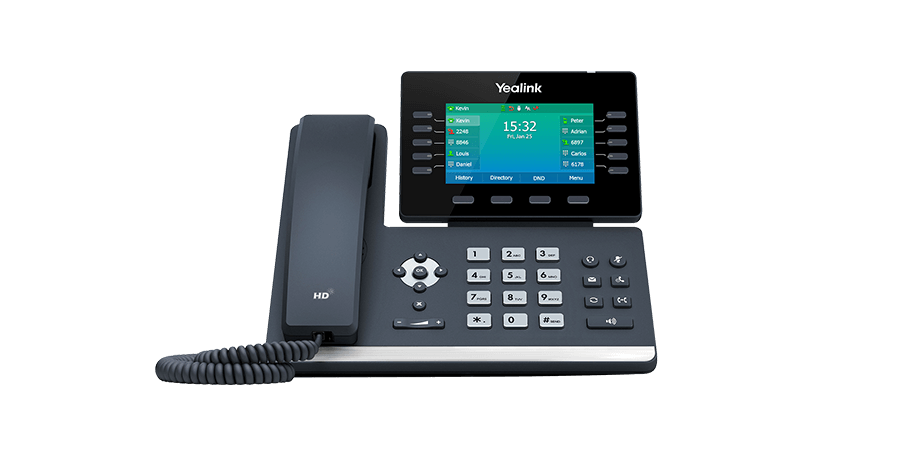
Documented specifications
Yealink · Yealink presented T54W on its current product and specification sites at review and described B2B distribution. Exact regional availability, ordered revision, approved firmware, platform certification, warranty entitlement and remaining support period were not established.
| Specification | Documented value |
|---|---|
| Display | 4.3-inch adjustable color display, 480 × 272 Source ↗ |
| Physical and mapped keys | 10 physical line keys; the datasheet lists up to 27 programmable assignments across three pages Source ↗ |
| SIP accounts | 16 VoIP accounts; this is not a simultaneous-call or carrier-capacity entitlement Source ↗ |
| Ethernet | Two Gigabit Ethernet ports Source ↗ |
| PoE | Supported Source ↗ |
| Wi-Fi | Built-in dual-band 2.4/5 GHz, IEEE 802.11a/b/g/n/ac Source ↗ |
| Bluetooth | Built-in 4.2 Source ↗ |
| USB | One USB 2.0 port with several alternative documented roles Source ↗ |
| Expansion | Up to three EXP50 modules are listed; the exact combined USB accessory and power arrangement requires validation Source ↗ |
| Optional DECT path | DD10K is listed for up to four named cordless handsets and four concurrent calls; DECT is not built into the base phone Source ↗ |
| Provisioning | Browser, phone and auto-provisioning methods are listed, including RPS and HTTPS; the supported platform template and ownership remain deployment decisions Source ↗ |
| Version-sensitive protection | The current product page associates TLS 1.3 and WPA3 with V87; the linked datasheet lists TLS 1.2, SRTP, HTTPS certificate management, 802.1X and OpenVPN Source ↗ |
Unlisted fields remain unverified. Platform compatibility and remaining support life require confirmation for the exact ordered model.
Keep accounts, keys and calls separate
The T54W combines an adjustable 4.3-inch 480 × 272 display with ten physical line keys. Yealink documents three key pages and as many as 27 programmable assignments, while separately listing 16 VoIP accounts. Ten keys, 27 assignments and 16 account identities are not simultaneous-call or carrier-capacity figures. Map the actual BLF, shared-line, park, transfer and account layout, then prove it against the intended PBX rather than buying from the largest published number.
The datasheet also lists ten-way conferencing and direct IP calling. Those are device capabilities, not evidence that a provider, dial plan, recording policy or emergency workflow permits them. A receptionist who needs many contacts visible at once may still need an EXP50 or another control layout.
Choose one network path and prove recovery
Two Gigabit Ethernet ports and IEEE 802.3af class-3 PoE support a conventional wired desk. Built-in dual-band 802.11a/b/g/n/ac Wi-Fi is a separate access path, not proof of coverage, roaming, voice prioritization or PBX support. Survey the selected band and access point, test busy-hour traffic, and confirm registration and incoming-call recovery after a controlled interruption. Do not assume a working cable path validates Wi-Fi.
The power adapter is optional in the published package, and the datasheet gives different consumption ranges for adapter and PoE operation. Confirm the exact carton, switch allocation and accessory load. A phone that can join Wi-Fi still needs an approved power source.
Treat the single USB port as a shared boundary
Yealink assigns the one USB 2.0 port to several possible roles: USB headset, call recording to a flash drive, EHS40, supported speakerphone, as many as three EXP50 modules, and other documented accessory paths. A list of supported uses does not prove that every combination can operate together or within the available power budget. Record the exact headset, adapter, storage device or expansion modules and validate only that chosen combination.
The optional DD10K turns the desk set into the base for up to four named DECT handsets and four published concurrent calls. This does not make DECT built in, transfer the limit to SIP accounts, or establish the purchased PBX and trunk capacity. Bluetooth 4.2 headset and mobile functions are another radio path again; pairing does not prove call control, two-way audio or privacy.
Attach security claims to firmware and configuration
The current product page associates TLS 1.3 and WPA3 with the V87 upgrade, while the linked exact-model datasheet still lists TLS 1.2, SRTP, HTTPS certificate management, 802.1X and OpenVPN. Preserve the installed hardware revision, firmware train and approved PBX or provider template before treating a protocol as available. A capability label does not prove the correct trust chain, cipher policy, Wi-Fi authentication or protected media on either call leg.
Use the calling platform's approved firmware and staged update procedure. The unified T53/T53W/T54W/T57W firmware statement does not authorize an arbitrary image, downgrade or cross-platform template. Retain a supported recovery path and repeat certificate, registration, provisioning and call checks after change.
Accept the exact desk workflow
Pilot registration, inbound and outbound calls, BLF state, message waiting, hold, blind and attended transfer, conference, DTMF, headset controls and the selected wired or wireless path. Restart the phone and provisioning service, then confirm that accounts, keys, certificates and accessory behavior return as intended. Where recording is allowed, verify storage ownership, indication, access, retention and deletion separately.
Yealink still presents the T54W on its current product site and describes B2B distribution, but that does not establish regional stock, price, provider certification, warranty entitlement or a future support period. Confirm the exact ordered part and lifecycle terms. No phone, firmware, PBX, account, accessory, radio path, protected session, power combination, audio quality, emergency route, availability, price or live call was tested for this guide.
Watch the explanation
Covers the T54W controls and everyday calling tasks, including attended versus blind transfer, conference management, Wi-Fi and Bluetooth. Useful for onboarding phone users.
Read applicability and editorial notes →Watch this video here
T54W demonstration on UD Voice in 2022. The video title and narration identify T54W; its description contains copied references to other models. Review used the available transcript and primary references; audio and screen readability remain unverified.

The player loads only when you choose Watch here. Playback uses YouTube’s privacy-enhanced embed; YouTube processes playback data.
Sources & applicability
Primary references for the technical details above. Operational examples and planning checklists are VoIP.info editorial guidance.
- Yealink T54W current product page ↗
- Yealink T54W current specification page ↗
- Yealink T54W exact-model datasheet ↗
- Yealink V87 security summary for SIP-W phones ↗
Examples require adaptation to your topology. No live PBX or hardware testing is claimed.