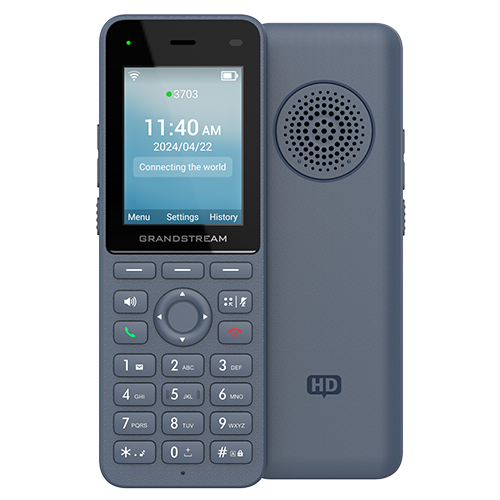
Documented specifications
Grandstream · Current manufacturer product and documentation pages available October 5, 2026; firmware table listed 1.0.3.35 as general and 1.0.3.39 as beta. Remaining support period, regional availability and installed fleet state were not established.
| Specification | Documented value |
|---|---|
| SIP accounts | 3 Source ↗ |
| Display | 2.4-inch 240 x 320 color LCD Source ↗ |
| Wi-Fi | Dual-band Wi-Fi 6; manufacturer lists 802.11k/r/v Source ↗ |
| Bluetooth | Integrated Bluetooth 5.0 Source ↗ |
| Battery | 3000 mAh lithium-ion Source ↗ |
| Talk time | 12 hours talk and 240 hours standby, manufacturer laboratory ratings Source ↗ |
| Charging | USB Type-C charging interface and supplied cradle Source ↗ |
| Provisioning | GDMS, TR-069 or encrypted XML configuration Source ↗ |
| Current firmware listing | 1.0.3.35 general; 1.0.3.39 beta on October 5, 2026 Source ↗ |
Unlisted fields remain unverified. Platform compatibility and remaining support life require confirmation for the exact ordered model.
Keep exact-model capability separate from site readiness
The WP826 is a handheld three-account SIP endpoint with dual-band Wi-Fi 6, Bluetooth 5.0, a 2.4-inch display and a 3000 mAh battery. Grandstream lists 802.11k/r/v, but those labels do not prove fast, loss-free roaming on an arbitrary WLAN. Access-point coverage, security mode, radio policy, client behavior, IP continuity, SIP registration and usable media remain separate evidence states.
Do not transfer WP816, WP825, WP836 or WP856 features to this record. The WP826 is not listed as weatherproof. Its three SIP accounts and five-way local conference are configuration capabilities, not proof of three simultaneous carrier calls, PBX capacity or an accepted conferencing workflow.
Treat battery, audio and accessories as deployment inputs
The datasheet's 12-hour talk and 240-hour standby values are explicitly laboratory data. Display use, roaming, retransmissions, Bluetooth, PTT activity, signal quality, temperature, firmware and battery age can change shift endurance. Measure the assigned workflow over representative shifts and keep charging, spare-device and battery-replacement procedures separate.
Integrated Bluetooth establishes a radio path, not compatibility or call-control behavior with every headset. Grandstream maintains exact-family Bluetooth and USB Type-C PTT compatibility material in its documentation centre. Verify the exact accessory, firmware, audio routing, answer, mute, volume, reconnection and charging behavior before standardizing it.
Separate the emergency button from an emergency service
Grandstream's product page marks the accelerometer and emergency button as pending while the December 2024 datasheet lists an emergency button and a customizable alarm or paging function. Preserve that source conflict. Do not promise a lone-worker, panic, emergency-location or public-safety outcome until the installed firmware, configured action, receiving system, escalation owner, power and network failure behavior are proved together.
A successful button event, SIP call or push-to-talk session is not proof that the correct responder receives an authenticated alarm with usable identity and location. Define an approved test procedure that cannot create an unintended emergency call.
Own provisioning, firmware and acceptance evidence
On October 5, 2026, Grandstream's firmware table grouped WP816, WP826 and WP836 under general release 1.0.3.35 and beta 1.0.3.39. The higher beta number is not a production recommendation. Record the handset label, hardware revision, installed version, selected channel, approved configuration owner and rollback boundary before change. Stage one device, validate configuration retention and only then broaden a fleet rollout.
GDMS, TR-069 and encrypted XML are documented provisioning mechanisms, not simultaneous configuration authorities. Define one effective owner for accounts, Wi-Fi, certificates, PTT, keys and updates; then verify the returned artifact and loaded state. Walk the work route during calls, cross intended AP boundaries, idle and wake the handset, change audio routes, reboot it and repeat after an approved update. No handset, firmware, WLAN, battery, headset, provisioning service, PBX, emergency workflow, price, availability, compatibility or live call was inspected or tested for this guide.
Do not transfer WP836 rugged and alarm claims to the WP826
The WP836 has separate ruggedization and alarm documentation. Shared WP8x6 firmware and some controls do not make the WP826 environmentally equivalent or prove that an alarm workflow is enabled, received or acted upon.
Sources & applicability
Primary references for the technical details above. Operational examples and planning checklists are VoIP.info editorial guidance.
- Grandstream WP826 manufacturer specifications ↗
- Grandstream WP826 December 2024 datasheet ↗
- Grandstream WP816, WP826 and WP836 documentation centre ↗
- Grandstream firmware and support resources ↗
- Grandstream WP836 product page ↗
- Grandstream WP836 datasheet ↗
- Grandstream WP816, WP826 and WP836 user guide ↗
- Grandstream WP816, WP826 and WP836 administration guide ↗
- Grandstream WP836 quick installation guide ↗
- Grandstream compliance resources ↗
Examples require adaptation to your topology. No live PBX or hardware testing is claimed.