Ask which service needs to be reachable
A carrier may need to send signaling and media to your PBX. Remote phones need an approved connection path. Neither requirement automatically means the management interface or every listener should be publicly reachable.
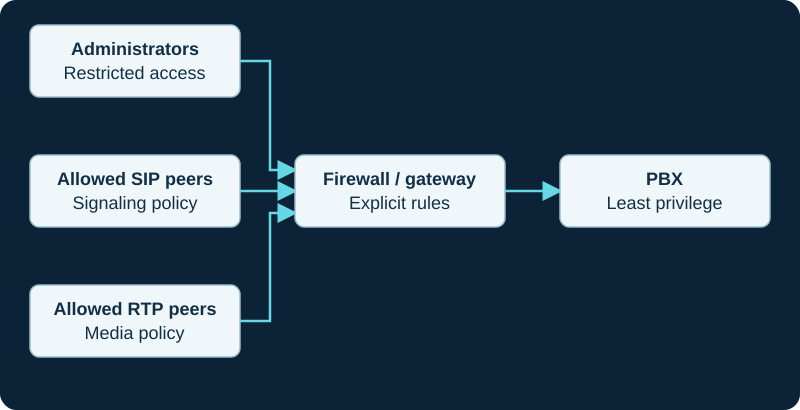
Example defensive architecture. Source restrictions, authentication, update policy and call permissions work together.
Build an access matrix
For each service, identify permitted source, destination, protocol and purpose. Use provider-documented networks where applicable and a controlled remote-access architecture for administrators. Confirm the policy for both IPv4 and IPv6.
Do not confuse obscurity with control
Changing a default port can reduce some noise but is not an authorization boundary. Authentication, software maintenance, rate controls and restricted dialing remain necessary. Encryption protects configured traffic paths but does not prevent an authenticated account from abusing granted permissions.
Verify the actual deployment
Inventory listening services and compare the firewall to the intended matrix. Remove unused exposure through a planned change with a recovery path. Test legitimate incoming, outgoing and remote calls after hardening. Keep emergency and continuity arrangements documented separately with the carrier.
Treat PJSIP ACLs as one control, not complete authentication
The Asterisk PJSIP ACL guide limits source or REGISTER Contact addresses but does not replace firewall ownership, endpoint identification, SIP authentication or dialplan authorization.
Do not turn a PBX zone into an internet-wide trust shortcut
On FreePBX systems, use the Firewall zone and service guide to classify interfaces and known networks before exposing a service. Responsive Firewall is bounded to selected signaling; it does not authorize GUI, SSH, provisioning, UCP or arbitrary calling from an unknown address.
Keep facility-control management off the open internet
The IP facility control station category can combine web administration, SIP, streams, storage and privileged door actions. Restrict management and peer access to the intended network, disable unused services and prove certificate and role enforcement before remote operation.
Keep 2N management and door control on intended paths
2N intercoms can expose SIP, streams, web management, APIs, mobile and central-management paths. The 2N hub keeps those services and the physical relay as separate trust boundaries. Do not publish a management interface or stream merely to make remote door answering convenient.
Keep the manager interface behind a protected path
The AMI login diagnostic follows Asterisk's safe-environment, SSH-or-VPN and manager ACL boundaries.
Keep GDS3712 administration and direct SIP off unnecessary public paths
The GDS3712 guide separates local management, event receivers, PBX service and direct peering. Do not expose its web interface or accept arbitrary direct SIP merely to restore a doorbell call.
Constrain remote lookup destinations
The Asterisk CURL guide keeps scheme, host, port and path controlled and treats redirects and dynamic URI input as separate authorization boundaries.
Keep external text out of dialplan control names
The dialplan input guide requires a bounded allowlist and full-shape decision before external data becomes a context, destination, path or command argument.
Sources & applicability
Primary references for the technical details above. Operational examples and planning checklists are VoIP.info editorial guidance.
- Asterisk PJSIP configuration and endpoint access ↗
- Asterisk 22 res_pjsip_acl configuration reference ↗
- Asterisk 22 res_pjsip endpoint configuration reference ↗
- Asterisk PJSIP configuration sections and relationships ↗
- Asterisk pjsip.conf sample ↗
- Asterisk debug-information collection guide ↗
- Sangoma FreePBX Firewall overview ↗
- Sangoma FreePBX Firewall getting started ↗
- Sangoma FreePBX Firewall technical details ↗
- Sangoma FreePBX Firewall permissions ↗
- Sangoma Responsive Firewall ↗
- FreePBX Firewall 17 module metadata ↗
- Grandstream GSC3570 user manual ↗
- Grandstream GSC3570 FAQ ↗
- 2N IP intercom configuration manual 3.3 ↗
- 2N IP One product and technical specifications ↗
- 2N IP Verso 2.0 product and technical specifications ↗
- ↗
- ↗
- ↗
- ↗
- ↗
- ↗
- ↗
- ↗
- ↗
- Grandstream GDS3712 product page ↗
- Grandstream GDS3712 datasheet ↗
- Grandstream GDS3710/GDS3712 user manual ↗
- Grandstream GDS3712 quick installation guide ↗
- Grandstream GDS37xx and GRP26xx integration guide ↗
- Grandstream GDS37xx digital input configuration ↗
- Grandstream GDS37xx event logs guide ↗
- Asterisk CURL dialplan function ↗
- Asterisk CURLOPT dialplan function ↗
- Asterisk JSON_DECODE dialplan function ↗
- Asterisk URIENCODE dialplan function ↗
- Asterisk command-line interface ↗
- Asterisk func_curl implementation ↗
- libcurl CURLOPT_TIMEOUT reference ↗
- libcurl CURLOPT_CONNECTTIMEOUT reference ↗
- Asterisk FILTER dialplan function ↗
- Asterisk REGEX dialplan function ↗
- Asterisk ISNULL dialplan function ↗
- Asterisk LEN dialplan function ↗
- Asterisk FIELDQTY dialplan function ↗
- Asterisk CUT dialplan function ↗
- Asterisk dialplan-functions overview ↗
- Asterisk func_strings implementation ↗