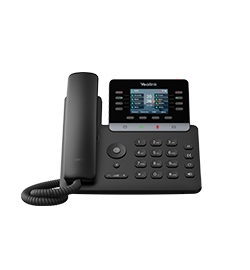
Documented specifications
Yealink · Yealink marked the T74U NEW in its current IP-phone catalogue and published quick-start guide v1.1 on June 8, 2026. Regional stock, exact order code, hardware revision, firmware support, accessory availability and provider approval remain separate evidence.
| Specification | Documented value |
|---|---|
| Display | 4.3-inch 480×272 color screen; readability, theme and viewing-angle acceptance remain deployment tests Source ↗ |
| Accounts and local keys | Up to 16 SIP accounts and 10 LED line keys; account count, programmed identities, visible pages and concurrent calls are different quantities Source ↗ |
| DSS capacity | Up to 50 DSS assignments across five phone pages; Yealink separately states up to 234 programmable keys with as many as three cascaded EXP55 modules Source ↗ |
| Network and radios | Dual-port Gigabit Ethernet; Wi-Fi and Bluetooth are listed through optional WF50 and BT51 USB accessories rather than built-in T74U radios Source ↗ |
| Power and USB | IEEE 802.3af PoE class 2 or optional 5 V/2 A adapter; the phone-side USB output is listed as 5 V/500 mA Source ↗ |
| Package | Phone, handset and cord, Ethernet cable, stand and quick-start guide are listed; power adapter and wall bracket are optional Source ↗ |
| Current documentation | Yealink published the multilingual quick-start guide v1.1 record on June 8, 2026 and maintains a dedicated T74U support centre Source ↗ |
Unlisted fields remain unverified. Platform compatibility and remaining support life require confirmation for the exact ordered model.
Keep the T74U exact model distinct from adjacent T7X phones
Yealink's current catalogue lists the T74U within the new T7 Series alongside T73U, T73W, T74W and T77U. Shared industrial design and a unified firmware family do not make those devices interchangeable. The T74U is the wired model in this record; do not transfer built-in Wi-Fi from the T74W or another family member.
Capture the label, order code, hardware revision, regional package and installed firmware before provisioning. A vendor family page, reseller title or shared firmware file is not exact-device evidence.
Separate accounts, line keys, DSS pages and live calls
The datasheet lists up to 16 SIP accounts, ten LED line keys and up to 50 DSS assignments across five pages. Those are configuration capacities with different owners. Ten physical keys do not expose every account at once, and 16 registered identities do not prove 16 simultaneous calls, carrier channels or usable call starts.
Preserve the actual account set, page map, displayed labels, active-call behavior and service capacity separately. Test line selection, hold, transfer, park, pickup, BLF, voicemail and failed-action recovery on the intended PBX instead of treating a programmable-key label as server support.
Treat EXP55 modules and USB power as one acceptance set
Yealink says the T74U can cascade up to three EXP55 color-screen modules and reach up to 234 programmable keys. The same phone-side USB interface can serve expansion, a headset, storage, recording, EHS40 or optional radio accessories, and the datasheet lists 5 V/500 mA USB output. Connector presence and headline module count do not prove that every accessory can be attached or powered together.
Inventory each module, cable, headset, adapter and recording device. Confirm the supported chain, power budget, boot order, key labels, page state, firmware prerequisites and recovery after restart or reprovisioning.
Commission Ethernet, optional radios and power independently
The T74U datasheet lists dual-port Gigabit Ethernet and supports Wi-Fi through WF50 and Bluetooth headsets through BT51. Those dongles, approved headset combinations and regional radio rules remain procurement and compatibility evidence; they are not built-in radio results. Keep the phone and PC Ethernet paths, VLANs, LLDP, 802.1X, DNS, time and QoS visible.
Power is either IEEE 802.3af PoE class 2 or an optional 5 V/2 A adapter. Record the selected source and UPS boundary, then test cold boot, switch restart and accessory load. A link light, Wi-Fi association or Bluetooth pairing does not establish SIP registration or intelligible two-way media.
Bound security and dual-system claims to the installed path
Yealink publishes TEE hardware encryption, dual-system recovery, secure boot, TLS 1.3, SRTP, certificate management, 802.1X and encrypted provisioning capabilities. These are selectable or implementation-dependent controls, not proof that a particular phone validated the intended server, protected a call, loaded an approved image or recovered from a failed update.
Preserve the provisioning owner, certificate chain, enabled services, management access, installed firmware, approved target and rollback method. Inspect the effective signaling and media negotiation on an authorized call; do not infer protection from a menu label or a successful registration.
Confirm the regional package and physical deployment
The datasheet lists the phone, handset and cord, two-metre Ethernet cable, stand and quick-start guide as package contents, while the power adapter and wall bracket are optional. Treat the purchased regional order as authoritative. Verify desk angle or wall hardware, cable strain, display readability, handset switch behavior, hearing-aid workflow and accessibility requirements in the intended workspace.
A published operating range or accessory listing is not a suitability result. Keep environmental, ergonomic, acoustic and service acceptance evidence with the exact installed device.
Pilot provisioning, call features and recovery end to end
On an authorized service, test clean provisioning, registration, inbound and outbound calls, caller identity, mute, hold, resume, transfer, voicemail indication, BLF, pickup, conference, headset, speaker, restart, network loss, power loss and an approved firmware change. Repeat workflows that depend on an EXP55, USB accessory or optional radio path.
Preserve the assigned number, physical location and provider-approved emergency validation process without an uncoordinated live emergency call. No T74U, package, adapter, wall bracket, EXP55, USB accessory, radio dongle, network, PoE source, firmware, provisioning service, account, PBX, protected session, emergency workflow, availability, compatibility, price, audio result or live call was inspected or tested for this reference.
Sources & applicability
Primary references for the technical details above. Operational examples and planning checklists are VoIP.info editorial guidance.
- Yealink SIP-T74U product page ↗
- Yealink SIP-T74U datasheet ↗
- Yealink SIP-T74U quick-start guide v1.1 ↗
- Yealink SIP-T74U support centre ↗
- Yealink current IP-phone catalogue ↗
Examples require adaptation to your topology. No live PBX or hardware testing is claimed.