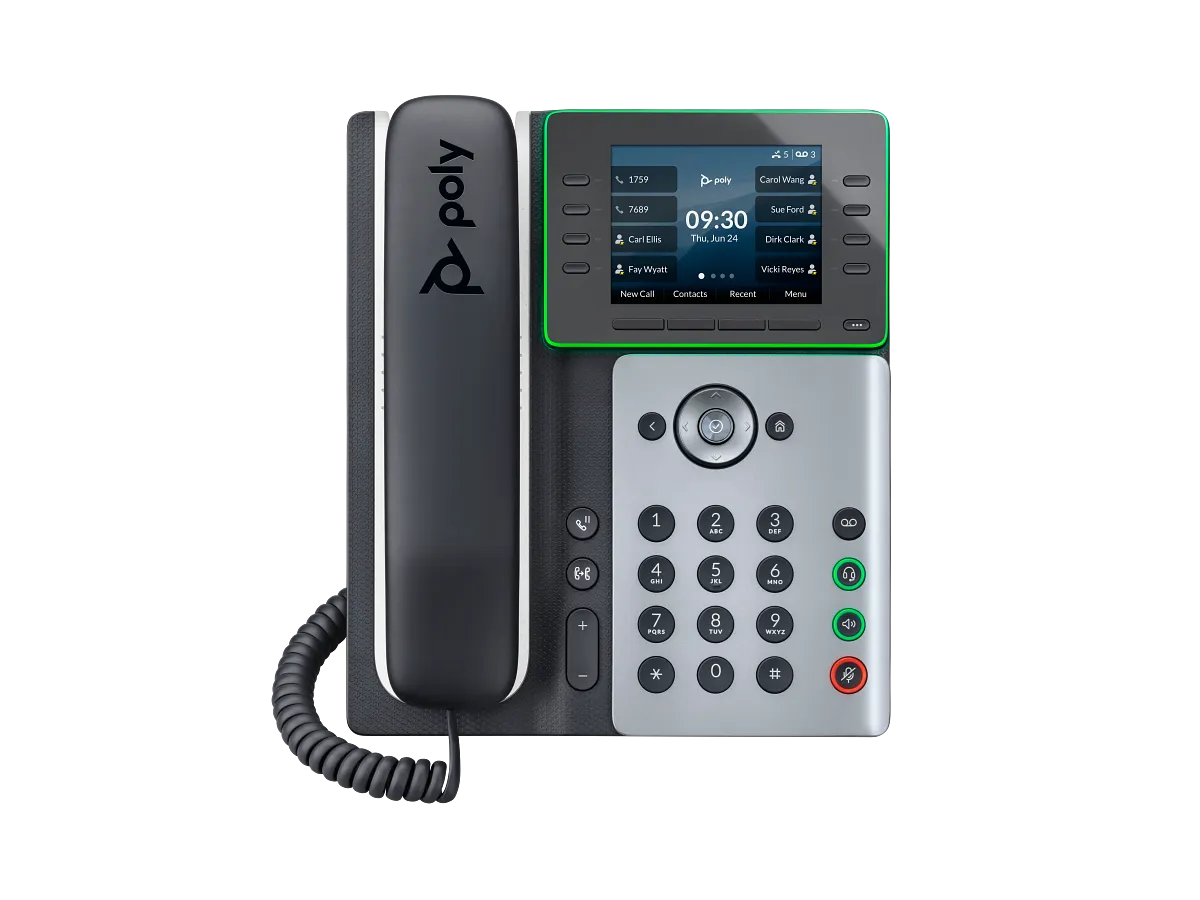
Documented specifications
HP Poly · Exact manufacturer product record available at review; remaining support period and local availability not established.
| Specification | Documented value |
|---|---|
| Display | 3.5-inch color IPS LCD Source ↗ |
| Lines and controls | 8 line keys supporting up to 32 SIP lines or contacts with pagination; not a concurrent-call figure Source ↗ |
| Ethernet | Two Gigabit Ethernet ports, including PC passthrough Source ↗ |
| PoE | Supported through Ethernet; optional 5 VDC, 3 A supply required when using Wi-Fi without PoE Source ↗ |
| Wi-Fi | 2.4 GHz 802.11b/g/n and 5 GHz 802.11a/n/ac Source ↗ |
| Bluetooth | Integrated 5.0 Source ↗ |
| Headset interfaces | Bluetooth, USB-C, RJ9 and EHS; APP-51 adapter is optional for EHS Source ↗ |
| Codecs | G.711 A-law/μ-law, G.722, G.729AB, iLBC, Opus and G.722.1 Source ↗ |
| Provisioning and security | SIP; FTP/TFTP/HTTP/HTTPS provisioning; TLS, SRTP, 802.1X and signed-software support listed Source ↗ |
Unlisted fields remain unverified. Platform compatibility and remaining support life require confirmation for the exact ordered model.
What it is and why consider it
The Edge E350 is the wireless-capable member of HP's E300 desk-phone family. It combines two Gigabit Ethernet ports with 802.11ac Wi-Fi, Bluetooth 5.0 and USB-C, RJ9 and EHS headset paths. Its 3.5-inch display and eight line keys can page through as many as 32 SIP lines or contacts; that published identity capacity is not a promise of 32 simultaneous carrier calls.
Reasons to choose something else
A wired common-area desk may not benefit from the E350's radios, while a contact-heavy reception position may need a dedicated second display or expansion workflow. Bluetooth support does not establish that every headset exposes answer, mute and call-status controls. If Wi-Fi is the network path and the phone is not receiving PoE, HP says an optional power supply is required; include that accessory in the design rather than treating wireless networking as wireless power.
Deployment and acceptance checks
Confirm the exact product number, provider-approved firmware and provisioning template before purchase. HP lists SIP, HTTPS provisioning, TLS, SRTP and 802.1X mechanisms, but the calling platform still determines which features and authentication combinations it supports. Test registration, inbound and outbound calls, hold, attended transfer, message waiting and emergency-location behavior with the approved platform.
For Wi-Fi, test the intended band and SSID at the actual desk during busy-hour traffic, then verify recovery after an access-point interruption and a cold boot. Test the chosen headset over its real path—Bluetooth, USB-C, RJ9 or EHS—including answer, mute and call-status controls. Record whether the phone is powered by PoE or the optional local supply.
Firmware, support and evidence
HP's exact product record identifies product 82M89AA and provides the specifications in this reference. It also warns that most software-enabled features require service-provider support. Match the device, hardware revision, firmware and calling platform in the deployment record, and preserve a supported recovery method before changing firmware.
This is manufacturer-documentation research, not a hands-on review. VoIP.info has not measured audio, radio range, recovery time or interoperability, and does not claim current price, inventory, regional availability or a future support end date.
Watch the explanation
The example changes transfer mode before selecting a colleague, then pauses for a private conversation before completing the handoff. It is a useful practical illustration of the difference between choosing a destination and actually connecting the original caller to it.
Read applicability and editorial notes →Watch this video here
Angell Business configuration on an Edge E350. The recording begins with blind transfer as the usual mode; your provisioned default can differ. Review used the available transcript and primary references; audio and screen readability remain unverified.

The player loads only when you choose Watch here. Playback uses YouTube’s privacy-enhanced embed; YouTube processes playback data.
See why parking uses a shared destination rather than simply placing a call on hold at one handset. The narration then pages a colleague and retrieves the call from the corresponding park key, connecting the phone action with a common front-desk workflow.
Read applicability and editorial notes →Watch this video here
Angell Business Edge E350 configuration. The example’s five-minute timer and paging group 3 are local service settings, not Poly defaults. Review used the available transcript and primary references; audio and screen readability remain unverified.

The player loads only when you choose Watch here. Playback uses YouTube’s privacy-enhanced embed; YouTube processes playback data.
Sources & applicability
Primary references for the technical details above. Operational examples and planning checklists are VoIP.info editorial guidance.
- HP Poly Edge E350 exact product specification (82M89AA) ↗
- HP US Poly Edge E350 technical specifications and platform footnotes ↗
Examples require adaptation to your topology. No live PBX or hardware testing is claimed.