Name the first missing state
Record the phone model, exact firmware, account slot, displayed state, PBX address, transport and time window without copying the secret. Confirm power, address, gateway, DNS and time before changing SIP settings. A disabled account, a REGISTER that never leaves the phone, an unanswered request and a final rejection are different failures.
Use one bounded capture or Asterisk's temporary PJSIP logger to identify the first missing message. Logs and captures can contain identities, addresses and authentication material, so restrict access, stop collection after the reproduction and retain only what the incident requires.
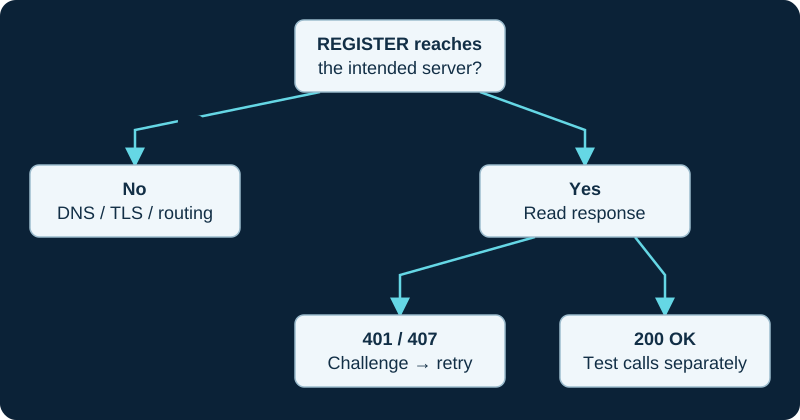
A first 401 challenge can be normal. Read the response to the authenticated retry before changing credentials.
Follow REGISTER end to end
If no REGISTER leaves the phone, inspect the selected account, provisioning result and local dialer state. If it leaves but no response returns, confirm DNS resolution, destination address, port, transport, routing and firewall policy. If a response arrives, keep the full Call-ID and CSeq sequence together.
A challenge followed by a new REGISTER carrying authorization can be normal. A repeated 401 or 407 is not enough by itself to name a bad password: compare username, realm, algorithm, request URI, nonce handling and which system issued the challenge.
Prove the endpoint and auth loaded
Asterisk's PJSIP guide separates endpoint, auth, AoR, transport and contact objects. Inspect the loaded endpoint rather than assuming that a saved file or GUI form became runtime state. The endpoint should reference the intended inbound auth and AoR; the auth object should exist with the exact case-sensitive identity expected by the phone.
Do not remove authentication or reuse an administrator password to make the indicator turn green. Asterisk may return a deliberately unanswerable 401 when it cannot match an endpoint, so prove endpoint identification before rotating a valid secret.
Match the AoR named by REGISTER
For an inbound phone registration, Asterisk uses the user portion of the REGISTER To URI to locate the AoR. The endpoint must reference that AoR, and the AoR must permit a dynamic contact. A section with the wrong name, missing type, misspelled option or unsuitable contact limit can fail before credential checking completes.
Inspect the loaded endpoint and AoR and compare them with the actual To and Contact URIs. A saved endpoint without its expected AoR is not a registration-ready endpoint.
Separate binding from reachability
A successful REGISTER binds a Contact URI to an AoR for an expiry interval. That proves a current location binding, not that OPTIONS qualification succeeds, the phone rings, the call is authorized or media works. Record the contact URI and expiry, then observe at least one refresh without forcing a reboot.
If a contact appears briefly and disappears, compare requested and accepted expiry, duplicate devices using the same identity, max_contacts, removal policy, phone restarts and network changes. Do not hide the lifecycle problem by repeatedly deleting contacts.
Accept recovery in layers
After the correction, prove a fresh challenge and accepted REGISTER, the expected AoR/contact binding and a later renewal. Reboot the phone and confirm that provisioning does not restore the fault. Then test an internal call, two-way media, normal hangup and only the external destinations the endpoint is permitted to use.
This guide did not inspect a phone, PBX, credential, packet, registration, contact, call or media path. Adapt the sequence to the exact firmware, provisioning system, Asterisk build and FreePBX module state.
Follow a failed replacement flow after mobility
When registration fails only after a connectivity transition, preserve the last old-flow keepalive and the new DNS, transport and REGISTER sequence. The softphone network-change diagnostic keeps path availability, SIP flow recovery and registrar contact selection separate.
Use the Baresip branch when an account line exists
For Baresip, use the module, account and registration diagnostic. It distinguishes an absent account User-Agent, intentional regint=0 local account and failed REGISTER transaction.
Trace a Wi-Fi D810W from association to SIP response
Use the D810W Wi-Fi registration diagnostic when the phone joins the SSID but registration still fails.
Respect VoIP Much response timers before retrying
VoIP Much says repeated bad credentials and re-registration that ignores the minimum response interval can trigger source blocking. The provider-specific workflow preserves one complete transaction before credentials, timers or network policy change.
Prove the PhonerLite profile source before resetting credentials
After an update or portable move, PhonerLite may load a different sipper.ini. Use the local-state diagnostic before changing the PBX or password.
Do not reset Linphone credentials before proving the active profile
An update can expose a different configuration or user profile. The Linphone local-data diagnostic separates loaded state from later registration failure.
Sources & applicability
Primary references for the technical details above. Operational examples and planning checklists are VoIP.info editorial guidance.
- IETF RFC 3261 — SIP, including linked updates ↗
- Asterisk PJSIP troubleshooting guide ↗
- Asterisk PJSIP object relationships ↗
- RFC 5626: Managing Client-Initiated Connections in SIP ↗
- RFC 6314: NAT Traversal Practices for Client-Server SIP ↗
- Android: read dynamic network state ↗
- Android ConnectivityManager reference ↗
- Apple NWPathMonitor reference ↗
- Baresip project repository and feature and module list ↗
- Baresip 4.12.0 release ↗
- Baresip account-file reference ↗
- Baresip configuration reference ↗
- Baresip module catalogue ↗
- Snom D810W product page ↗
- Snom D8xx desk-phone family ↗
- Snom SRAPS secure redirection and provisioning service ↗
- Snom Security Center ↗
- Snom product security lifecycle ↗
- Snom TLS support reference ↗
- VoIP Much SIP Trunks ↗
- VoIP Much 3CX Phone System guide ↗
- VoIP Much FreePBX trunk guide ↗
- VoIP Much UniFi Talk guide ↗
- VoIP Much IP blocking guidance ↗
- VoIP Much SIP ALG guidance ↗
- VoIP Much supported audio codecs ↗
- VoIP Much quality suggestions ↗
- VoIP Much network status ↗
- VoIP Much service agreement ↗
- PhonerLite downloads and release history ↗
- PhonerLite profiles, SIP settings and configuration-file locations ↗
- PhonerLite PLP provisioning profiles ↗
- PhonerLite sound devices, active calls and recordings ↗
- PhonerLite logbook and recorded-call linkage ↗
- Linphone stable Windows application archive ↗
- Linphone Desktop application files tree ↗
- Linphone Desktop linphonerc configuration reference ↗
- Linphone troubleshooting and support-log collection ↗
- Linphone remote provisioning ↗
Examples require adaptation to your topology. No live PBX or hardware testing is claimed.