Freeze the last-good and first-bad boundary
Record the last known-good timestamp and exact version, the target artifact or package transaction, repository or source owner, current core show version, service unit, executable path, module directory, configuration directory, build options and the first reproducible symptom. Preserve the original error, a bounded log window and one unaffected control before another reload, restart or edit changes the evidence.
Classify the transition as a point update within one major branch, a major-version upgrade, a managed-product update or an operating-system and dependency change. Asterisk treats updates and upgrades separately, and its support table does not prove which binary, patch set or packaging policy is active on this host.
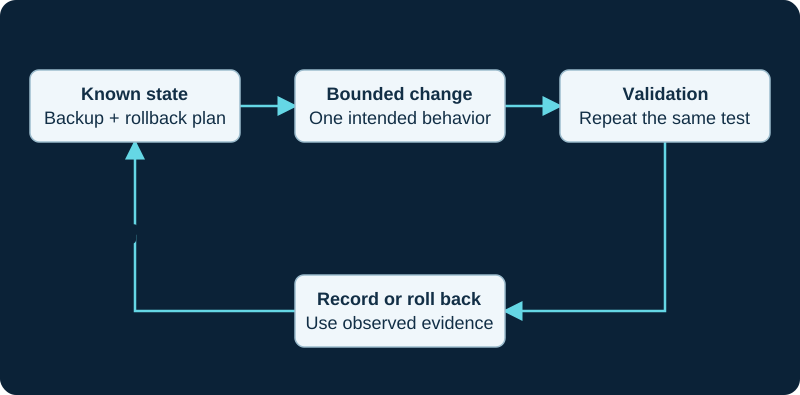
An example operational loop. Follow the supported reload or restart behavior for the affected component.
Confirm that the intended binary is running
Compare the running process and CLI version with the package database or pinned source artifact and with the executable referenced by the service manager. Reconcile architecture, prefix, runtime user, asterisk.conf directories, library search path and module directory. A successful install can leave an old process running, while a service can start a different binary or read a different configuration tree.
On managed FreePBX, appliance or distribution builds, keep the supported package owner in control. Do not replace its Asterisk binary, repositories or generated configuration with a standalone source build merely to make the version string match upstream.
Compare module inventory and load policy
Preserve the last-good and current module files, build-selection record, modules.conf policy, loaded-module inventory and exact load error. Asterisk documents automatic and explicit load controls including autoload, load, noload, preload and require; a present .so file does not prove that it loaded, that its dependencies resolve or that its configuration parsed.
Check third-party and out-of-tree modules against the exact ABI, packaging and vendor support boundary. Correct the demonstrated missing binary, dependency, selection or load rule. Avoid force-unloading an in-use module or copying a module from another build, because either action can turn a bounded regression into a crash or an unsupported mixed installation.
Compare authoritative configuration and state
Read the exact release's upgrade record and compare authoritative configuration, generated output, include order, option names, defaults, object identifiers, file ownership and permissions. The current Asterisk maintenance guide points operators to UPGRADE.txt, CHANGES and ChangeLog records for compatibility, features and fixes; newer release policy notes may place details in per-version change documents. Follow the artifact that belongs to the installed target rather than a moving Latest API page.
Reconcile AstDB or realtime records, voicemail and spool data, recordings, prompts, certificates and keys, database schemas and external AMI, ARI or AGI clients separately. A configuration parser accepting a file does not prove that stored state, credentials or an integration still matches it.
Trace one affected workflow to its first divergence
Run the smallest approved reproduction and follow it in order: listener, module and object load, endpoint or application selection, authentication, routing, channel creation, answer, media, feature execution and hangup. Compare the same checkpoints with the retained last-good evidence and an unaffected control. For a startup failure, stop at the first module, file or dependency error instead of testing calls.
Keep release-note relevance conditional. A note that resembles the symptom is a hypothesis until the installed version, affected component and observed behavior agree. A process that starts, a trunk that registers or one completed call cannot establish every call path, integration, failover case or emergency workflow.
Repair or roll back one proven owner
Change only the first proven boundary: repository or artifact, executable path, build selection, dependency, module policy, supported configuration owner, schema migration, file permission, certificate reference or client integration. Reapply through the documented package, source or managed-platform path. If the acceptance stop condition is reached, use the rehearsed rollback rather than stacking speculative edits.
After repair or rollback, prove the intended version and paths, module and object state, affected workflow, unaffected control and required restart persistence. Record what remains untested. No host, module, configuration, state store, certificate, registration, call, media path or rollback was inspected or tested for this diagnostic.
Check Realtime schema revision after an Asterisk upgrade
The PJSIP Realtime diagnostic compares the installed branch, migration revision, table definition, mapping and cache before changing rows.
Trace missing capability through the complete build chain
When a feature disappears after an update or upgrade, use the missing-by-version diagnostic to compare branch docs, source, dependencies, build selection, installed file, load policy, running state and registry.
Classify a deprecated dialplan-function regression
Use the VALID_EXTEN upgrade diagnostic to separate removal, build state, omitted defaults and routing semantics.
Sources & applicability
Primary references for the technical details above. Operational examples and planning checklists are VoIP.info editorial guidance.
- Asterisk release-series lifecycle ↗
- Asterisk official GitHub release feed ↗
- Updating or upgrading Asterisk ↗
- Upgrading to Asterisk 23 ↗
- Asterisk module-loader configuration ↗
- Asterisk main configuration file and paths ↗
- Asterisk Realtime database configuration ↗
- Asterisk setting up PJSIP Realtime ↗
- Asterisk Sorcery overview and mapping ↗
- Asterisk Sorcery caching ↗
- Asterisk Realtime schema management with Alembic ↗
- Asterisk PJSIP troubleshooting guide ↗
- Asterisk extconfig.conf sample ↗
- Asterisk sorcery.conf sample ↗
- Asterisk: Software Configuration Management Policies ↗
- Asterisk: What to Download ↗
- Asterisk: Supported Platforms ↗
- Asterisk 23 Documentation ↗
- Asterisk: Troubleshooting Module Loading ↗
- Asterisk: Types of Asterisk Modules ↗
- Asterisk: CLI Syntax and Help Commands ↗
- Asterisk 22 VALID_EXTEN function and deprecation notice ↗
- Asterisk 23 DIALPLAN_EXISTS function ↗
- Asterisk 23 dialplan-function index ↗
- Asterisk func_dialplan implementation ↗
- Asterisk dialplan-function availability and syntax ↗
- Asterisk dialplan reload and show workflow ↗
- Asterisk dialplan pattern matching ↗
Examples require adaptation to your topology. No live PBX or hardware testing is claimed.