Inventory configured paths before copying defaults
Record the Asterisk version, source or package origin, build options, operating system, service unit, runtime user and loaded modules. Then read the active asterisk.conf: Asterisk documents configurable locations for configuration, modules, variable data, the internal database, keys, system data, AGI scripts, spool content, runtime files and logs. Default path names are examples, not proof of where this host stores its state.
Classify each location by recovery purpose. Configuration and custom dialplan, certificates and keys, custom sounds, AGI programs, voicemail, monitor or recording output and the internal AstDB can all affect service restoration. PID and control-socket files are runtime artifacts rather than items to restore onto a stopped replacement. Logs and reports may be required for audit or investigation even when they are not required to start calls.
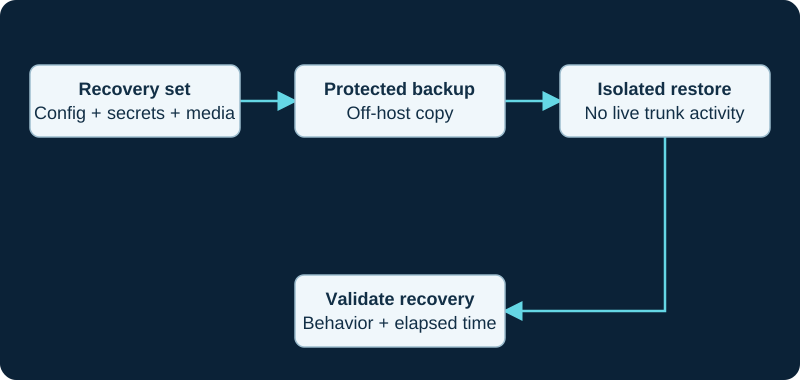
Keep production trunk identities from registering during a restore exercise. Include the dependencies needed to decrypt and use the backup.
Follow state outside the Asterisk directories
The Asterisk backup guidance explicitly includes the internal database, other databases used by Asterisk, and logs or reports. Inventory ODBC, realtime, CDR, CEL, queue, voicemail and application backends by actual configuration. A file archive and a separate database dump taken at unrelated moments are not automatically one consistent recovery point. Record the capture order, transaction or snapshot mechanism and the time boundary.
Preserve package or source-build metadata, installed codec and resource modules, custom libraries, service overrides, scheduled jobs, firewall and DNS dependencies and any external scripts or media stores needed for the same behavior. Do not copy installed module binaries across an operating-system or major-version boundary as if they were portable configuration.
Capture mutable files and secrets deliberately
Choose a capture method that accounts for files changing during collection. Asterisk's SQLite-backed AstDB uses the configured astdbdir and can create journal state, so copying only a remembered astdb.sqlite3 path is not a substitute for a controlled backup procedure. Treat voicemail, call recordings, outgoing spool files and database writes as mutable workloads with an explicit consistency decision.
Encrypt off-host copies and restrict access to SIP credentials, database passwords, API secrets, private keys, recordings, voicemail and call records. Keep the recovery instructions, encryption-key custody and contact path available independently of the failed PBX. A successful archive command proves only that bytes were written; verify readability, integrity, retention and restore authorization separately.
Restore first into an isolated identity
Build the target with the intended operating system, Asterisk branch, modules and dependencies before placing configuration and data at their configured paths. Restore ownership, permissions and certificate references explicitly. Asterisk warns that restoration into a new major version must follow the same review as an upgrade because configuration syntax, database schemas, applications and functions can change.
Block provider registration, public inbound exposure, outbound trunks, AMI or ARI automation and scheduled call files until the recovered host has a distinct test identity. Avoid allowing a restore exercise to compete with production Contacts, execute queued calls, send duplicate notifications or reuse a live certificate and credential without authorization. FreePBX installations require the supported FreePBX backup workflow, not this standalone file inventory alone.
Prove service, data and rollback separately
Start with configuration parsing, module load, expected endpoints and database connectivity. In the isolated environment, verify internal registration and calling, prompts, voicemail deposit and retrieval, queues or applications in scope, CDR or CEL output and access to restored recordings. Compare counts or hashes for representative mutable data and retain the exact restore log.
Schedule provider, public-number and emergency-path validation under separate controlled procedures. Record recovery-point age, elapsed recovery time, manual dependencies, accepted data loss and the decision to promote or abandon the recovered host. A booting process is not evidence that routing, media, stored messages, reports or external integrations were recovered. No PBX, archive, database, credential, module, voicemail, recording, route, call or disaster-recovery time was inspected or tested for this guide.
Include owned AstDB state in recovery evidence
The AstDB guide requires explicit backup scope, restore timestamp, namespace ownership and post-restore readback instead of assuming configuration files carry every persistent value.
Back up the true configuration owner before remote edits
The AMI configuration diagnostic records source and destination hashes, generator ownership and rollback scope before correction.
Preserve module policy and package inventory together
The AMI module-control guide treats modules.conf and the installed module set as separate recovery inputs.
Protect AstDB before a subtree deletion
The AMI AstDB guide requires a bounded inventory, consistent backup and tested recovery contract before DBDelTree.
Sources & applicability
Primary references for the technical details above. Operational examples and planning checklists are VoIP.info editorial guidance.
- Asterisk backup and restore guidance ↗
- Asterisk directory and file structure ↗
- Asterisk main configuration file ↗
- Asterisk SQLite AstDB backend ↗
- Asterisk internal database overview ↗
- Asterisk DB dialplan function ↗
- Asterisk DB_EXISTS dialplan function ↗
- Asterisk DB_DELETE dialplan function ↗
- Asterisk DB_KEYS dialplan function ↗
- ↗
- ↗
- ↗
- ↗
- ↗
- ↗
- ↗
- ↗
- ↗
- ↗
- ↗
- ↗
- ↗
- ↗
- ↗
- ↗
- ↗
- ↗
- ↗
- ↗
- ↗
- ↗
- ↗
- ↗
- Asterisk 23 AMI DBGet action ↗
- Asterisk 23 AMI DBGetTree action ↗
- Asterisk 23 AMI DBPut action ↗
- Asterisk 23 AMI DBDel action ↗
- Asterisk 23 AMI DBDelTree action ↗
- Asterisk AMI v2 specification ↗
Examples require adaptation to your topology. No live PBX or hardware testing is claimed.