Classify one failure before changing the trunk
Record the source device and selected account, digits entered, timestamp, Call-ID and exact user-visible result. Separate no request leaving the phone, local PBX rejection, no outbound channel, remote SIP rejection, ringing without answer, answer without two-way audio and an established call that later drops. Those outcomes have different evidence owners.
Use one permitted destination and only purposeful comparisons: the same number from another authorized extension, another allowed destination in the same class, or an internal call. One international destination failing is not evidence that every outbound route or trunk is down. Do not use an emergency number as an ordinary test destination.
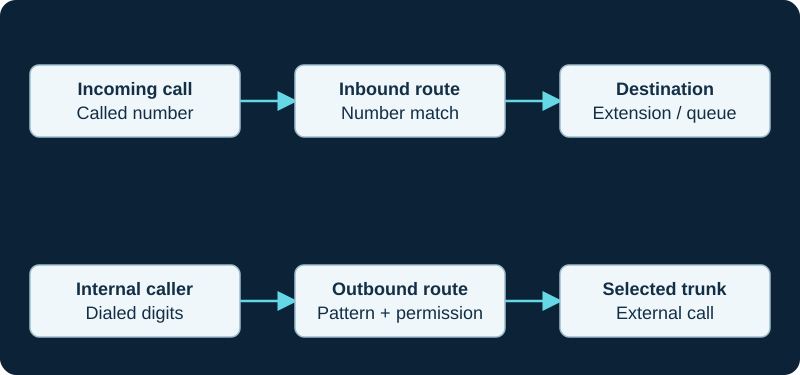
A working outbound call does not prove inbound number routing. Diagnose the direction and the matching rule independently.
Prove the phone-to-PBX leg and received digits
If no INVITE reaches the PBX, inspect the active line, endpoint dial plan, Send behavior, interdigit timeout and provisioning result. A registered icon does not prove that the dial action selected that account or transmitted the displayed digits. Preserve the Request-URI and From identity when the INVITE does arrive.
Confirm which endpoint Asterisk identified and the loaded context where routing begins. An authorization or dialplan failure on this first leg cannot be repaired by rotating carrier credentials. Continue with the focused registered phone cannot call investigation when the fault remains before trunk selection.
Follow route order, transformation and trunk attempts
Identify the exact FreePBX outbound route that matched, the digits it received, any removed prefix or prepended digits, and its configured trunk sequence. Sangoma documents that matching dial patterns select a route and that the listed trunks are attempted in order until a call completes. A configured trunk is not proof that this call reached it.
Preserve every attempted channel and the number sent at each boundary. A broad earlier route may intercept the call; a fallback trunk may require different normalization, caller identity, emergency treatment or commercial authorization. If no carrier request leaves the PBX, use the outbound-route investigation before changing upstream settings.
Separate local channel outcome from the remote response
Asterisk Dial() attempts one or more requested channels and exposes DIALSTATUS; per-channel hangup-cause information can preserve additional results. BUSY, CONGESTION and CHANUNAVAIL are summaries, not interchangeable root causes. Correlate them with channel creation, the outbound SIP transaction and the party that generated the final response.
If an INVITE reaches the carrier, retain the complete final response, any Retry-After and the carrier call identifier. Number format, destination permission, authorized caller ID, registration or IP-auth state, account policy, concurrent-call entitlement and a genuinely busy remote party require different remedies. A 403 does not prove an incorrect password, and FreePBX's all-circuits-busy announcement is not a measured capacity result. The Asterisk hangup-cause guide provides the per-channel method: retain every HANGUPCAUSE_KEYS() entry, its technology and translated cause, the application-level DIALSTATUS and the original SIP exchange instead of assigning one final value to every attempted trunk.
Continue through answer and media instead of stopping at ringback
A provisional response or audible ringback does not prove answer, billing state or media. Record the final response, ACK, answered bridge, negotiated SDP on each PBX leg, received RTP and decoded two-way audio. If the far end answers but one or both parties cannot hear, preserve the successful signaling path and move to the relevant media diagnostic rather than reopening route matching.
If the call drops later, record elapsed time and the in-dialog request or timeout that ended it. Registration, outbound routing, answer, media and session continuity are separate acceptance stages.
Repair one owner and verify policy as well as success
Correct the narrow demonstrated owner: phone digit handling, endpoint identity, loaded route, number normalization, trunk selection, reachability, authentication, caller identity, carrier permission or media path. Keep a rollback record and disable temporary PJSIP logging after the authorized reproduction. SIP traces can contain phone numbers, addresses and authentication material, so redact shared extracts.
Retest the original permitted destination, a neighboring allowed case and a deliberately prohibited class. Confirm the selected trunk, displayed caller identity, answer, bidirectional audio and normal hangup. No phone, PBX, route, trunk, carrier account, number, permission, response, call, media stream, emergency workflow, price, capacity, availability or compatibility was inspected or tested for this guide.
core show version
pjsip show endpoint <source-extension>
pjsip show endpoint <selected-trunk>
pjsip set logger on
# Place one authorized call; retain the Call-ID, matched route, attempted channel and final response.
pjsip set logger off
Continue an answered Zen call into the media path
If the Zen leg answers but audio is missing, use the Zen media diagnostic to resolve SDP, RTP direction and codec evidence after outbound routing has succeeded.
Check SIPTRUNK source identity after an authentication-mode change
A SIPTRUNK IP-authenticated trunk accepts outbound traffic only from its stored public address, while registration mode uses a challenge exchange. The mode-mismatch diagnostic separates source-address rejection, credential failure, route failure and later call handling.
Keep SIP.US outbound gateway recovery separate from inbound failover
SIP.US gateway selection can move one trunk between provider edges, while DID secondary assignment and PSTN Backup affect inbound treatment. The SIP.US failover diagnostic records those paths and their capacity separately.
Keep Bulk Solutions emergency destinations out of ordinary-call guesswork
Bulk Solutions documents separate 911 and 922 destinations plus exact emergency caller-number formats. The Bulk Solutions emergency diagnostic traces the chosen trunk, SIP identities, response and database readback without using 911 as a generic test call.
Do not confuse Flowroute inbound PSTN forwarding with trunk egress
Flowroute describes a number inbound route as an outbound PSTN call to the destination, while ordinary customer-originated outbound access uses a separate interconnection path. The Flowroute diagnostic records the correct leg and result.
Diagnose Twilio silence or 403 at the first provider boundary
Use the Twilio termination diagnostic to prove the Request-URI, selected address, source IP, challenge flow and exact rejection before changing dial plans, caller ID or account permissions.
Start with the issued IP Telecom trunk profile
The reviewed public pages do not publish a complete IP Telecom authentication, proxy or caller-identity profile. Use the provider record to compare the exact handoff, loaded PBX object, request identity, response and later media before changing unrelated defaults.
Start with the issued Clearfly voice-group profile
The reviewed public pages do not publish one Clearfly authentication, proxy or caller-identity profile. Use the provider record to compare the exact handoff, loaded PBX object, request identity, response and later media.
Start with the current Redcentric handoff
The reviewed public pages do not publish one Redcentric authentication, proxy or identity profile. Use the provider record to compare the issued handoff, DNS, loaded PBX or SBC object, request, response, destination answer and media.
Start with the selected CommPeak account method
CommPeak documents password and IP-based SIP accounts. Use the provider record to compare portal state, DNS, source address or challenge, PBX route, caller identity, request, response, destination answer and media.
Identify which Voximplant leg failed
The Voximplant provider record separates the originating PBX or application leg, scenario logic, external SIP or PSTN leg, authentication, identity, response and media so a scenario failure is not treated as a carrier conclusion.
Separate TelVox caller-ID lookup from carrier presentation
The TelVox Connect provider record keeps lookup response, allowed-ID enforcement, default fallback, outbound SIP identity, carrier acceptance and destination display distinct—especially when the five-second lookup fails.
Trace VoIP Much digits, identity and channel scope
The VoIP Much diagnostic records normalization, Request-URI, presented identity, provider response and paid-channel state; invalid-number retries can themselves contribute to source blocking.
Trace VoIPline caller identity and concurrent-call scope
The VoIPline diagnostic records normalized digits, valid allocated caller identity, selected route, response and channel state.
Check the SignalWire credential handler and Send As identity
The SignalWire workflow separates profile-default, passthrough, block-PSTN and resource handling from PBX routing and downstream rejection.
Do not repair Telnyx inbound routing in the Outbound Voice Profile
The Outbound Voice Profile controls outbound association, destinations and limits; it is not the number-to-Connection relationship for inbound delivery. Use the Telnyx diagnostic for the inbound path.
Keep Bandwidth outbound realm credentials outside inbound routing
A valid Bandwidth realm and SIP credential authenticate outbound calls; they do not prove a number’s inbound route configuration. Use the Bandwidth diagnostic for the inbound path.
Preserve MicroSIP Request-URI and PAI separately
MicroSIP 3.22.19 documents a fix where P-Asserted-Identity could replace the originally dialed extension. The MicroSIP diagnostic records entered digits, dial-plan result, Request-URI, From, PAI, PBX route and final response without assuming the release note explains the call.
Use a working didlogic outbound call only as a bounded control
Outbound success proves one egress path at one time. The didlogic inbound-DID diagnostic traces the separate inbound number path.
Keep Bulk Solutions digest evidence separate from inbound routing
If challenges loop, preserve the authenticated retry and any account-specific registration requirement. The provider diagnostic keeps that branch separate from a missing inbound DID.
Sources & applicability
Primary references for the technical details above. Operational examples and planning checklists are VoIP.info editorial guidance.
- Sangoma: FreePBX outbound route matching and trunk sequence ↗
- Asterisk: Dial application and DIALSTATUS ↗
- Asterisk: per-channel hangup-cause inspection ↗
- Asterisk: PJSIP troubleshooting and SIP logger ↗
- Asterisk: collect and clean up debug logging ↗
- IETF RFC 3261 — SIP, including linked updates ↗
- Asterisk hangup-cause mapping table ↗
- Asterisk HANGUPCAUSE function ↗
- Asterisk HANGUPCAUSE_KEYS function ↗
- Asterisk HangupCauseClear application ↗
- Asterisk CHANNEL function and hangupsource ↗
- Zen General SIP Settings ↗
- Zen Business SIP Trunking ↗
- Zen Business Talk SIP specific terms ↗
- SIPTRUNK IP authentication setup ↗
- SIPTRUNK registration connection issues ↗
- SIPTRUNK inbound-call troubleshooting ↗
- SIPTRUNK registration status ↗
- SIPTRUNK call failover options ↗
- SIPTRUNK interconnection and gateway addresses ↗
- SIPTRUNK general SIP device configuration ↗
- SIP.US current gateways and interconnection requirements ↗
- SIP.US general device configuration ↗
- SIP.US registration status guide ↗
- SIP.US call failover options ↗
- SIP.US SIP glossary and routing model ↗
- SIP.US IP authentication guide ↗
- SIP.US Asterisk registration guide ↗
- Bulk Solutions E911 FAQ ↗
- Bulk Solutions E911 testing instructions ↗
- Bulk Solutions E911 country coverage ↗
- Bulk Solutions E911 address change guidance ↗
- Bulk Solutions outbound IP-authenticated trunk setup ↗
- Bulk Solutions E911 webhook notifications ↗
- Bulk Solutions E911 SMS notifications ↗
- Flowroute inbound route and failover assignment guide ↗
- Flowroute current PoP and DNS guidance ↗
- Flowroute interconnection options ↗
- Twilio Elastic SIP Trunking configuration ↗
- Twilio Elastic SIP Trunking troubleshooting ↗
- Twilio sending-SIP best practices ↗
- Twilio CredentialList resource ↗
- Twilio Trunk resource ↗
- Twilio error 32201: source IP address not in ACL ↗
- IP Telecom SIP Trunks ↗
- IP Telecom terms and SIP Trunking product schedule ↗
- IP Telecom Fair Use Policy ↗
- IP Telecom Ireland copper switch-off guidance ↗
- IP Telecom contact and support ↗
- Clearfly voice services and SIP trunking ↗
- Clearfly service FAQs ↗
- Clearfly partner programme and portal ↗
- Clearfly support contacts ↗
- Clearfly legal and regulatory index ↗
- Clearfly Acceptable Use Policy ↗
- Redcentric voice modernisation ↗
- Redcentric communications services ↗
- Redcentric customer support ↗
- Redcentric service status ↗
- Redcentric SIP Trunking Service Description SD032 v2.1 (legacy public PDF) ↗
- Redcentric Hays telephony customer case study ↗
- CommPeak SIP trunking ↗
- CommPeak documentation and developer hub ↗
- CommPeak SIP account configuration ↗
- CommPeak FreePBX SIP trunk guide ↗
- CommPeak Asterisk PBX SIP trunk guide ↗
- CommPeak pricing overview ↗
- CommPeak service status ↗
- Voximplant SIP trunking solution ↗
- Voximplant SIP trunk connection FAQ ↗
- Voximplant SIP phone registration FAQ ↗
- Voximplant processing calls in scenarios ↗
- Voximplant CallSIP parameters ↗
- Voximplant telephony and SIP capabilities FAQ ↗
- Voximplant pricing ↗
- Voximplant service status ↗
- TelVox Connect SIP trunks API reference ↗
- TelVox Connect authentication and API keys ↗
- TelVox Connect Calls API reference ↗
- TelVox Connect phone numbers reference ↗
- TelVox Connect recordings API reference ↗
- TelVox Connect webhooks API reference ↗
- TelVox Connect pricing ↗
- TelVox security and compliance ↗
- Renav Limited TelVox products ↗
- VoIP Much SIP Trunks ↗
- VoIP Much 3CX Phone System guide ↗
- VoIP Much FreePBX trunk guide ↗
- VoIP Much UniFi Talk guide ↗
- VoIP Much IP blocking guidance ↗
- VoIP Much SIP ALG guidance ↗
- VoIP Much supported audio codecs ↗
- VoIP Much quality suggestions ↗
- VoIP Much network status ↗
- VoIP Much service agreement ↗
- VoIPline Telecom SIP trunking ↗
- VoIPline Telecom pricing and rates ↗
- VoIPline Telecom legal documents ↗
- VoIPline Voice and SMS (IP) service schedule ↗
- VoIPline SIP trunks critical information summary ↗
- VoIPline Telecom network ↗
- VoIPline Telecom number porting ↗
- VoIPline Telecom service status ↗
- SignalWire SIP trunking ↗
- SignalWire SIP credentials ↗
- SignalWire Get SIP credential API ↗
- SignalWire Update SIP profile API ↗
- SignalWire FreePBX integration ↗
- SignalWire caller ID and CNAM ↗
- SignalWire rate limits ↗
- SignalWire E911 ↗
- SignalWire rates ↗
- Telnyx SIP trunking service objects ↗
- Telnyx authentication methods ↗
- Telnyx failover and retries ↗
- Telnyx SIP response codes ↗
- Telnyx Outbound Voice Profiles ↗
- Telnyx round-robin routing ↗
- Telnyx current SIP network information ↗
- Telnyx machine-readable voice network data ↗
- Telnyx configuration-guide boundary ↗
- Bandwidth Build SIP trunking setup ↗
- Bandwidth number feature and Final Destination URI management ↗
- MicroSIP project and platform scope ↗
- MicroSIP stable downloads and changelog ↗
- MicroSIP current-version pointer ↗
- MicroSIP account, call and network settings ↗
- MicroSIP troubleshooting ↗
- MicroSIP frequently asked questions ↗
- didlogic SIP credentials ↗
- didlogic outbound calling and regional gateways ↗
- didlogic inbound setup and destination routing ↗
- didlogic SIP trunking and PBX setup ↗
- didlogic Asterisk configuration and troubleshooting ↗
- didlogic direct interconnection requirements ↗
- Bulk Solutions service overview ↗
- Bulk Solutions inbound IP-authenticated setup ↗
- Bulk Solutions current IP-authentication workflow ↗
- Bulk Solutions current registration workflow ↗
- Bulk Solutions direction-split Retell integration ↗
- Bulk Solutions legacy FreePBX 14 IP-authentication template ↗
Examples require adaptation to your topology. No live PBX or hardware testing is claimed.