Identify which stage failed
Can the caller reach the correct greeting? Does a message appear in the mailbox? Can the user retrieve it? Does the phone show a waiting-message indicator? Treat each answer as a separate branch rather than resetting the phone immediately.
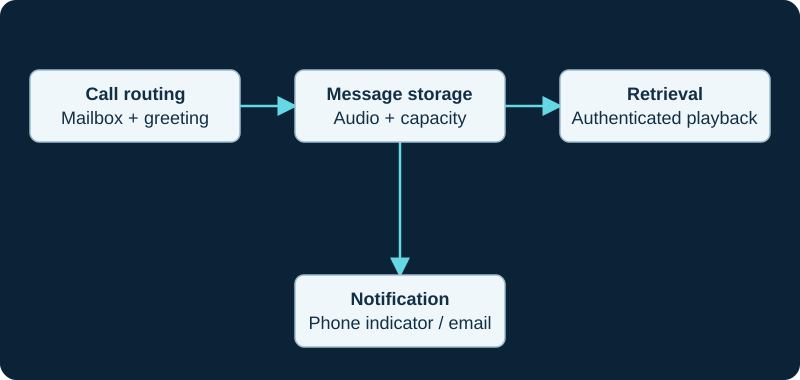
A message-waiting or email fault can occur even when the recording was saved correctly.
If the greeting is wrong or missing
Check the unanswered-call destination and the mailbox context. Confirm the mailbox exists and the call reaches the intended application. On FreePBX, inspect the extension voicemail settings and GUI routing; avoid editing generated Asterisk files.
If recording or playback fails
Check mailbox capacity, filesystem space and service permissions. Compare one controlled message with the failure. If the stored message is silent, inspect the inbound media path; if it contains audio but playback is silent, investigate the retrieval leg instead.
If only notification fails
Check the phone's mailbox association and subscription behavior. Email notifications have a separate delivery path and may fail despite a valid local message. When local playback succeeds but email does not, use the FreePBX voicemail-to-email investigation to separate mailbox policy, Asterisk's mail command, local transport, relay acceptance and recipient handling. Do not expose voicemail retrieval without authentication to simplify access. Finish by testing greeting, message deposit, retrieval and notification together, then remove any temporary diagnostic capture.
If the message exists and retrieval works but the lamp is stale, continue with the MWI-specific evidence path. It keeps mailbox state, mapping, SUBSCRIBE/NOTIFY behavior and the phone interface as separate layers.
Prove whether Blink suppressed the voicemail branch
Blink documents Reject as a 603 decision that can cancel voicemail, Busy as 486 that leaves server routing active, and Escape as local silence without a SIP response. The Blink inbound-disposition diagnostic provides a fixed three-attempt test before changing mailbox settings.
Separate mailbox counts from recording, retrieval and notification symptoms
Use the AMI mailbox-query diagnostic to isolate identity, field mapping, store freshness and cache faults before changing voicemail flow.
Separate missing users from missing messages
Use the voicemail-user diagnostic to isolate node, module, context, framing, parsing and cache faults.
Diagnose rejected or over-broad MWI controls
Use the AMI MWI control diagnostic for release, module, scope, mailbox, count and EntityID faults.
Sources & applicability
Primary references for the technical details above. Operational examples and planning checklists are VoIP.info editorial guidance.
- Asterisk 22 VoiceMail application ↗
- IETF RFC 3842: SIP message-summary and message waiting indication ↗
- Asterisk PJSIP MWI troubleshooting ↗
- Blink incoming-call alert choices ↗
- Blink SIP accounts and registration state ↗
- Blink main interface and outbound account selection ↗
- Blink audio-call controls and preferences ↗
- Blink platform-specific changelog ↗
- RFC 3261 SIP response and proxy-branch behavior ↗
- ↗
- ↗
- ↗
- ↗
- ↗
- ↗
- ↗
- ↗
- ↗
- ↗
- ↗
- ↗
- ↗
- ↗
- ↗
- ↗
- ↗
Examples require adaptation to your topology. No live PBX or hardware testing is claimed.