Freeze the working baseline and name the remote topology
Record the working local endpoint, firmware, account, DNS answer, transport, address family, provisioning source and call behavior before moving it. Then label the intended remote design: public NAT traversal, organization VPN, managed SBC or another supported boundary. A different Wi-Fi network is not a topology description.
Compare one variable at a time: DNS, route, source address and port, firewall policy, VPN prefix, overlapping private subnet, transport, TLS trust, provisioning reachability and endpoint policy. Do not rotate a credential that the local control has just demonstrated to work unless the signaling evidence points to authentication.
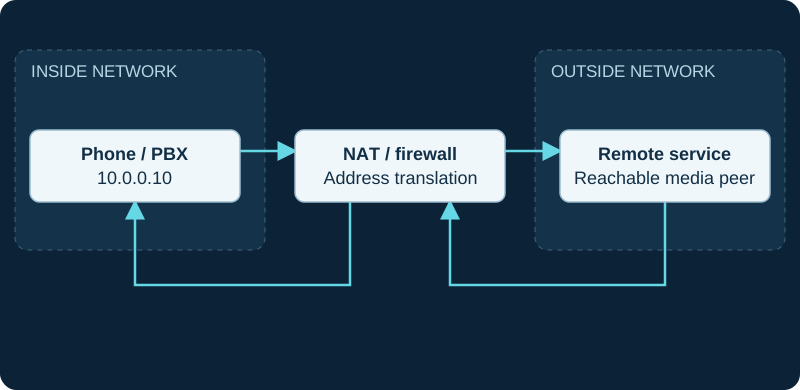
10.0.0.10 is an illustrative private address. Both directions traverse the NAT/firewall; signaling success does not validate SDP media reachability.
Find the first missing signaling checkpoint
Trace DNS, socket establishment, TLS negotiation where used, REGISTER, challenge and authenticated retry, accepted binding, the AoR's stored Contact, qualification, inbound INVITE and endpoint ringing. Stop at the first missing transition. Asterisk cannot contact an endpoint without an AoR and usable Contact, while a successful OPTIONS qualification is reachability evidence rather than proof of an inbound call or media path.
Preserve timestamps, endpoint and AoR names, source and destination tuple, response code, Call-ID and Contact URI. A completed outbound call with failed inbound delivery points to a different boundary than no registration reply.
Assign each advertised address to its owner
For Asterisk behind NAT, transport-level local_net, external_media_address and external_signaling_address govern the PBX's advertised boundaries. For a remote endpoint behind NAT, endpoint options such as force_rport, rewrite_contact, rtp_symmetric and direct_media affect different return or media paths. Inspect SIP source, Via, Contact and SDP connection and media values separately before changing one of them.
force_rport sends SIP responses to the request's source port. rewrite_contact targets subsequent requests at the observed source address and port. rtp_symmetric sends RTP to the address and port from which media arrives. These controls are not interchangeable, and enabling every NAT option cannot substitute for identifying the failing address.
Inspect Contact creation, refresh and removal
A dynamic registration creates a Contact under the AoR; the REGISTER user must identify that AoR. Capture the stored URI and status before and after a refresh, public-address change and controlled reconnect. With rewrite_contact, a refresh from a different source can create a distinct Contact and exceed max_contacts.
Treat remove_existing and remove_unavailable as explicit lifecycle policies, not generic cleanup switches. Qualification frequency and timeout can mark a Contact unavailable, but a green current status does not prove that stale alternatives, routing order or a later NAT expiry cannot break inbound delivery. Check that policy matches the endpoint's roaming and simultaneous-device requirements.
Separate registration from media delivery
For one-way or absent audio, compare SDP c= and m= values with the actual RTP source and destination on each call leg. direct_media changes whether endpoints attempt media with each other; rtp_symmetric changes the return target observed by Asterisk. ICE, STUN, TURN and VPN routing are separate designs whose support and placement must be verified for the selected client.
A registered phone, ringing endpoint, received RTP packet and decoded audible stream are four different results. Preserve codec and DTMF negotiation, hold and transfer changes, and the network interface on which media was observed before altering credentials or increasing Contact limits.
Verify security, recovery and unattended persistence
Use the organization's supported remote-access design and current device guidance. A handset's calling path does not require exposing its web administration or the PBX management interface to the internet. Apply least-privilege signaling and media rules, and document where TLS and SRTP begin and end instead of describing the whole route as encrypted from one protected leg.
Test inbound, outbound, hold, transfer and DTMF, then restart the endpoint and exercise controlled address, Wi-Fi and VPN transitions. Record re-registration, Contact replacement and recovery timing, plus the approved emergency-calling alternative for a remote location. No endpoint, PBX, AoR, Contact, NAT device, firewall, VPN, signaling exchange, call, RTP stream or emergency workflow was inspected or tested for this guide.
Reproduce the transition, not only the destination network
If a remote extension works after a fresh launch but fails after Wi-Fi, mobile data or VPN changes, use the softphone network-change diagnostic. A network can be reachable while the client still routes calls through a stale SIP flow or registrar contact.
Use the Sangoma Phone service branch for PBX-bound clients
When a Sangoma Phone user cannot sign in remotely, the product-specific diagnostic keeps RTAPI, certificate, WSS and PBX user authorization separate from generic SIP registration and NAT.
Sources & applicability
Primary references for the technical details above. Operational examples and planning checklists are VoIP.info editorial guidance.
- IETF RFC 3261 — SIP, including linked updates ↗
- IETF RFC 3550 — RTP and RTCP ↗
- Asterisk: configuring res_pjsip through NAT ↗
- Asterisk: PJSIP configuration sections and relationships ↗
- Asterisk latest res_pjsip configuration reference ↗
- IETF RFC 5626 — SIP outbound connections and flow keepalive ↗
- RFC 5626: Managing Client-Initiated Connections in SIP ↗
- RFC 6314: NAT Traversal Practices for Client-Server SIP ↗
- Android: read dynamic network state ↗
- Android ConnectivityManager reference ↗
- Apple NWPathMonitor reference ↗
- Sangoma Phone web app for FreePBX and PBXact ↗
- Sangoma softphone troubleshooting tips ↗
- Sangoma PBX platform port reference ↗
- Sangoma Phone desktop installation and login ↗
- Sangoma Phone external connection requirements ↗
- Sangoma Phone PBX setup guide ↗
- Sangoma desktop softphone release record ↗
Examples require adaptation to your topology. No live PBX or hardware testing is claimed.