Find the first failed stage
Start with a single affected call and a timestamp. Check microphone capture, application signaling, session negotiation, ICE connectivity, DTLS keying and media flow in that order. Some stages overlap, but this sequence prevents a media problem from triggering unrelated credential changes. Record the exact browser, operating system and client release. A reproducible result on one network and failure on another is more useful than a general statement that browser calling is unreliable.
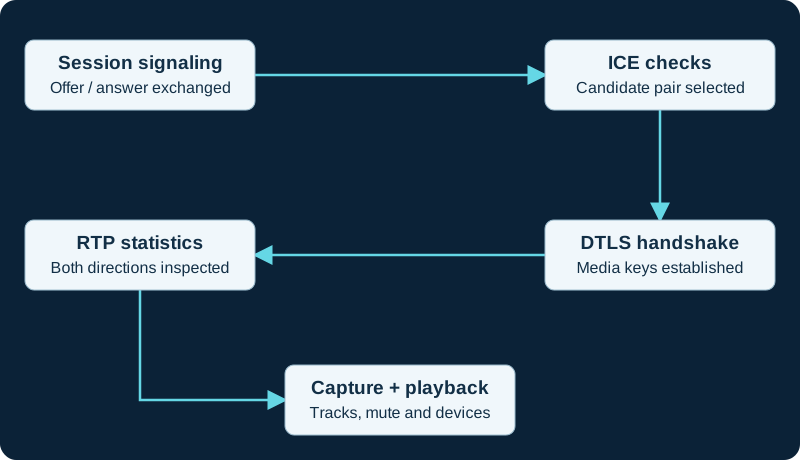
A diagnostic order, not a strict application timeline: capture can start earlier and ICE gathering may be incremental. Successful signaling alone does not prove audio works.
Read counters with state
Inspect connection-state changes, the selected candidate pair, codec and inbound/outbound RTP statistics. Increasing bytes on a candidate pair may include control traffic; inspect media-specific counters too. Received RTP with no audible output points toward a different investigation from no incoming packets. Compare both endpoints or the browser and PBX. A server-side media count does not establish that the browser decoded and played the audio. If the call goes through a media relay or B2BUA, keep each leg's evidence separate and correlate it by the application's call identifier.
Use one controlled change
Repeat with a known audio device, then a different network, then a deliberate relay test as separate experiments. Changing all three at once may recover the call while leaving the cause unknown. Preserve diagnostics before reloading the page or clearing application state. After a fix, test incoming calls following an idle period, hold/resume, network change and device replacement. Keep a concise incident record: failing stage, evidence, bounded change and observed recovery. Do not include passwords, authorization headers or unnecessary audio recordings in a routine support export.
Apply the connection stages to Asterisk
For an Asterisk browser endpoint, the registration-without-audio diagnostic records the loaded PJSIP WebRTC options, final SDP on both call legs, nominated candidate pair, DTLS state and direction-specific media counters.
Split incoming-call alerting from post-answer media
The browser no-ring diagnostic keeps INVITE delivery, ringtone element, user activation, AudioContext state and the later remote WebRTC track separate. A silent ringtone is not evidence of failed ICE or RTP.
Watch the explanation
Explains why an audio packet can arrive yet be discarded before playback. This distinction helps separate network loss from jitter-buffer and timing problems.
Read applicability and editorial notes →Watch this video here
Conceptual browser-media discussion from 2024. Specific receiver algorithms and statistics vary. Review used the available transcript and primary references; audio and screen readability remain unverified.

The player loads only when you choose Watch here. Playback uses YouTube’s privacy-enhanced embed; YouTube processes playback data.
Follows candidate pairs in a live browser session, then finds the same selected pair in an exported diagnostic dump. This connects ICE terminology to an actual troubleshooting workflow.
Read applicability and editorial notes →Watch this video here
A March 2025 Chromium walkthrough with Philipp Hancke; browser diagnostic layouts can change. Review used the available transcript and primary references; audio and screen readability remain unverified.
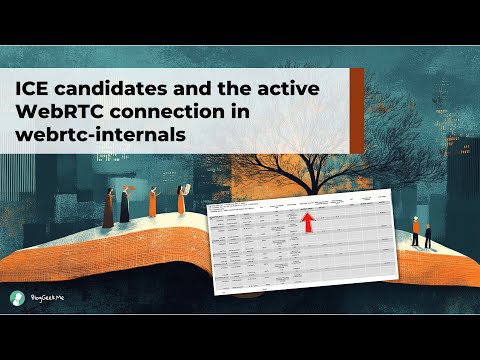
The player loads only when you choose Watch here. Playback uses YouTube’s privacy-enhanced embed; YouTube processes playback data.
Sources & applicability
Primary references for the technical details above. Operational examples and planning checklists are VoIP.info editorial guidance.
- IETF RFC 8835 ↗
- IETF RFC 8834 ↗
- W3C: WebRTC statistics and connection state ↗
- Asterisk WebRTC client configuration ↗
- Asterisk current res_pjsip configuration reference ↗
- RFC 8445: Interactive Connectivity Establishment ↗
- RFC 5764: DTLS-SRTP ↗
- RFC 8842: SDP offer/answer for DTLS ↗
- W3C WebRTC Statistics API ↗
- SIP.js receive-a-call guide ↗
- SIP.js user-agent and registration guide ↗
- SIP.js remote-media attachment guide ↗
- SIP.js mobile guide ↗
- MDN HTMLMediaElement play method ↗
- MDN autoplay guide for media and Web Audio ↗
- MDN AudioContext resume method ↗
- MDN document visibility state ↗
- Chrome autoplay policy ↗
- WebKit media autoplay policy ↗
Examples require adaptation to your topology. No live PBX or hardware testing is claimed.